11 Nov 2026 From Best Practices to a Common Standard: The Power BI Semantic Model Template
Our Semantic Model Template for Microsoft Power BI can help organisations to standardise semantic model development, promote the reuse of business logic, and improve the scalability and maintainability of analytical solutions.
As Power BI adoption grows, different teams often develop their own semantic models, resulting in duplicated models, inconsistent KPI definitions, differing naming conventions, and increased maintenance. To address these challenges, we have developed a reusable template that provides a standardised starting point for development, incorporating data modelling best practices, naming conventions, reusable calculation patterns, Power BI configuration settings, and automated validation.
Objectives of the Semantic Model Template
Its main objective is to provide a reusable, standardised foundation for developing scalable and maintainable semantic models. More specifically, the template aims to:
Standardise semantic model architecture: Establish a consistent structure based on a star schema, with a clear separation between fact and dimension entities.
Accelerate model development: Give teams a reusable starting point that includes predefined structures, conventions, and modelling patterns.
Promote consistency and reuse: Encourage common approaches to naming, keys, measures, metadata, and reusable business logic across analytical solutions.
Improve maintainability and scalability: Apply modular design principles and reusable components that make models easier to extend and maintain.
Strengthen governance and data quality: Incorporate standard Power BI settings, modelling practices, and validation mechanisms to improve reliability and consistency.
Support continuous improvement: Provide a framework that can evolve by incorporating new best practices, organisational standards, and reusable patterns over time.
Use Case
Imagine that an organisation needs to develop a Power BI semantic model to analyse its sales performance. The available data includes sales transactions, customers, products, and dates, and the business needs to answer questions such as:
- How are sales evolving over time?
- Which products and categories are performing best?
- How does performance vary across customers and sales channels?
- How does the current period compare with previous periods?
Rather than designing the semantic model from scratch, the development team uses our template as the starting point for the solution.
How to Use the Semantic Model Template
The template can be adapted to individual project requirements whilst offering a standard foundation for semantic model development. The typical workflow is outlined below:
- Download the template
Start with the latest version of the Semantic Model Template and use it as the foundation for the new semantic model. - Connect your data
Connect the required data sources and adapt the existing model structure to the available data. - Adapt the model to the business requirements
Add or modify tables, fields, relationships, measures, and business logic according to the use case, whilst maintaining the template’s modelling principles. - Build the business solution
Develop the required business measures and calculations, reusing the components and patterns already available in the template whenever possible. - Validate and deliver
Run the automated audit to identify potential deviations from the defined modelling standards and address them before delivering the semantic model.
What You Don’t Need to Build from Scratch
One of the main benefits of starting from the template is that the development team doesn’t have to establish the same semantic modelling foundations for every new project, as the template already provides:
- A standardised semantic model structure and relationship approach
- Consistent naming conventions and model organisation
- A dedicated structure for organising and reusing measures
- Standard Power BI configuration settings
- Reusable calculation groups and helper measures
- Standardised formatting and design patterns
- Automated validation rules to audit the semantic model
This allows the team to focus on meeting business requirements and delivering value, rather than repeatedly rebuilding the same technical components for each model.
Solution: The Semantic Model Template
Our template is a living framework that combines modelling standards, predefined conventions, and reusable Power Query and DAX patterns. It can be adapted to different business scenarios and evolve over time as new best practices, organisational standards, and reusable patterns are introduced.
The following sections highlight the framework’s key components and show how they contribute to a consistent, reusable, and maintainable approach to model development.
1. Semantic Model Structure
The template follows a standardised semantic model architecture based on the following principles:
- Star schema
- Fact and dimension tables
- One-to-many relationships
- Single-direction filtering
- Technical keys hidden from report users
2. Organising and Reusing Measures
- Dedicated Measures table
- Display folders
- Helpers measures
- Reuse of existing measures instead of duplicating logic
- Business-friendly measure names and descriptions
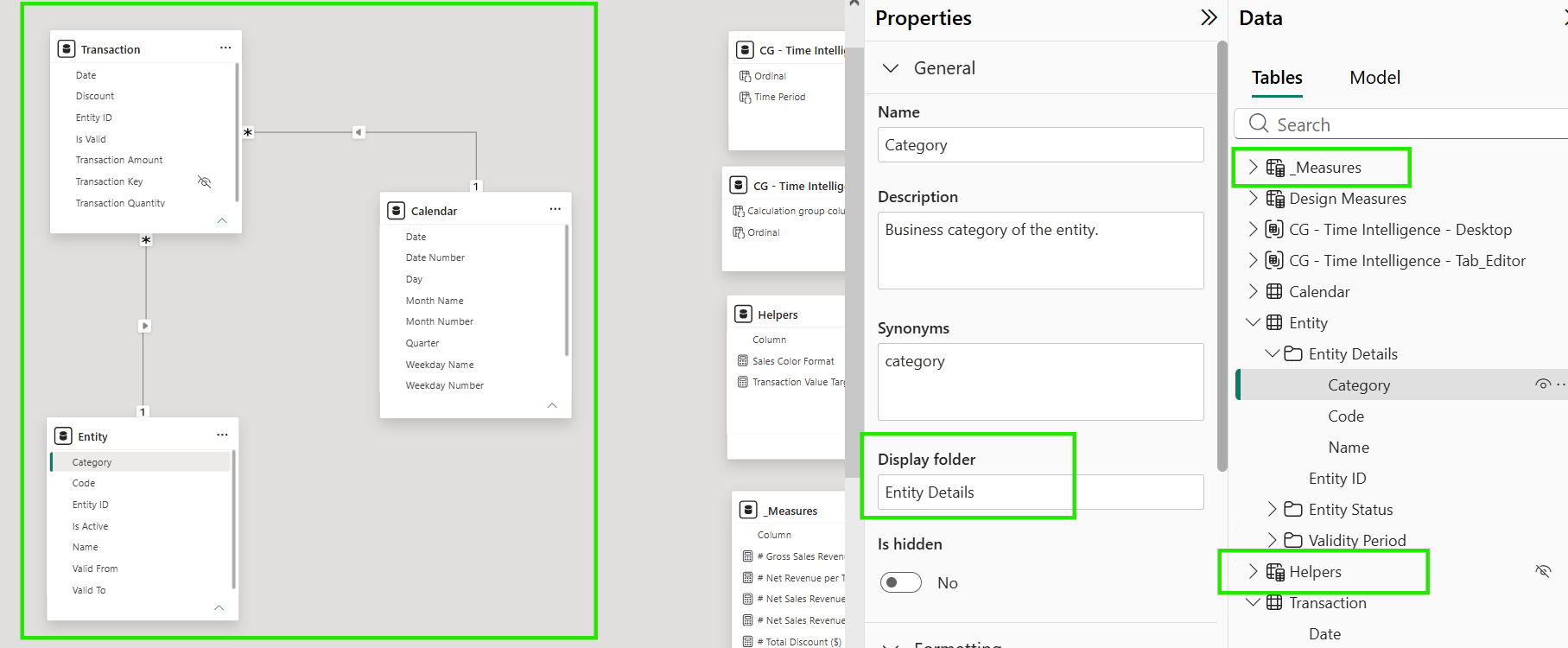
Figure 1: Semantic model structure and dedicated folders
This approach helps to keep the model organised whilst making its business logic easier for report developers and users to navigate.
3. Consistent Naming and Formatting
The template also establishes a common set of conventions that can be applied consistently across different models:
- Business-friendly naming
- Standard suffixes for time-intelligence measures
- Number formatting
- Descriptions and business definitions
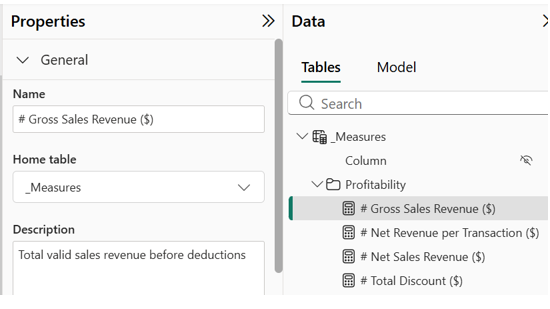
Figure 2: Example of consistent naming and description
4. Power BI Configuration and Time Intelligence
The framework also incorporates key Power BI configuration principles and a standard approach to time intelligence, including:
- Critical Power BI settings
- Date table configuration
- Standard time-intelligence setup
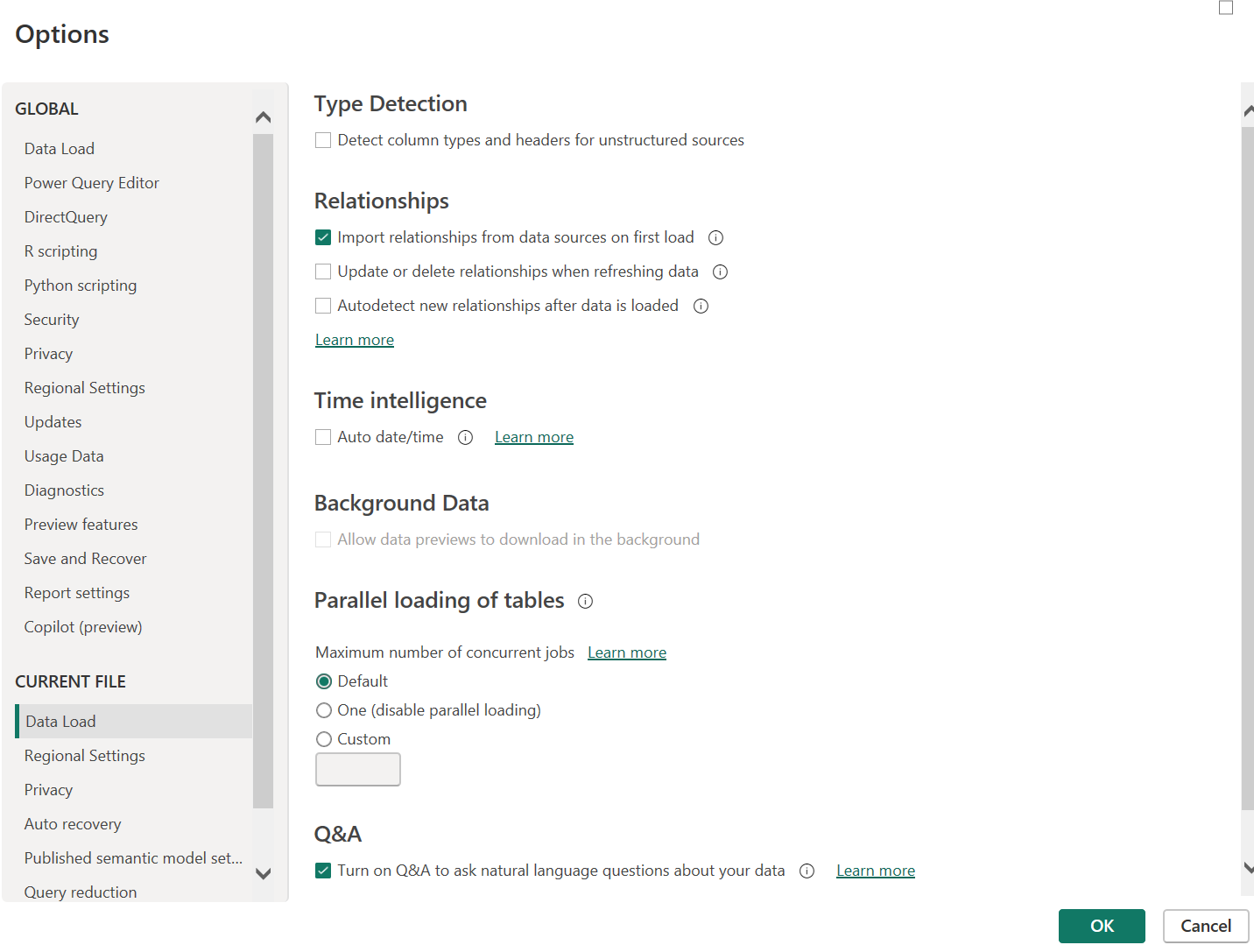
Figure 3: Settings and Time Intelligence configuration
5. Calculation Groups and Design Measures
For more advanced modelling scenarios, the template provides reusable components such as calculation groups and design measures. These components facilitate the standardisation and reuse of common modelling patterns, particularly for time intelligence and supporting model logic.
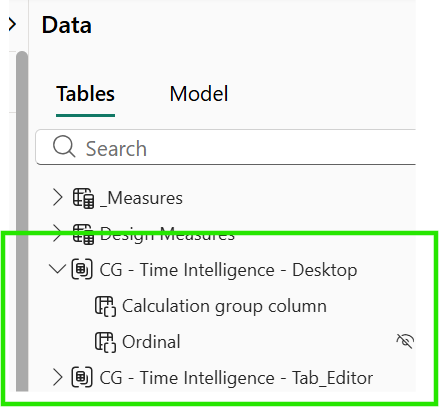
Figure 4: Calculation groups
Semantic Model Template Audit
As the Semantic Model Template evolves, changes must align with the organisation’s established Power BI best practices. To support this, the template includes an automated audit mechanism based on a set of Best Practice Analyzer (BPA) rules stored in a JSON file. These rules define the modelling standards and recommendations that the template is expected to follow.
The following excerpt illustrates the structure of the JSON file:
[
  {
    "ID": "META_SUMMARIZE_NONE",
    "Name": "Don't summarize numeric columns",
    "Category": "Metadata",
    "Description": "Set the SummarizeBy property of all visible numeric columns to \"None\", to avoid unintentional summarization in client tools. Create measures for columns that are supposed to be summarized.",
    "Severity": 1,
    "Scope": "DataColumn, CalculatedColumn, CalculatedTableColumn",
    "Expression": "IsVisible\nand SummarizeBy <> \"None\"\nand (DataType = \"Double\" or DataType = \"Decimal\" or DataType = \"Int64\")",
    "FixExpression": "SummarizeBy = AggregateFunction.None",
    "CompatibilityLevel": 1200
  },
  {
    "ID": "LAYOUT_HIDE_FK_COLUMNS",
    "Name": "Hide foreign key columns",
    "Category": "Model Layout",
    "Description": "Columns used on the Many side of a relationship should be hidden, as the related dimension table is likely the best place to apply a filter context.",
    "Severity": 1,
    "Scope": "DataColumn, CalculatedColumn, CalculatedTableColumn",
    "Expression": "IsVisible\nand Model.Relationships.Any(FromColumn = outerIt)",
    "FixExpression": "IsHidden = true",
    "CompatibilityLevel": 1200
  },
The audit is integrated into the PBIP project’s Tabular Editor configuration and can be run from there. When triggered, the rules are evaluated against the semantic model, identifying which practices have been successfully implemented and which require further attention.
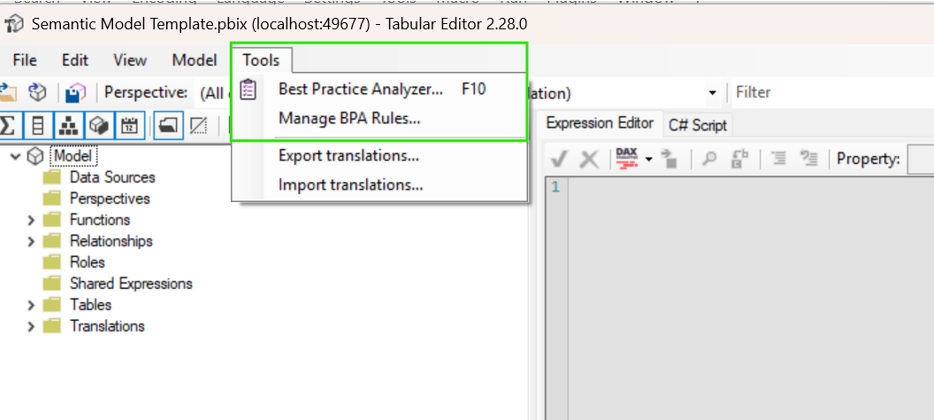
Figure 5: Best Practice Analyzer in Tabular Editor
This provides a simple way for developers to validate the model before delivery and identify potential deviations from the established standards. The audit also supports the template’s continuous evolution: as new Power BI best practices or organisational requirements are introduced, additional rules can be incorporated into the JSON definition and automatically included in future validations.
The following screenshot shows an example of the audit results generated in Tabular Editor:
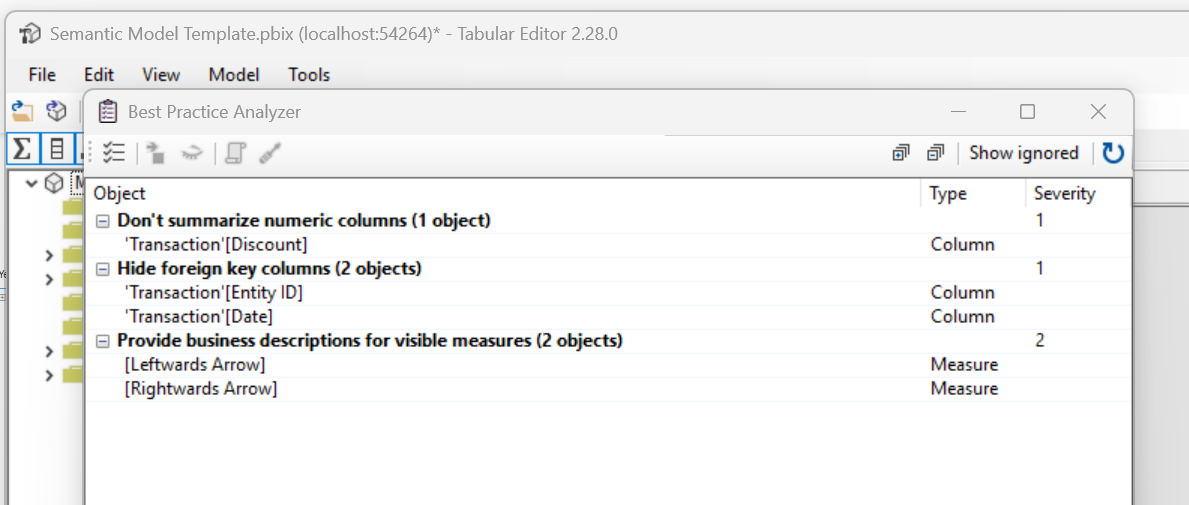
Figure 6: Example of audit results
As you can see, the template not only documents best practices, but also provides a mechanism to validate them.
Extending the Living Framework with AI
The value of our Semantic Model Template extends beyond providing a predefined structure. It also serves as a common foundation for AI-assisted development, helping to guide, accelerate, and validate different stages of the Power BI development process. For example, instructing the mock-up generator skill to use the template means that mock-ups are created within an established structure rather than from a blank canvas, simplifying the generation process whilst giving developers greater control over the output.
Furthermore, as the template already incorporates the BPA JSON file, the mock-up generator skill can draw on its rules, embedding some of these best practices directly into the generation process. The BPA file can also be used with the model-auditor skill, which reads a locally stored, up-to-date BPA file, applies its rules, and generates feedback based on the defined best practices. Rather than simply producing a checklist of passed and failed rules, AI can provide more contextual and actionable feedback, making the results easier to interpret and apply. Together, these capabilities create a feedback loop in which models can be generated, assessed, and refined against a consistent set of standards.
AI doesn’t replace the template but enhances its value; rather than remaining a static reference or a collection of recommended modelling patterns, the template becomes an active part of the development workflow, guiding model creation and supporting continuous validation. The result is a more integrated approach to Power BI development, bringing together standards, best practices, AI-assisted generation, and validation.
Conclusions
As Power BI adoption continues to grow, organisations need a consistent and scalable foundation for semantic model development. Our Semantic Model Template addresses this by bringing together established modelling practices, naming conventions, reusable business logic, standardised Power BI settings, and automated validation into a single framework. AI capabilities further enhance its value by helping teams to apply these principles throughout the development process.
By using the template, teams can reduce duplicated effort, improve consistency across analytical solutions, and make semantic models easier to understand and maintain. It can also evolve to incorporate new best practices and organisational requirements over time.
Would you like to learn more about how standardised semantic modelling can improve your Power BI environment? Get in touch with us to see how our experts can help you to establish a scalable Power BI architecture and implement best practices tailored to your organisation.