22 Abr 2026 Dataiku DSS Execution Engine Best Practices
Dataiku DSS enables teams to design and automate end-to-end data workflows through a collaborative interface with limited coding effort. One of the most important decisions when building a pipeline is choosing the right execution engine. Dataiku offers several options, including its native DSS engine and external SQL engines, each with different trade-offs in performance, scalability, and resource usage. This article outlines how to choose between them and where a hybrid approach makes sense.
Understanding Dataiku Execution Engines
DSS Engine
The DSS engine runs computations directly in memory or on the application server, making it ideal for fast experimentation and smaller datasets.
How does it work?
When you use the DSS engine, Dataiku processes data directly within its environment. This means transformations, formulas, and even Python or R code are executed on the DSS server rather than being pushed to external systems.
Advantages
- Flexibility: Supports complex transformations, custom Python or R code, and visual recipes.
- Ease of use: No need to write SQL, making it accessible for non-technical users.
- Transparency: Errors and logs are clearly visible within the platform, making debugging easier.
- Rapid prototyping: Well-suited to testing ideas and building workflows quickly.
Limitations
- Scalability: Performance can degrade with large datasets due to memory and CPU constraints.
- Resource usage: Consumes DSS server resources, which may affect other users or processes.
- Not optimised for big data: For large-scale operations, external engines like SQL or Spark are typically more efficient.
Error Handling
One of the advantages of the DSS engine is its transparent and customisable error handling. When a step fails, Dataiku provides detailed logs and error messages directly in the interface, often making it easier to trace the issue to a specific transformation or script. By contrast, with the SQL engine, errors are reported by the database itself, and messages can be vaguer or more technical depending on the SQL dialect and configuration. This can make debugging more difficult, particularly for users with limited SQL knowledge.
SQL Engine
With the SQL engine, transformations are delegated to the connected database, using its own optimisation and indexing.
How does it work?
When you select the SQL engine for a recipe, Dataiku translates the visual steps or formulas into SQL code. The code is then sent to the database, which executes the operations and returns the results. This approach is particularly effective when working with large datasets stored in relational databases like PostgreSQL, Oracle, or Snowflake.
Advantages
- Performance: Executes directly on the database, which is optimised for handling large volumes of data.
- Scalability: Benefits from the database infrastructure, including parallel processing and indexing.
- Efficiency: Reduces data movement by keeping operations close to the data source.
- Integration: Works well with enterprise data warehouses and cloud databases.
Limitations
- Transformation constraints: Limited to operations that can be expressed in SQL, so complex logic may not be supported.
- SQL dialect sensitivity: SQL syntax varies across databases, which can lead to compatibility issues.
- Requires SQL knowledge: Users may need a working understanding of SQL to troubleshoot or customise queries.
DSS Engine vs SQL Engine
The table below compares the DSS and SQL engines across the main decision points:
| Feature | DSS Engine | SQL Engine |
| Execution location | Local, in memory or on the DSS server | Push-down to the database through SQL execution |
| Performance | Good for small to medium datasets | Optimised for large datasets |
| Scalability | Limited by server memory and CPU | Scales with database infrastructure |
| Transformation flexibility | Supports complex logic, Python, and custom code | Limited to SQL-compatible transformations |
| Ease of use | Intuitive, with no SQL knowledge required | Requires an understanding of SQL and database structure |
| Resource usage | Consumes DSS server resources | Uses database resources |
| Error handling | Errors shown clearly in DSS, usually easier to trace and debug | Depends on database messages, which may be more technical or less transparent |
| Best use cases | Data preparation, prototyping, and small workflows | Large datasets, production pipelines, and joins |
| Limitations | Slower on large datasets and more memory-intensive | Less flexible, with potential SQL dialect issues |
Let’s look at a few practical scenarios that show where each engine performs best.
Use Cases and Best Practices
Case 1: Operations Across Different Databases or Input-Output Types
Scenario
You need to perform transformations or joins between datasets stored in different databases, for example by combining data from a Snowflake warehouse with an SQL Server operational database. The same issue also arises when the output differs from the input. For instance, you might join two datasets from the same SQL database, but write the result to a file system. In this case, all recipes run in DSS because the inputs and outputs differ, so the SQL engine cannot be used.
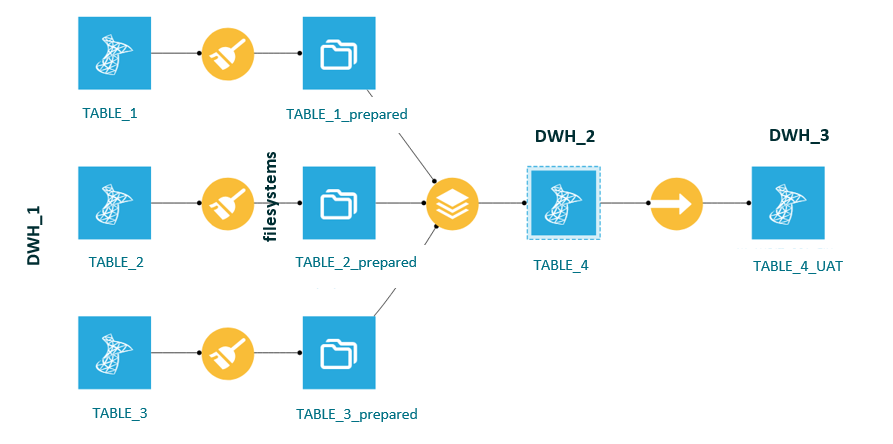
Figure 1: Use case 1 – different input and output sources
Challenge
Dataiku’s SQL engine executes recipes by pushing computations to the database. However, when datasets come from different databases, SQL push-down is not possible because no single database can execute queries across both sources.
Why the DSS Engine is Used
- The SQL engine cannot operate across multiple databases.
- The DSS engine can handle the logic in memory or on the DSS server.
- It provides the flexibility to join, filter, and transform data from different sources.
Best Practice
Where possible, consolidate the data into a single database before performing joins. For example:
- Copy the relevant tables from DWH_1 to DWH_2 within the same database environment.
- Use the SQL engine for downstream operations once the data has been unified.
- In some cases, the DSS engine remains the only option, especially when data must be copied between different databases, for example when a master table is needed in the UAT database.
Case 2: Replacing SQL Queries with Direct Table Access
Scenario
In many workflows, users create SQL recipes with custom queries to extract or transform data. However, in a well-structured data warehouse, it is often more efficient and easier to maintain to replace these SQL queries with direct table access.
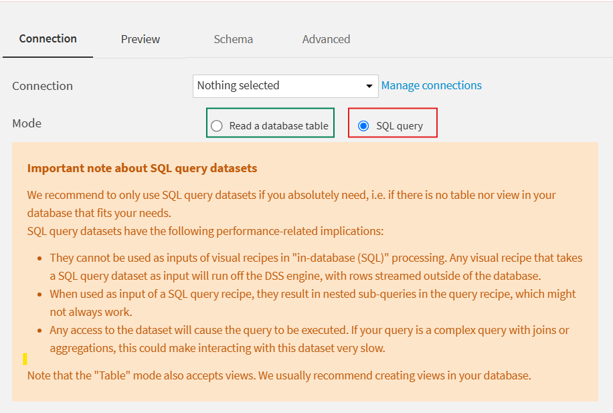
Figure 2: Use case 2 – an SQL query instead of reading the table
Challenge
Custom SQL queries can be harder to maintain, less transparent, and more limiting from an optimisation perspective. They can also make workflows more complex to debug and scale.
Best Practice
Instead of writing an SQL query inside a recipe:
- Connect directly to the source table in the data warehouse. There is no need to connect every table referenced in the query, only the relevant connection is required.
- Use an SQL table dataset in Dataiku rather than a query-based dataset.
- Then use an SQL recipe to perform transformations on that table.
This approach ensures:
- Better performance through full SQL engine push-down.
- Easier debugging and monitoring.
- Improved clarity and maintainability across the flow.
Example
Instead of:
SQL: SELECT * FROM TABLE_01 WHERE year = 2025
Use:
- An SQL table dataset pointing to TABLE_01.
- An SQL recipe that applies the filter year = 2025.
This makes the flow more transparent and allows Dataiku to optimise execution more effectively.
Case 3: Complex Logic Not Supported by SQL
Scenario
You’re building a data pipeline that includes advanced transformations, such as custom formulas, date parsing, or logic that cannot be expressed in SQL.
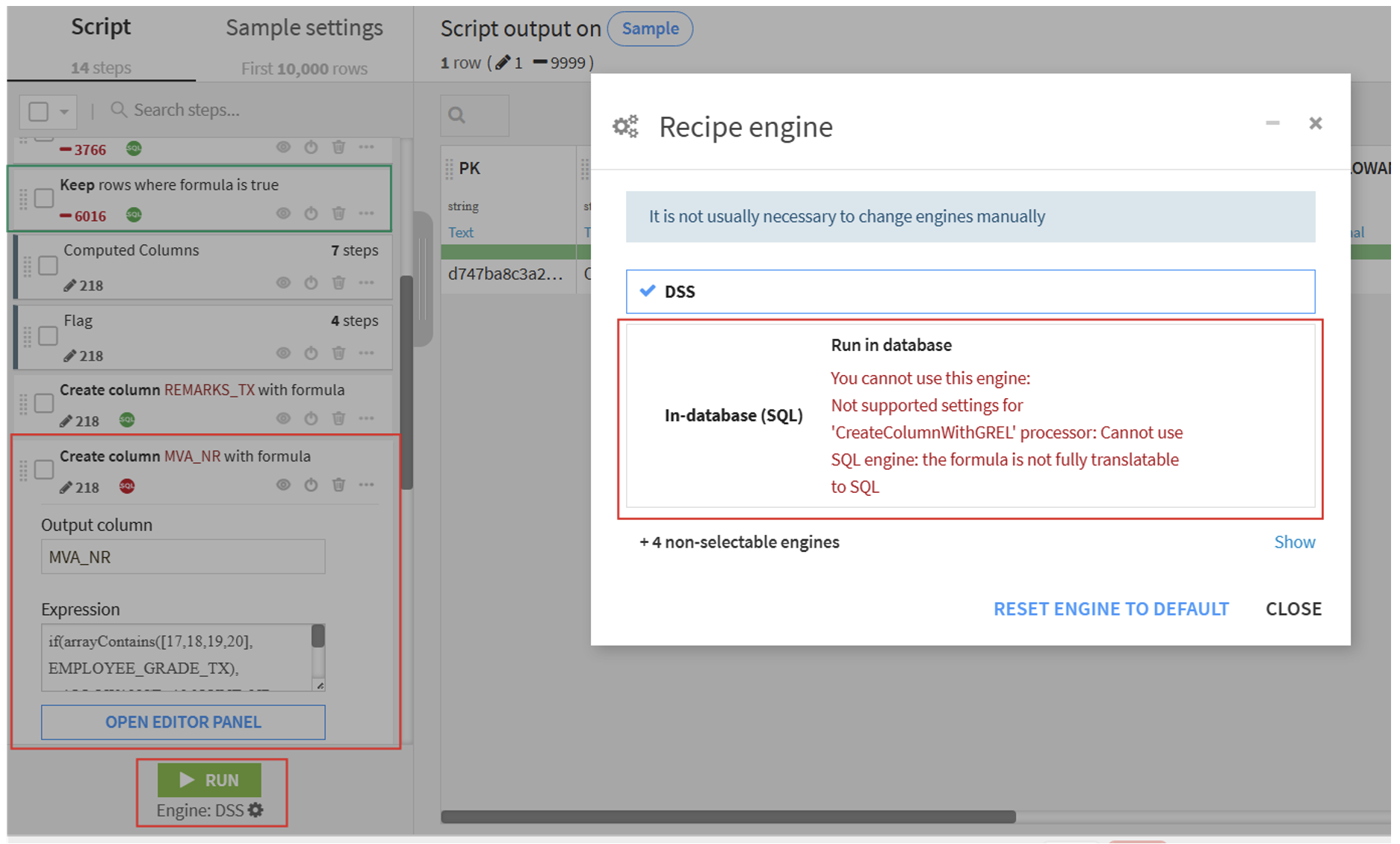
Figure 3: Use case 3 – logic not supported by SQL
Challenge
While the SQL engine is a great fit for standard operations, it has its limitations. Certain transformations, particularly those involving the following, cannot be translated into SQL:
- Custom formulas (for example, IF, REGEX, or CASE with complex logic).
- Date parsing (for example, converting strings to dates using locale-specific formats).
- Text manipulation beyond regular SQL capabilities.
- More than 10 CASE expressions in a DSS formula combined with concatenated IF logic.
- Python or R code snippets.
In these situations, attempting to use the SQL engine will either fail or trigger an automatic fallback to the DSS engine.
Best Practice
- Use the SQL engine for all operations that can be expressed in SQL.
- Reserve the DSS engine for steps that require:
- Advanced formulas.
- Date and time parsing.
- Python or R code.
- Split workflows: Use the SQL engine for heavy processing, then switch to DSS for the final, more complex steps.
Case 4: When Prepare Recipe Joins Cannot be Pushed to SQL
Scenario
You’re using a Prepare recipe in Dataiku to clean and transform data, and you include a join clause within that recipe, either to enrich the dataset or to apply conditional logic based on another dataset.
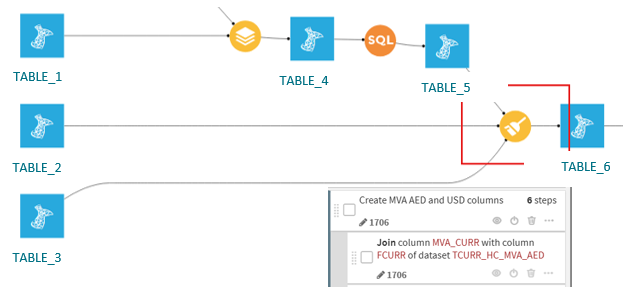
Figure 4: Use case 4 – join clause in Prepare recipe
Challenge
Although joins are supported in SQL, joins defined inside a Prepare recipe are not translatable into SQL by Dataiku. Prepare recipes are designed for row-level transformations and are not inherently optimised for multi-table operations like joins.
Best Practice
- Avoid using joins inside Prepare recipes when working with large datasets.
- Instead, use a Join recipe explicitly or an SQL recipe, which can be pushed down to the SQL engine when both datasets are in the same database.
- Reserve Prepare recipes for row-level transformations like:
- Text cleaning.
- Date parsing.
- Conditional formulas.
When SQL is Not Enough
Pushing computation to the SQL engine is often the most efficient approach, but not every transformation can, or should, be translated into SQL. The key is to understand the trade-offs and choose the right execution engine for the use case at hand.
Evaluate the Benefits and Limitations
- The SQL engine offers performance and scalability, but it comes with constraints on transformation complexity.
- The DSS engine provides greater flexibility and supports more advanced logic, but it consumes local resources and may not scale as well for large datasets.
- A hybrid approach, using SQL for heavy processing and DSS for more complex logic, can often provide the best balance.
Be Aware of Functional Differences
Some functions behave differently in DSS and SQL, which can lead to unexpected results if not carefully managed. For example:
- Date parsing: SQL engines may not support locale-specific or flexible date formats, which may require the use of DSS’s Parse Date step.
- String manipulation: Complex regex or conditional logic may not be supported in SQL and may therefore require execution in DSS.
Conclusion
Choosing the right engine is not just a technical detail: it has a direct impact on performance, scalability, maintainability, and the reliability of your data pipelines. Understanding where SQL performs well, where DSS adds value, and where a hybrid approach makes sense helps teams to design efficient and effective workflows.
If you’re reviewing your Dataiku workflows, ClearPeaks can help you to assess where SQL push-down makes sense, where DSS execution is the better option, and how to structure pipelines for performance, maintainability, and scale. Get in touch with our experts to discuss your use case.