23 Jul 2026 From Assistance to Action: The Rise of The Enterprise AI Coworker
For much of the generative AI era, our relationship with the system has followed a familiar pattern: we ask a question, request a summary, or provide instructions, and the AI returns an answer. This has helped employees to research topics, draft documents, analyse information, and work more efficiently, but now the boundary between answering and acting is beginning to shift.
The new generation of AI coworkers can be given an outcome and allowed to work across files, applications, and connected business systems to achieve it. For example, instead of merely suggesting the contents of a presentation, these tools can create the presentation itself. They can also work with spreadsheets, consolidate source material, prepare documents, and carry out multi-step tasks whilst keeping the user involved.
Here at ClearPeaks, we are seeing two models emerge: the first, an AI coworker made broadly available across the workforce and connected to approved company data and tools; the second, a more tailored experience for business leaders and executives, sometimes described as a “virtual self”. Both depend on trusted data, effective integrations, carefully designed permissions, and clear governance.
The Change in Everyday Productivity
One of the clearest signs of progress can be seen in the creation of business documents. Until recently, asking a general-purpose AI assistant to create a PowerPoint presentation often produced little more than a sequence of bullet points, perhaps accompanied by some generic stock images. The result might help with initial brainstorming, but it was rarely ready for professional use without substantial redesign.
This is changing. For example, in a recent internal exercise we started with the intended message and the content that needed to be communicated, then asked an AI coworker to transform it into a slide deck. The first version wasn’t perfect: some colours, images, and layout decisions still needed the human touch, but we did have a coherent visual structure and a usable starting point in a matter of minutes. The important point here is not simply that AI can now design presentations, but that employees can concentrate on the argument, evidence, and decisions behind the presentation, whilst the tool handles the basics. Once that first draft exists, changing a section or testing a different arrangement becomes considerably easier than starting from scratch with a blank slide.
The same principle applies to other business tasks. Anthropic, for example, documents the ability of Claude to create and edit Excel spreadsheets, PowerPoint presentations, Word documents, and PDF files. These coworkers can help a user to update a spreadsheet, create pivot tables, review formulas, and organise unstructured information; of course, the user still needs to understand the business question and validate the result, but no longer has to perform every step manually.
Document-intensive commercial work offers another example. When preparing a proposal, a team may need to combine client information, previous project material, market research, technical notes, and input from different departments and specialists. An AI coworker can review those sources, produce summaries, and assemble the initial structure, helping the team to focus on the proposed solution itself.
Quality is still not guaranteed: figures need to be checked, arguments analysed, sources verified, and branding adjusted. A plausible-looking presentation containing an unsupported claim remains an unsupported presentation. However, when these tools are used as supervised collaborators rather than autonomous authors, they can remove a lot of low-value preparation.
What Makes an AI Coworker Different?
The term “AI coworker” is loosely defined, but it does describe an important change in how AI systems operate. A conventional AI assistant primarily responds to an individual prompt, whilst an AI coworker can maintain the context of a broader task, plan several steps, work with different tools, and continue until it has produced the requested outcome or reached a point where human input is needed.
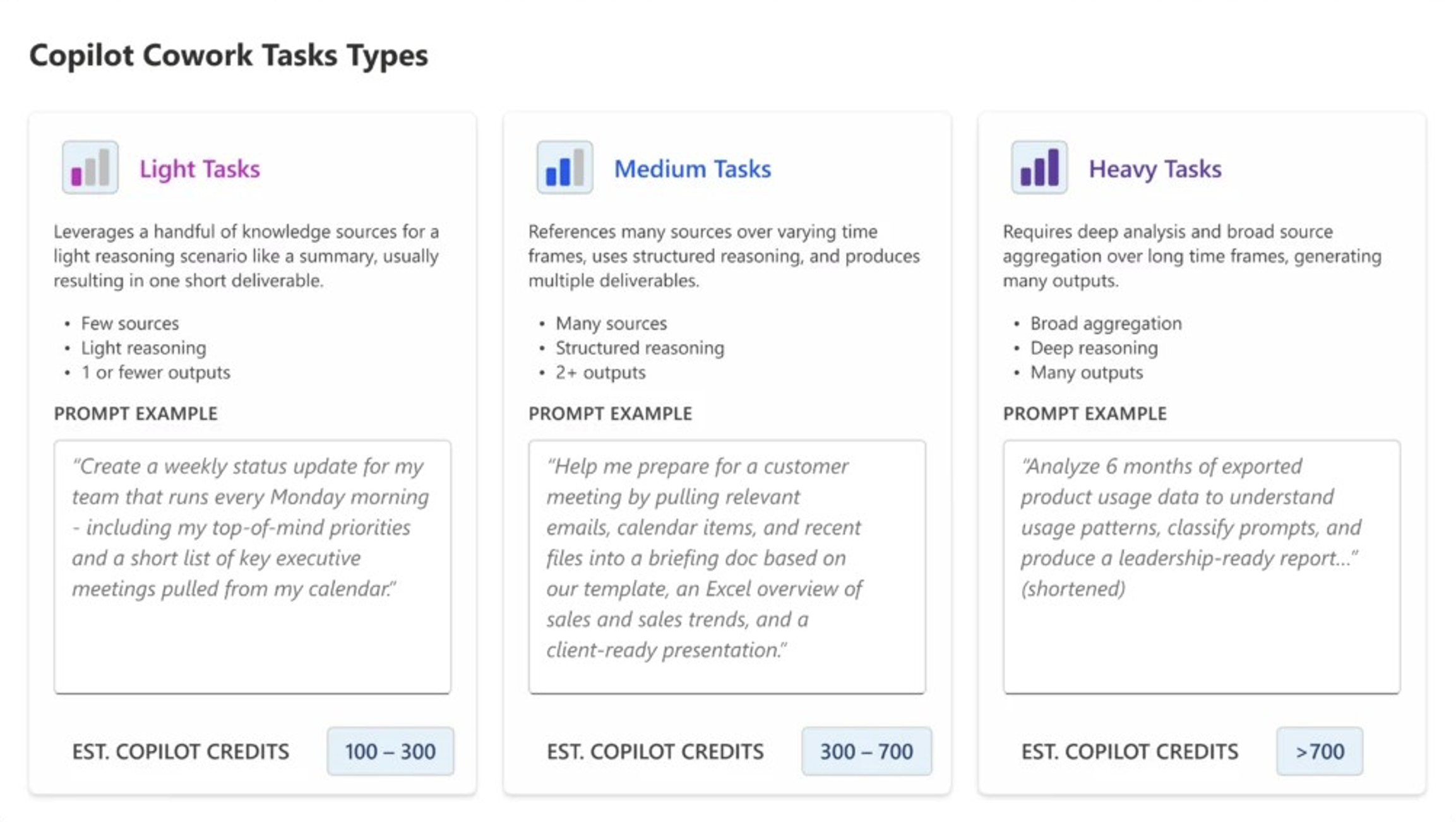
Microsoft groups Copilot Cowork work into light, medium and heavy tasks according to the number of sources involved, the depth of reasoning required, and the volume of outputs. Source: Microsoft.
Claude Cowork and Microsoft 365 Copilot Cowork illustrate this shift. Microsoft worked with Anthropic to bring the technology behind Claude Cowork into Microsoft 365 Copilot Cowork. However, Copilot Cowork is multi-model: OpenAI’s GPT‑5.6 became its preferred model in July 2026. Copilot Cowork can select from several models according to the task, so its value lies not only in the model, but in combining organisational context, tools and multi-step execution across Microsoft 365.
Copilot Cowork can create documents, send emails, post in Teams, and manage meetings and calendars. Sensitive actions require user approval, with risk indicators for medium- and high-risk actions. This makes the interface a delegation layer rather than an unsupervised worker: users define the required result, authorise the necessary context, and review progress. This means not just better answers, but a new structure for everyday work.
The Enterprise Ecosystem is the Real Enabler
The capabilities of the underlying model matter, but they are only part of the equation. An enterprise AI coworker is ultimately only as useful as the information, services, and controlled actions that the organisation makes available to it.
For a general productivity task, an uploaded document or a set of files may be sufficient. For enterprise work, the coworker may need to find approved information in SharePoint or another content repository, query governed business data, consult a customer or operational system, use an internal knowledge source, and initiate an action through an API. Without these connections, even a highly capable model remains separated from much of the context that gives the task meaning.
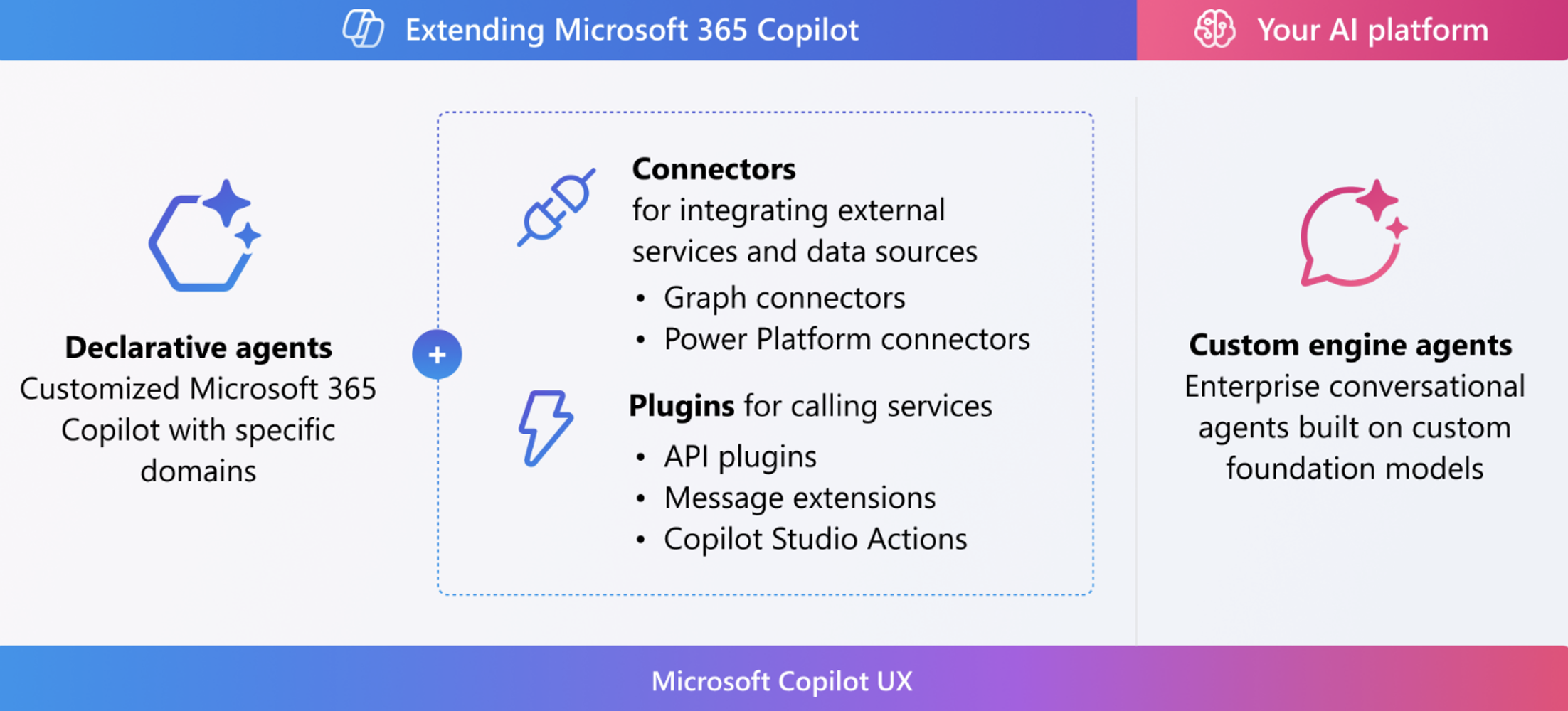
Microsoft’s extensibility model distinguishes connectors, which integrate external services and data sources, from plugins, which allow Copilot and its agents to call services and perform actions. Source: Microsoft.
Model Context Protocol (MCP) is one of the technologies addressing this problem. Introduced by Anthropic as an open standard for connecting AI systems to data sources and tools, MCP can help organisations to expose selected capabilities without building a separate integration for every combination of model and system. Microsoft 365 Copilot Cowork also supports extensibility through skills and connectors. Nevertheless, adding a connector does not magically create enterprise intelligence: the agent still needs to know which source is authoritative, which business definition applies, whether the information is current, and what the user is permitted to see. If two departments calculate the same measure differently, the coworker may simply reproduce that confusion more quickly and convincingly.
This is why data management, analytics governance, metadata, semantic modelling, identity, and access control become even more important than before. The AI interface may be new, but the old data problems are still there. Organisations need to help the coworker to understand both where information is located and how it should be interpreted: a connected ecosystem needs trusted business context, tools through which the coworker can act, and controls that determine which information and actions are available to each user and agent. Weaknesses in any of these areas will limit the value of the whole system.
Two Enterprise Models Are Emerging
Although the underlying foundations are similar, organisations are starting to pursue two different AI coworker models. Let’s look at the differences.
A Coworker for the Wider Workforce
The first model is a standard productivity tool typically available to a large number of employees. Users work through an established interface, whilst the organisation enables approved connections to files, applications, data, and internal services. The coworker can help with presentations, spreadsheets, research, proposals, meetings, communications, and other recurring knowledge work.
This model can provide a consistent experience across departments, reduce the need for separate solutions, and help employees to carry out multi-step tasks without requiring each business area to build its own application. It also benefits from the platform provider’s security, administration, and compliance capabilities.
Its limitation is that the experience remains largely defined by the product: organisations can extend it with connectors, skills, and approved tools, but they do not control every aspect of the interface or workflow. Nevertheless, for most employees, this is an acceptable compromise.
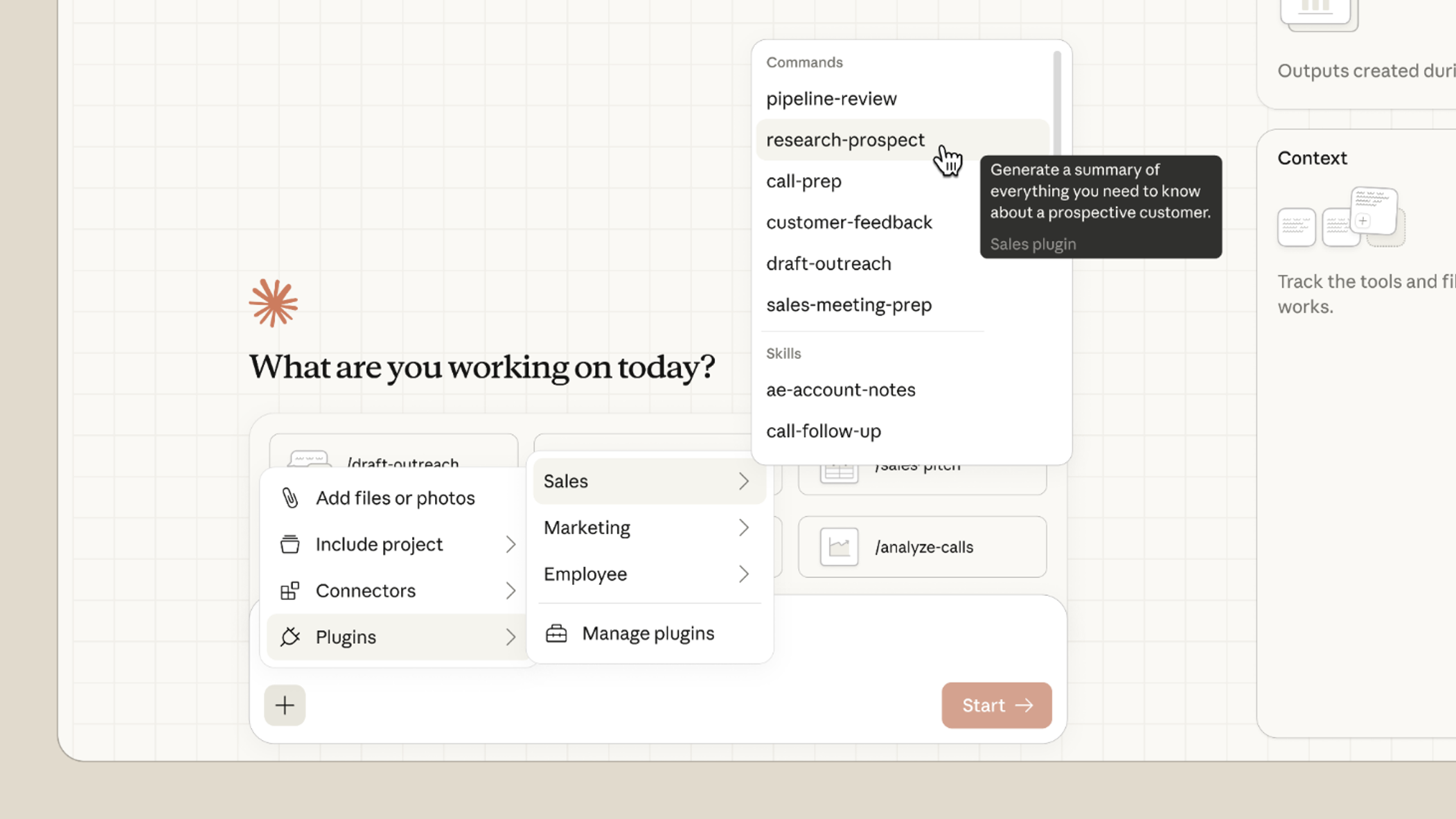
Claude Cowork plugins provide role-specific commands, skills and connectors, allowing a general-purpose AI coworker to support specialised workflows across departments. Source: Anthropic.
A Tailored Executive “Virtual Self”
The second model is more specialised. Some executives want an experience designed around their own responsibilities, devices, information sources, communications, and decision-making processes, providing continuity between mobile and desktop, specific data views, or integrations unavailable through a standard productivity tool.
This is where the idea of a “virtual self” begins to emerge: the system can prepare responses using the executive’s established tone, prioritise information according to their role, monitor selected developments, or carry out routine digital actions on their behalf. With authorised business context, it can produce outputs that are closely aligned with the way that individual works.
This should not be confused with creating an autonomous digital copy of a person. Tone matching, for example, may help to produce a useful email draft, but it also raises questions about transparency, accountability, and the record of who or what performed an action. Likewise, a system may be permitted to make a routine decision within defined parameters, but financial, legal, personnel, or reputational decisions still need a human in the loop.
This type of tailored solution offers greater flexibility, but it also creates more design responsibility. Permissions, integrations, escalation rules, monitoring, and user experience all need to be built deliberately.
These two models are not mutually exclusive. A company can have an enterprise coworker for its wider workforce whilst developing personalised experiences for a small number of roles with specific requirements. The important point is to choose the model according to the work that needs to be done, not according to which demonstration looks more impressive.
The Autonomy Question: Where Should the Agent Stop?
Once an AI system can act, autonomy should no longer be treated as a simple yes-or-no decision; a more useful approach is to define progressive levels of authority.
At the lowest level, the coworker reads information and recommends an action. It may then progress to creating or editing a deliverable, such as a spreadsheet, presentation, or email. At the next level, it prepares an external action but waits for explicit approval before sending, publishing, or updating. Beyond that, it may be permitted to carry out a narrow set of routine and reversible actions automatically. Each level requires a different degree of control, which depends on the potential impact of an error. Sending an internal meeting invitation is not the same as approving a payment, changing an employee record, issuing a customer commitment, or deleting production data. Organisations should carefully assess financial exposure, legal and regulatory consequences, data sensitivity, reversibility, and reputational impact before deciding where human approval is required.
In the longer term, a virtual self may be able to perform a much wider range of digital activities that its human counterpart, but the immediate enterprise questions are much more prosaic: which activities should it be allowed to perform today, under which conditions, and who is accountable? Once these questions have been answered, a promising demonstration can become a production system. Effectively defining where the agent should stop is only the first step. Organisations must also put controls in place that reliably enforce that boundary.
Governance Must Grow with Autonomy
Giving an AI coworker access to sensitive company files and systems has its risks. The solution is not to reject connected AI altogether, but to put the necessary guardrails in place.
Permissions should follow the principle of least privilege. Microsoft states that Copilot Cowork inherits the user’s existing permissions, meaning that it cannot access a file or email that the user cannot already access. It also recognises sensitivity labels applied to protected content. Custom systems should preserve the same principle and, for higher-risk actions, may need controls that are stricter than normal.
Permissions, however, are only one part of the control environment. Organisations also need to consider how agents are identified, authenticated, authorised, monitored and held accountable. The U.S. National Institute of Standards and Technology (NIST) AI Risk Management Framework, published in 2023, provides a broad structure for governing AI risk. More recently, their 2026 AI Agent Standards Initiative addresses the secure and interoperable development and adoption of AI agents, and a draft concept paper from the National Cybersecurity Center of Excellence (NCCoE), titled Accelerating the Adoption of Software and AI Agent Identity and Authorization, examines how established identity, authentication, and authorisation standards can be applied to agents.
Together, these frameworks and initiatives establish the direction of travel, but organisations must translate their principles into practical operating controls. At a minimum, an enterprise AI coworker programme should address the following areas:
- Identity and access: every action should be attributable to a defined user, agent, or service identity, with access limited to the information and tools required for the task.
- Approval and escalation: the system should know which actions it can complete, which require confirmation, and which must be handed over to a human.
- Auditability: prompts, sources, outputs, approvals, tool calls, and completed actions should be recorded at a level appropriate to their risk.
- Secrets and credentials: API keys, passwords, tokens, and other secrets should be managed securely and should never be exposed casually through prompts, generated code, or configuration files.
- Reversibility and resilience: destructive or high-impact actions need additional protection, and organisations should maintain the backups and recovery processes required when something goes wrong.
- Monitoring and evaluation: teams need to review whether the coworker is completing tasks accurately, using the correct sources, respecting permissions, and escalating as necessary.
AI-assisted coding illustrates this tension particularly well: although the ability to generate code can help business users to test ideas and development teams to work more quickly, it can also allow an inexperienced user to expose an API key, create an insecure integration, or publish a service without understanding the consequences.
Pairing business teams with digital teams is a good start, as business users provide the requirements and operational context, whereas trained technical users operate the coding assistant and review what it produces. This helps both sides to learn without distributing powerful development access across the organisation from the very start of the project. The same principle applies to executive coworkers. Begin with users who understand both the potential and the limitations of the system; start with well-defined tasks, require approval for consequential actions, and observe how the tool behaves in real-world scenarios.
A Practical Route to Enterprise Adoption
The best starting point is not “we need an AI coworker”, but a specific workflow in which better access to context and controlled execution can remove delay or repetition.
A practical adoption process should cover these six areas:
- Choose a well-scoped, valuable workflow: Identify a recurring task with a clear owner, accessible inputs, and an outcome that can be evaluated.
- Map the required context and systems: Determine which data, documents, applications, APIs, and business definitions the coworker will need, and confirm the authoritative sources.
- Define permissions and limit actions: Specify what the agent can read, create, change, send, or delete, with approval thresholds based on risk.
- Design the human role: Decide who provides instructions, validates outputs, approves consequential actions, and handles escalations.
- Pilot with the right users: Select people who understand the process and can provide detailed feedback. Pair business and digital specialists where technical actions are involved.
- Measure, learn, and expand: Track the time saved, quality, corrections, rejected actions, user confidence, and governance incidents. Expand when the workflow is demonstrably useful and controlled.
This process also helps an organisation to choose between a standard coworker and a tailored application. If existing tools, approved connectors, and configuration can meet the requirement, custom development may add little, but if the workflow needs a distinctive interface, cross-platform continuity, or specialised actions, a tailored solution may be justified.
Conclusion: Connected, Capable, and Controlled
AI productivity is moving from assistance towards execution. The important development is not just that a model can write better content or produce a more attractive slide, but that an AI coworker can combine context, tools, and actions to help a user to reach a business outcome.
The organisations that benefit most will connect the right information, expose well-governed services, define clear limits, and preserve human judgement where it matters. A broadly available employee coworker and a tailored executive experience can both form part of that strategy, provided that each has a real purpose.
Here at ClearPeaks, we help organisations to connect AI with the data, analytics, and business systems that make it genuinely useful, whilst putting the appropriate governance around its actions. Get in touch with our dedicated AI team to discuss how we can help you to identify and build the right enterprise AI agent or coworker for your use case.