07 Oct 2026 Tracking Databricks Genie Costs with a Dedicated Usage Page
Databricks’ move to pay-as-you-go billing for Genie Code in July 2026 exposed a gap in our internal usage dashboard: although we had visibility into compute, jobs, and pipelines, we lacked equivalent visibility into which users were driving Genie LLM costs and which were approaching the free allowance.
Scoping the Page to LLM Usage, Not Triggered Compute
One aspect of Genie billing is particularly important when designing the dashboard: each identified human user gets 150 free DBUs per month, but service principals get no free allowance at all. In addition, the DBUs Genie itself consumes (the LLM calls) are billed separately from any compute it triggers, so, for example, a Genie-generated query that starts an SQL warehouse shows up as ordinary warehouse usage elsewhere in the dashboard, but not here. Combining the two would have obscured the distinction between Genie LLM usage and compute, so we scoped the page exclusively to Genie’s own LLM usage.
Dashboard Design
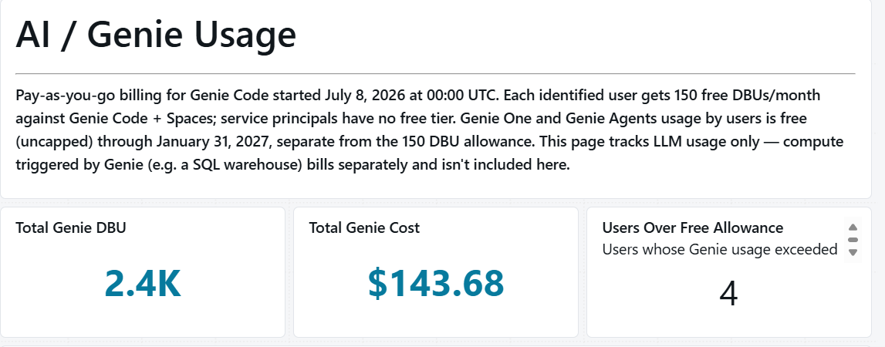
The page uses three standard Databricks AI/BI dashboard visualisation types: counters, an area chart, and a table.
- Three headline counters: Total Genie DBU, Total Genie Cost, and Users Over Free Allowance, for an at-a-glance overview of the current window.

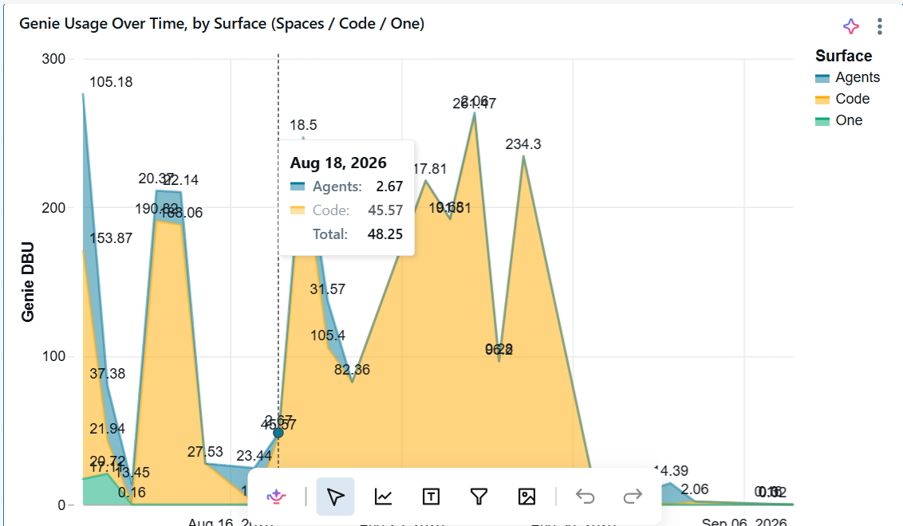
- An area chart of Genie usage over time, split by surface (Code/One/Agents), so we can see where the growth is coming from:

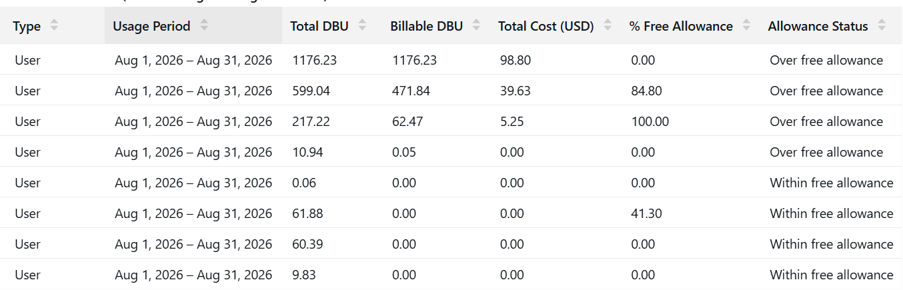
- A per-user table: User, identity type, usage period, total DBU, billable DBU, cost, % of free allowance used, and allowance status, all sorted by cost in descending order. This table identifies the users driving Genie spend. It’s normal to see a high total DBU with $0 cost for a heavy Genie One or Genie Agents user; that’s the free promotion, not an error in the dashboard.

Two Datasets: Raw Genie Events and a Per-User Roll-Up
Everything on the page traces back to the system.billing.usage table, filtered to billing_origin_product = ‘GENIE’. We split the logic into two layers:
- genie_usage: The raw, per-event layer.
This decodes which Genie surface generated the usage and classifies the identity running it:
CASE

  WHEN u.usage_metadata.genie.surface = 'GENIE_CODE' THEN 'Code'

  WHEN u.usage_metadata.genie.surface = 'GENIE_SPACE' THEN 'Spaces'

  WHEN u.usage_metadata.genie.surface = 'GENIE_ONE' THEN 'One'

  WHEN u.usage_metadata.genie.surface = 'GENIE_AGENTS' THEN 'Agents'

  ELSE COALESCE(u.usage_metadata.genie.surface, 'Unknown')

END as surface,

...

CASE

  WHEN u.identity_metadata.run_as LIKE '%@%' THEN 'User'

  ELSE 'Service Principal'

END as identity_type
It’s then joined to system.billing.list_prices (matched on SKU and the usage window against each price’s effective start and end times) to attach the applicable list price to each row.
- genie_usage_by_user: The monthly, per-user roll-up.
- billed_dbu becomes the page’s billable_dbu figure, taken directly from what Databricks metered as billed, not a derived approximation.
- free_allowance_dbu is deliberately scoped to Genie Code, as this is the product covered by the 150 DBU allowance.
- free_promo_dbu (Genie One and Genie Agents) is tracked separately and not counted against the allowance or billed while the promotion is active.
Before applying the roll-up logic, it’s important to note that the 150 DBU allowance only applies to Genie Code. Genie One and Genie Agents usage by users is free until 31st January, 2027. It doesn’t draw down the same 150 DBU pool, and Databricks tracks it separately at the row level (via sku_name and usage_metadata.genie.surface) rather than requiring this to be inferred from a running total. Getting this distinction right in the query matters: combining Genie One and Genie Agents usage with Genie Code usage before applying the allowance would make heavy Genie One or Genie Agents users look like they’re over their limit when their usage is actually free.
This layer applies the distinction between free and billable usage. Rather than inferring the billed amount by subtracting a flat 150 from total usage, we read it directly from sku_name. Databricks already tags each row as free (GENIE_FREE_USAGE) or billed (the Serverless Real-Time Inference SKU), matching Databricks’ own recommended query pattern for this exact purpose:
SUM(CASE WHEN sku_name != 'GENIE_FREE_USAGE'
         THEN usage_quantity ELSE 0 END) AS billed_dbu,

SUM(CASE WHEN sku_name = 'GENIE_FREE_USAGE'
         AND surface IN ('Code', 'Spaces')
         THEN usage_quantity ELSE 0 END) AS free_allowance_dbu,

SUM(CASE WHEN sku_name = 'GENIE_FREE_USAGE'
         AND surface IN ('One', 'Agents')
         THEN usage_quantity ELSE 0 END) AS free_promo_dbu
All DBUs consumed by service principals are billable because they are not eligible for the free allowance.
The same roll-up also computes pct_of_free_allowance (based on free_allowance_dbu, not total usage) and a clear allowance_status value (Within free allowance, Over free allowance, or No free tier) driven by whether billed_dbu is nonzero, so the dashboard can flag a real risk without needing manual calculations.
The identity split relies on a heuristic: values containing @ in run_as are treated as users, and all other values are treated as service principal application IDs. This is accurate enough for our purposes, but we note on the Genie Usage page that it’s worth spot-checking against system.access.service_principals if a definitive distinction is necessary.
Refining the Free-Allowance Calculation: Moving Beyond a Flat 150-DBU Subtraction
The first version of this roll-up didn’t distinguish usage by sku_name, but computed a single total_dbu across every surface and subtracted a flat 150 for human users, treating “free allowance” as one pool. That produced two issues when checked against Databricks’ own “Monitor and understand your Genie cost” documentation: heavy Genie One and Genie Agents users looked like they were over their limit and accruing cost, when that usage is actually free and uncapped until 31st January, 2027, and any user whose usage fell entirely within the free allowance ended up with a blank/NULL cost instead of $0, because AVG() over an all-NULL price column returns NULL rather than 0.
The solution wasn’t a workaround, but a matter of reducing inference. Databricks already tags every usage row as free or billed via sku_name, so once we read that directly instead of re-deriving it from a running total, both issues were resolved.
Benefits of Building the Page
This page became an early-warning system rather than simply a retrospective report:
- Proactive cost monitoring: Because allowance_status is driven by billed_dbu (not raw total usage), it only flags a user once Databricks has started billing their Genie Code usage, allowing us to respond as soon as billable usage begins, before costs escalate, and without false alarms from users who are simply high-usage Genie One or Genie Agents users.
- Adoption tracking by surface: The Code/One/Agents breakdown shows where Genie adoption is occurring, helping us to determine where to focus prompt and Agent design or training efforts.
- Service principal accountability: Since automated identities have no free tier, any meaningful DBU count against a service principal is worth evaluating; it’s usually a scheduled job or agent that should be reviewed for efficiency.
One current limitation is that Genie usage doesn’t carry custom_tags in the same way as compute usage, so we still can’t break spend down by team the way we can elsewhere in the dashboard. We document this limitation directly on the Genie Usage page, with a plan to add a run_as-to-team mapping table when available.
Six Enhancements for a Multi-Team Rollout
This page was built for a small, single-team audience, so we didn’t need to restrict who sees what. If this pattern is adapted for a larger or multi-team environment, there are some enhancements worth adding:
- Row-level security via Unity Catalog row filters: If the dashboard were shared across the organisation, a row filter keyed on run_as or a team column would let each team lead see only their own users’ Genie spend, instead of maintaining separate copies of the dashboard for each team.
- A run_as-to-team mapping table: As well as enabling a team breakdown page, this would also act as the join key for any row-level security filter, allowing the same mapping to support both requirements.
- Configurable thresholds instead of a hard-coded 150: The free-allowance figure is currently hard-coded in the query. Pulling it from a small parameters table would turn a Databricks pricing change into a one-row update instead of a query edit.
- Proactive alerting: At present, detecting a change in allowance_status to Over Free Allowance needs someone to open the dashboard, but wiring the Users Over Free Allowance counter to a scheduled Slack or email alert would provide proactive notification without manual checks. Alternatively, for the billed portion, Databricks’ own Genie budgets and cost controls can alert or block spend directly.
- Genie Agent-level granularity: The page currently rolls up by user, rather than by the specific Genie Agent generating the usage. For teams running multiple Agents, this breakdown would show which ones are actually delivering value.
- Extending the same pattern to future billable AI products: As Databricks meters more products this way, the raw-plus-roll-up approach means adding a new page is mostly a matter of swapping the SKU filter and the surface list, not rebuilding the logic.
None of these were necessary for our use case, but they represent the next stage if the pattern is adopted more broadly across teams.
Conclusion
Building the Genie Usage page confirmed that Databricks’ system tables already contain everything needed to track a new billed product accurately, as long as the platform’s own free/billed classification is used rather than re-derived.
As Databricks continues to expand what’s measurable through the system.billing.usage table, and as Genie itself expands to new surfaces, we expect to reuse the same raw-plus-roll-up pattern rather than rebuild the underlying logic, creating a foundation for monitoring additional billable products. Having built this page for Genie, we’re now looking at whether the same pattern is worth applying proactively to other Databricks products that are still on standard consumption pricing, so we’re prepared should they move to a similar allowance model.
Contact us now to discover how ClearPeaks can help you design and implement custom Databricks monitoring solutions that provide clearer visibility into usage, costs, and governance!