22 Sep 2026 Automating and Securing the Deployment of Observation Deck in Azure
ClearPeaks’s Observation Deck is a powerful executive analytics framework designed to provide organisations with a unified view of their business performance and key metrics. To process these complex metrics and provide AI-powered insights, the platform is built on a container-based Azure architecture: Azure Kubernetes Service (AKS) for computing, Azure Database for PostgreSQL Flexible Server for storage, Azure Container Registry (ACR) for image management, Azure AI Search for AI capabilities, Azure Key Vault for secret management, and Microsoft Entra ID for identity and access management.
Although manually configuring these components in the Azure portal is acceptable for initial development or testing, deploying Observation Deck across customer environments requires a repeatable, secure, and automated approach. In this blog post we’ll explain how we codified Observation Deck’s cloud-native stack using Terraform, focusing on modules, configuration flags, and private networking to meet enterprise customer requirements.
Codifying Observation Deck
The migration of Observation Deck from Azure portal-based configurations to Infrastructure as Code (IaC) involved capturing the entire platform architecture within declarative Terraform code. Rather than manually configuring each component separately, we used Terraform to define the entire service stack as a single, cohesive unit.
The coding phase covered three key areas:
- Core Infrastructure Components: Converting the platform’s key services (AKS, Azure Database for PostgreSQL Flexible Server, Azure AI Search, ACR, Key Vault, and Microsoft Entra ID) into structured, version-controlled code definitions.
- Networking: Declaring the Azure Virtual Network (VNet) with dedicated subnets for AKS pods, AI capabilities, private endpoints, and the mandatory delegated subnet for PostgreSQL Flexible Server, establishing the necessary network isolation boundaries to support private connectivity.
- Integrated Observability: Configuring a centralised Log Analytics workspace to collect AKS telemetry and PostgreSQL logs, allowing us to monitor the entire platform from one place. We covered this setup in our AKS and PostgreSQL Monitoring with Azure Monitor and Grafana blog post.
Taken together, these changes created a version-controlled foundation for Observation Deck, making it much easier to use modules and customise settings to meet customer requirements.
Modularisation and Deployment Flags: Adapting to Customer Needs
Once the Observation Deck baseline code was ready, the next step was to transform it into a reusable and flexible architecture. Relying on a single, monolithic configuration quickly becomes unworkable when deploying solutions for multiple customers, each with specific requirements, budget constraints, and distinct operational needs, ranging from lightweight testing setups to high-capacity production environments.
To address this, we abstracted the Observation Deck architecture into reusable Terraform modules (such as module/aks and module/psql). Each module encapsulates the configuration and best practices required to deploy a specific service. To adapt these modules to different customers, we introduced deployment flags: Boolean variables that enable dynamic control over which resources and capabilities are provisioned in the target deployments.
The following Terraform code shows an example of the AKS module with its corresponding deployment and privatisation flags, along with other variables:
module "aks" {

   source = "./aks"

   # Deployment Flag
   count = var.deploy_aks_flag ? 1 : 0

   # Privatisation Flag
   aks_enable_private_endpoint = var.aks_enable_private_endpoint

   aks_cluster_name            = var.aks_cluster_name
   .
   .
   .
}
By combining a modular design with deployment flags, the baseline code of Observation Deck’s infrastructure remains clean, easy to maintain, and highly adaptable.
Privatisation Flags: Securing Enterprise Environments
When deploying Observation Deck in enterprise environments, security requirements often go far beyond standard IP address whitelists. Because the platform processes confidential executive metrics, financial performance data, and other sensitive information, customers often require private connectivity and restrictions on public access.
Following the strategy described above, we introduced privatisation flags to dynamically select which modules or resources should be isolated from the public internet. The configuration required varies by service and can include private endpoints, private DNS configuration, and restrictions on public network access. These flags simplify private networking configuration across customer environments.
The diagram below illustrates the Terraform code architecture, detailing how modules and privatisation flags interact:
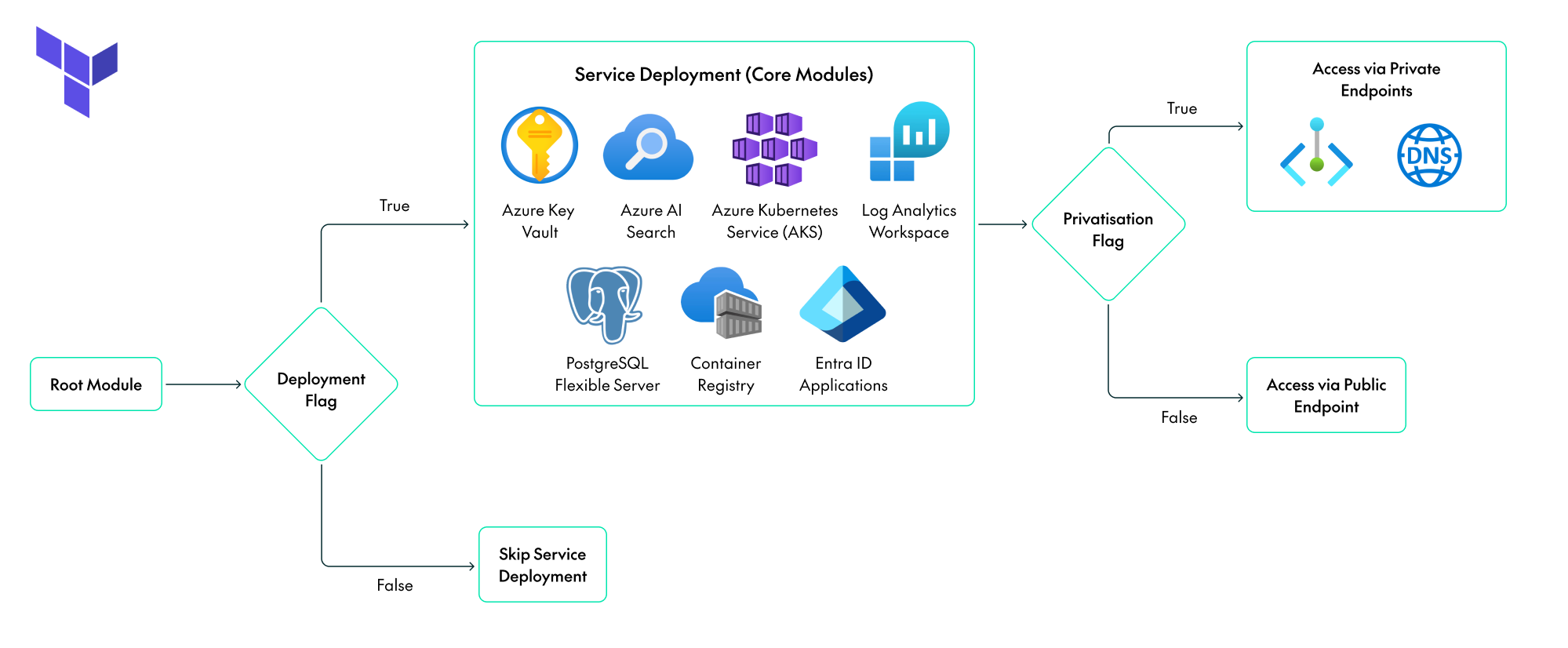
This table shows all the flag options available for each service:
| Core Component | Deployment Flag | Privatisation Flag |
|---|---|---|
| Azure AI Search | deploy_openai_flag | Always private |
| Azure Container Registry | deploy_acr_flag | acr_enable_private_endpoint |
| Azure Database for PostgreSQL Flexible Server | deploy_psql_flag | Always private |
| Azure Key Vault | deploy_keyvault_flag | kv_enable_private_endpoint |
| Azure Kubernetes Service | deploy_aks_flag | aks_enable_private_endpoint |
| Microsoft Entra ID applications | deploy_entra_id_apps_flag | N/A |
| Observability | deploy_monitoring_flag | N/A |
Conclusion
The migration of Observation Deck to IaC goes beyond simply automating resource creation: it’s about creating a more flexible platform. By combining Terraform’s modular design with dynamic flags, a single codebase can support anything from a quick test environment to a fully private enterprise deployment.
This approach avoids maintaining a separate code fork for each scenario. If you are interested in deploying Observation Deck in your Azure landing zone, contact us to discuss your requirements and explore how this approach can help you to automate deployment, simplify infrastructure management, and meet your organisation’s private networking needs.