
16 Sep 2026 Zoneless Angular: Understanding the Shift to Signals
In web applications, performance is fundamental. Users expect instant responses and smooth interactions, regardless of how complex the application might be. For development teams building large-scale applications, this means constantly evaluating and improving the technologies that power our user interfaces.
Here at ClearPeaks, we’ve always followed the evolution of Angular, and one of the most significant changes in recent years has been the framework’s transition from Zone.js-based change detection to a new system called Angular Signals. This shift isn’t just a technical detail; it represents a real improvement in how Angular applications handle updates and maintain performance at scale.
In this article, we’ll explore what this transition means, why it matters, and how it’s already improving the applications we build.
The Challenge: Keeping Large Applications Responsive
Imagine a dashboard application with dozens of widgets, real-time data feeds, user interactions, and background updates happening simultaneously. Every time something changes (for example, a user clicks a button, data arrives from an API, or a timer ticks), the application needs to update the UI to reflect those changes.
The challenge is knowing what changed and where to update: check too little, and users see stale data; check too much, and the application becomes sluggish. This balance between accuracy and performance becomes increasingly tricky as applications grow in size and complexity.
For years, Angular addressed this issue using a library called Zone.js, and whilst it worked well for many use cases, it came with trade-offs that became more apparent as applications scaled.
Understanding Zone.js: The Automatic Approach
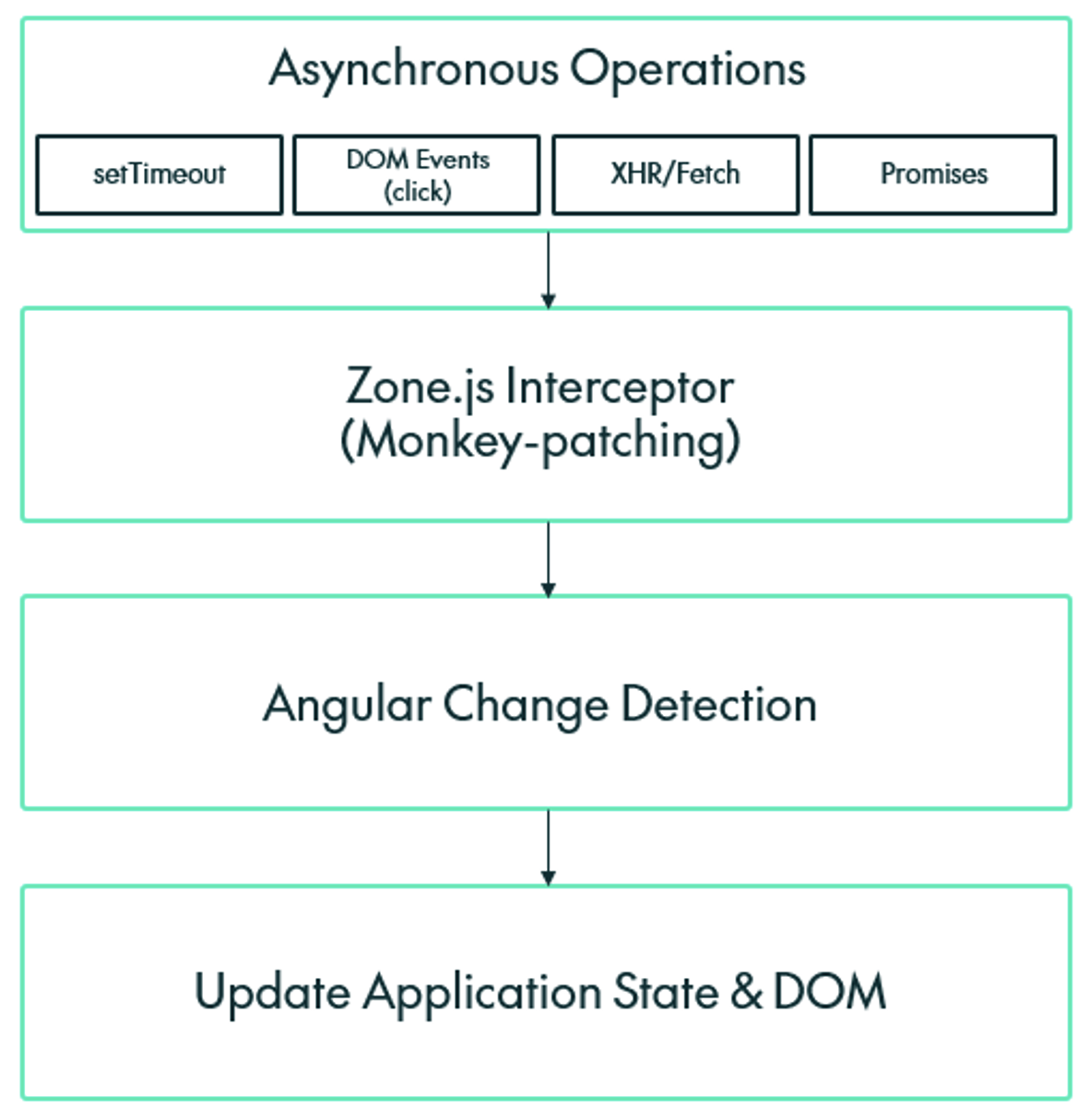
Zone.js is Angular’s original solution for detecting when an application needs to update. Think of it as an observer that monitors everything happening in your browser (every click, every timer, every network request) and tells Angular, “Hey, something’s happened! You should see if the UI needs updating.”
Zone.js uses a clever technique called “monkey-patching”. This means it wraps all the browser’s asynchronous operations (such as setTimeout(), addEventListener(), and HTTP requests) with its own code. When you use these browser features in your Angular application, you’re actually using the Zone.js-wrapped versions.
Here’s a simplified example of what happens:
// Before Zone.js patches it:
setTimeout(() => console.log('Hello'), 1000);

// After Zone.js patches it:
setTimeout(() => {
  console.log('Hello');          // Your code runs
  runChangeDetection();          // Zone.js triggers update check
}, 1000);
Whenever an asynchronous operation completes, Zone.js triggers Angular’s change detection system, which then:
- Walks through the entire component tree.
- Checks every binding in every component.
- Updates the DOM where values have changed.
The beauty of Zone.js is that it’s automatic, so developers don’t need to tell Angular when to update; it just does it. This is what makes Angular so effective for building applications quickly. However, there are some significant downsides:
- Performance Overhead in Large Applications:js doesn’t know what data changed; it only knows that something happened, so it checks everything, every time. In a small application with 10 components, this is fast, but in a large application with 500 components, checking them all becomes expensive, even when only two need updating.
- Unpredictable Change Detection:js triggers on any asynchronous operation, including those from third-party libraries you might not control. An analytics tracking script, a chat widget, or a monitoring tool can trigger change detection across your entire application, leading to performance issues that are difficult to trace.
- Zone Pollution: Operations like setInterval() running in the background can trigger change detection repeatedly, even when nothing in your data model has actually changed, creating unnecessary work for the browser.
- Debugging Complexity: Because Zone.js monkey-patches global browser APIs, error stack traces become harder to read, making it more difficult to find the root cause when something goes wrong.
- Bundle Size:js adds approximately 15 KB to your application bundle (after compression). Whilst this might not seem like much, every kilobyte matters when optimising for performance, especially on slower network connections.
- Testing Complexity: Testing asynchronous operations in Angular applications requires special utilities such as fakeAsync() and tick() to work with Zone.js, adding complexity to test code.
Signals: The Explicit Approach
In response to these challenges, Angular introduced signals, a new way to manage reactive data that fundamentally transforms how change detection works; for more detail, see the official Angular signals guide here.
A signal is a wrapper around a value that knows two important things:
- Who’s reading it: which components or computations depend on this value.
- When it changes: exactly when the value is updated.
Think of a signal as a smart container that tracks its own relationships. When you create a signal, it automatically builds a map of dependencies, so it always knows exactly who needs to be notified when its value changes.
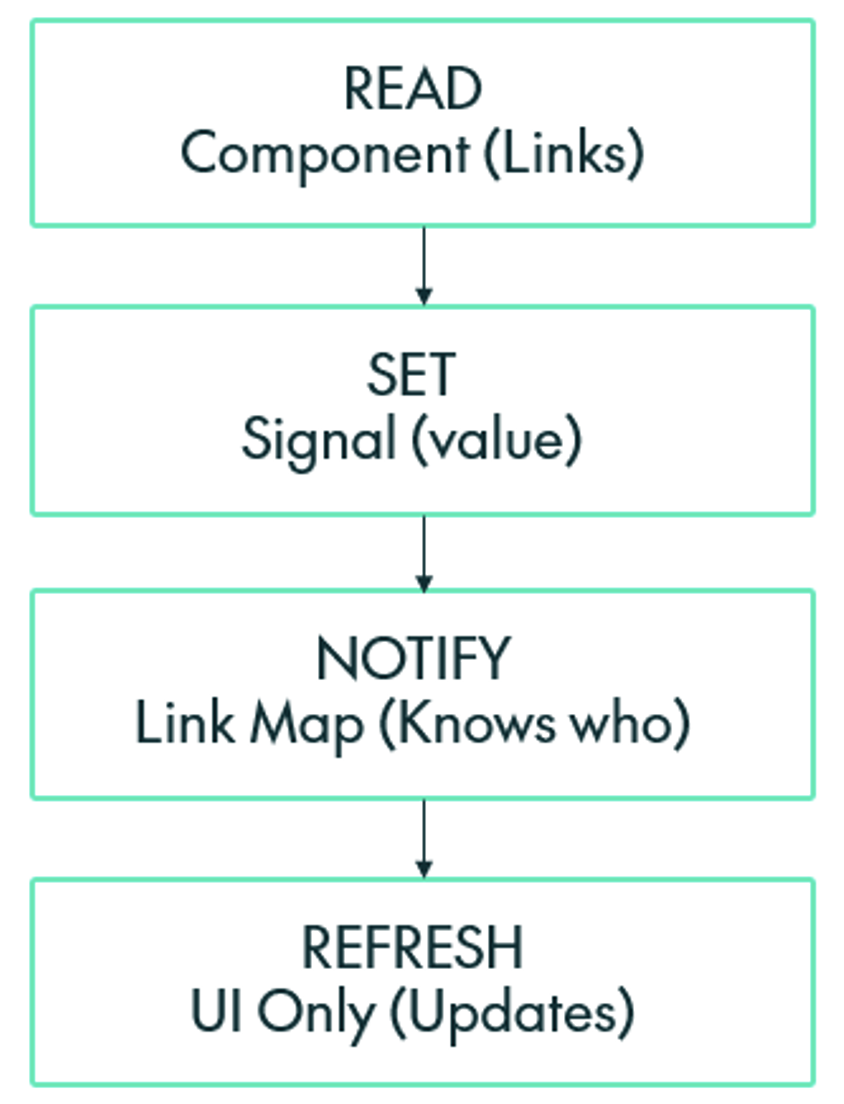
Instead of watching all asynchronous operations, signals work through explicit updates:
// Create a Signal
const count = signal(0);

// Read the value (this automatically tracks the dependency)
const currentCount = count(); // Returns 0

// Update the value (this notifies only dependent components)
count.set(5);
When a component reads a signal value, that signal records the dependency. Later, when you update the signal using .set() or .update(), it notifies only the components that actually read it.
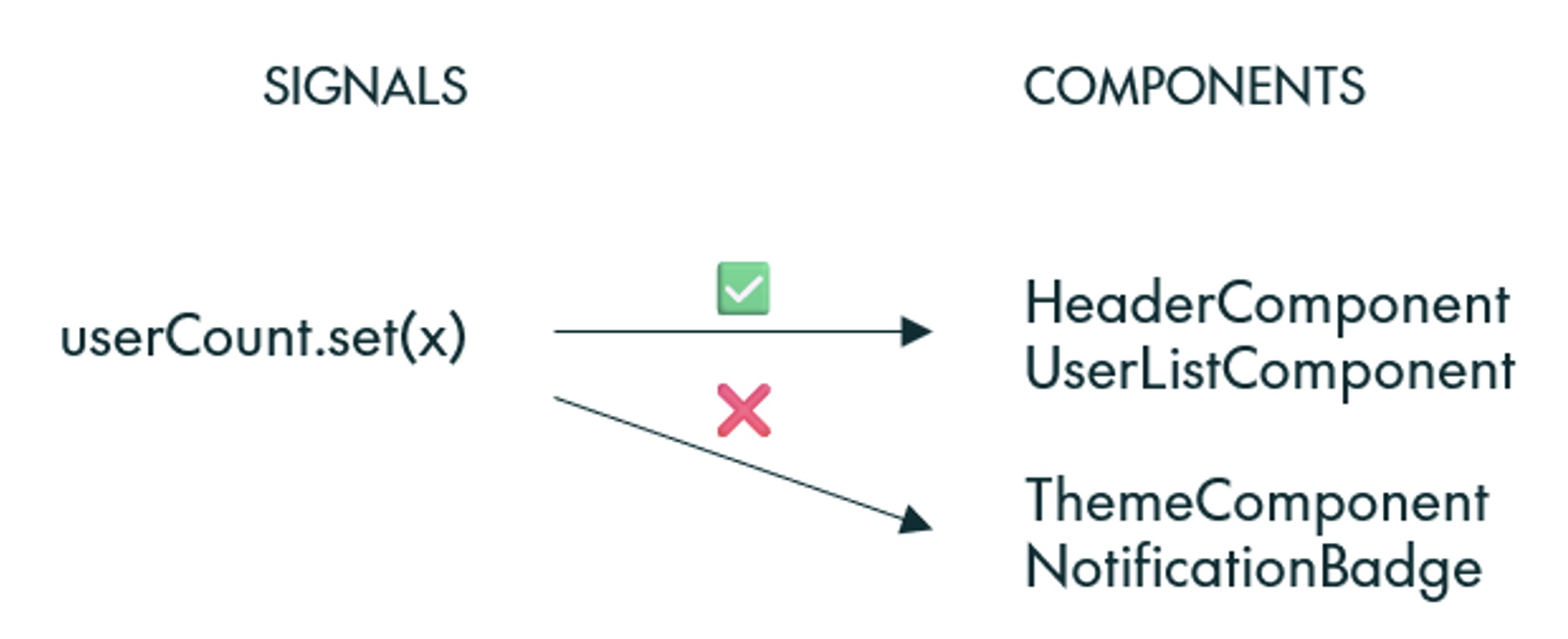
Behind the scenes, signals build a dependency graph that looks like this:
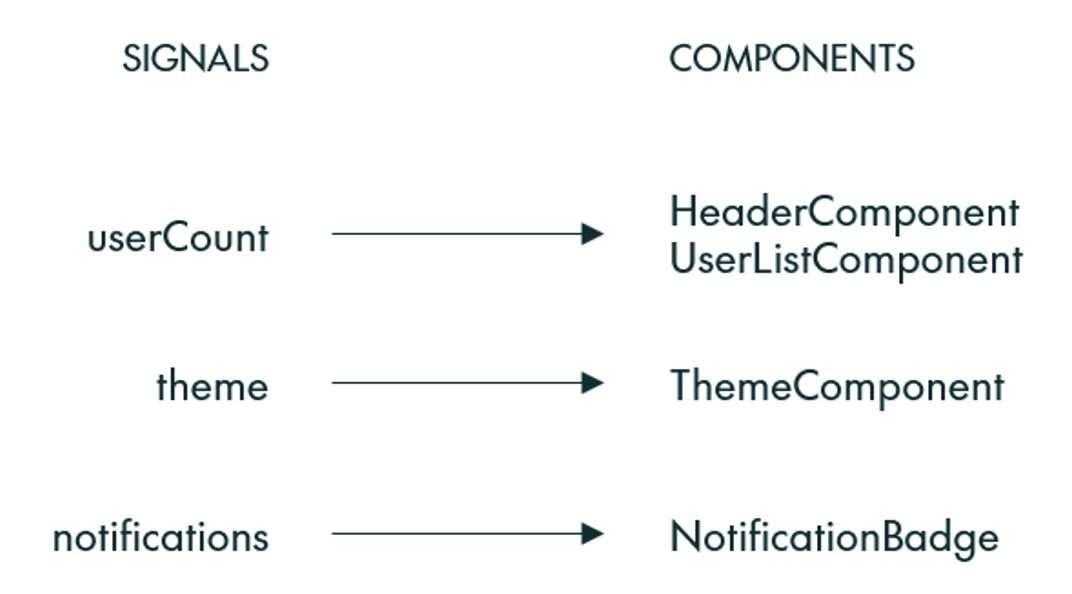
When userCount changes, only HeaderComponent and UserListComponent update; the ThemeComponent and NotificationBadge are completely unaffected. This is fine-grained reactivity: updates happen at the expression level, not the component level.
Advantages of Signals
Signals offer a number of advantages:
- Predictable Performance: Because signals know exactly which components depend on them, updates are accurate. Change one signal, and only its dependencies are updated; there’s no more checking hundreds of components when only a few need updating.
- No Monkey-Patching: Signals don’t need to wrap browser APIs; they use their own mechanism for tracking changes through explicit .set() and .update() This means there’s no interference with third-party libraries, cleaner stack traces for debugging, and no unexpected change detection triggers.
- Zero Overhead for Unused Data: If a component doesn’t read a signal, that signal’s changes won’t affect it. However, Zone.js checks components regardless of whether they use the changed data or not.
- Better Developer Experience: Signals make data flow explicit and traceable. When debugging, you can see exactly which signals a component depends on and track when and why updates happen.
- Smaller Bundle Size: Removing Zone.js eliminates approximately 15 KB from your application bundle, and signals are built into Angular with no additional dependency.
- Simpler Testing: Testing with signals is straightforward; just set a value and check the result. There’s no need for special async testing utilities.
Real-World Comparison
Let’s consider a real-world scenario from one of our projects:
With Zone.js:
@Component({...})
class DashboardComponent {
  totalUsers = 0;
  activeUsers = 0;
  // ... 48 more properties

  ngOnInit() {
    // This timer triggers change detection every second
    // checking all 50 properties across all dashboard components
    setInterval(() => this.checkServerStatus(), 1000);
  }
}
Every second, Zone.js triggers change detection for the entire dashboard, checking all 50 properties even though checkServerStatus() might not change any of them.
With signals:
@Component({...})
class DashboardComponent {
  totalUsers = signal(0);
  activeUsers = signal(0);
  // ... 48 more signals

  ngOnInit() {
    // This timer runs in the background
    // Only updates if signals actually change
    setInterval(() => this.checkServerStatus(), 1000);
  }

  checkServerStatus() {
    // Only if the value actually changes do dependent components update
    if (newTotal !== this.totalUsers()) {
      this.totalUsers.set(newTotal);
    }
  }
}
Now the timer runs without triggering any unnecessary checks; dependent components update only if the value actually changes.
Conclusion
The shift from Zone.js to signals shows Angular’s commitment to meeting the demands of modern web development. As applications grow more complex and performance expectations rise, having fine-grained control over updates becomes increasingly important.
Here at ClearPeaks, we’ve seen firsthand how signals can improve application responsiveness, make code more maintainable, and provide a better developer experience. By understanding the fundamentals of how signals work (building dependency graphs, tracking reads, and notifying only affected components), we’ve been able to build applications that are faster, more efficient, and easier to debug.
The transition to signals isn’t just a technical upgrade but an investment in the long-term health of our applications. As we continue migrating our projects, we’re excited about the possibilities of this new approach and confident that it positions us to build better software for our users.
Whether you’re just starting with Angular or maintaining large-scale applications, signals are key to building the next generation of high-performance web applications. The ClearPeaks team is here to help you along the way, so contact us to discover how we can support your business with tailored, professional solutions that ensure the best possible experience for you and your users.