09 Jul 2025 AI PPT Builder – The New SharePoint Lens Module
Before we present the enhancements we’ve made, let’s recap what the SharePoint Lens solution offers. As we explained in this blog post, it makes working with SharePoint documents much more intuitive. Through smart document tagging, an integrated Power BI dashboard and a conversational chatbot for on-the-spot Q&A, it streamlines navigation and knowledge discovery so you can locate the right information much faster and boost productivity. Here at ClearPeaks and across the synvert group, we rely on SharePoint Lens internally (we call it InnoHub) to simplify our own day-to-day work.
If you are interested in earlier versions of the SharePoint Lens solution, check out these blog posts of ours: Creating an Advanced SharePoint Indexer to Maintain an Organised Common Document Repository and Updating and Enhancing our Advanced SharePoint Indexer.
In this article we’ll explain the new capabilities provided by the AI PPT Builder, and outline the technical approach behind its development.
AI PPT Builder: A Functional Introduction
In this section we’ll look at the core concepts behind the AI PPT Builder, as well as how to interact with the chatbot to generate customised presentations.
Teams across departments often struggle when developing customised presentations. Building a presentation can be slow and laborious, hunting through past projects and files for relevant examples and materials, which all adds up to duplicated effort, uneven quality, and missed opportunities to draw on the organisation’s existing know-how. What’s more, the quality of the final presentation can vary significantly, depending on the user’s experience and familiarity with the resources available.
The AI PPT Builder module streamlines and optimises the presentation creation process through an intelligent, web-based interface with an integrated chatbot that generates presentations and scripts based on internal documents that are analysed to deliver a context-accurate solution.
The tool guides users through a structured series of questions in order to understand the presentation’s purpose and content requirements. Using natural language processing and the organisation’s document repository, the tool automatically produces tailored slides based on validated past work. The generated presentation is available for immediate download, significantly reducing preparation time as well as ensuring consistency and quality in different scenarios. By connecting users directly with existing knowledge, this tool enhances their ability to create professional, high-impact presentations with minimal manual effort.
Whilst the system is designed to adapt to different presentation types, we use it primarily to support our Sales team in creating presentations to prospective customers, which often cite previous projects to demonstrate value. By tailoring the tool to build these types of presentation, the Sales department can quickly generate polished, customer-ready material that reflects the company’s track record. This use case also provides a strong foundation for expansion into different presentation types in the future.
To craft each presentation the chatbot draws on the following:
- User prompt responses.
- A document listing the requirements that the generator will address.
- Existing corporate material stored in SharePoint and indexed via SharePoint Lens.
- Additional PPTs or Word documents that are manually uploaded by the user.
Benefits
The business goal of this new module is to make the most of the corporate knowledge available in SharePoint Lens, to assist and accelerate the creation of new presentations.
Its main benefits are:
- Ensure all relevant corporate knowledge is included and referenced in presentations, especially useful for fast-growing companies where team members might not be fully aware of the organisation’s capabilities and previously used materials.
- Accelerate the preparation of material. The timely delivery of presentations is often critical to meeting project deadlines, securing opportunities, or supporting decision-making processes.
- Improve consistency and quality across presentations. By using a structured template and standardised content, the tool helps to keep presentations clear and aligned with company standards.
- Enable real-time customisation based on user input. Users can adjust content through the chatbot interface so that the final presentation is perfectly matched to the context, audience, and objectives of the use case.
- Provide a supporting script alongside the slides. In addition to the presentation, the system also generates a script document containing the full content in paragraph form.
By tailoring the solution to a specific use case, we deliver added value by meeting that context’s unique requirements, on top of the core benefits already provided by the base solution. For example, in our Sales context, it ensures that relevant project success stories are included in the sales presentation, which is a key factor in winning a new project as most future customers ask about previous successful engagements.
Security & Responsible Usage of GenAI
Important considerations when using Generative AI are security and responsibility. When using it internally (and the same would apply if deployed in your organisation), we have ensured that the models adhere to our GenAI policies, the most important of which are:
- Use AI services that guarantee privacy, i.e. uploaded content is not used externally.
- Uploaded content does not contain sensitive or protected data.
- Generated content must be treated as a suggestion, not a fact. Any content generated must be reviewed and amended, if needed, by relevant parties (in our case, the Sales team) before use.
AI PPT Builder Technical Overview
Main Components
The following diagram showcases the solution’s principal components, including the web application interface, Azure support services, and the AI models:
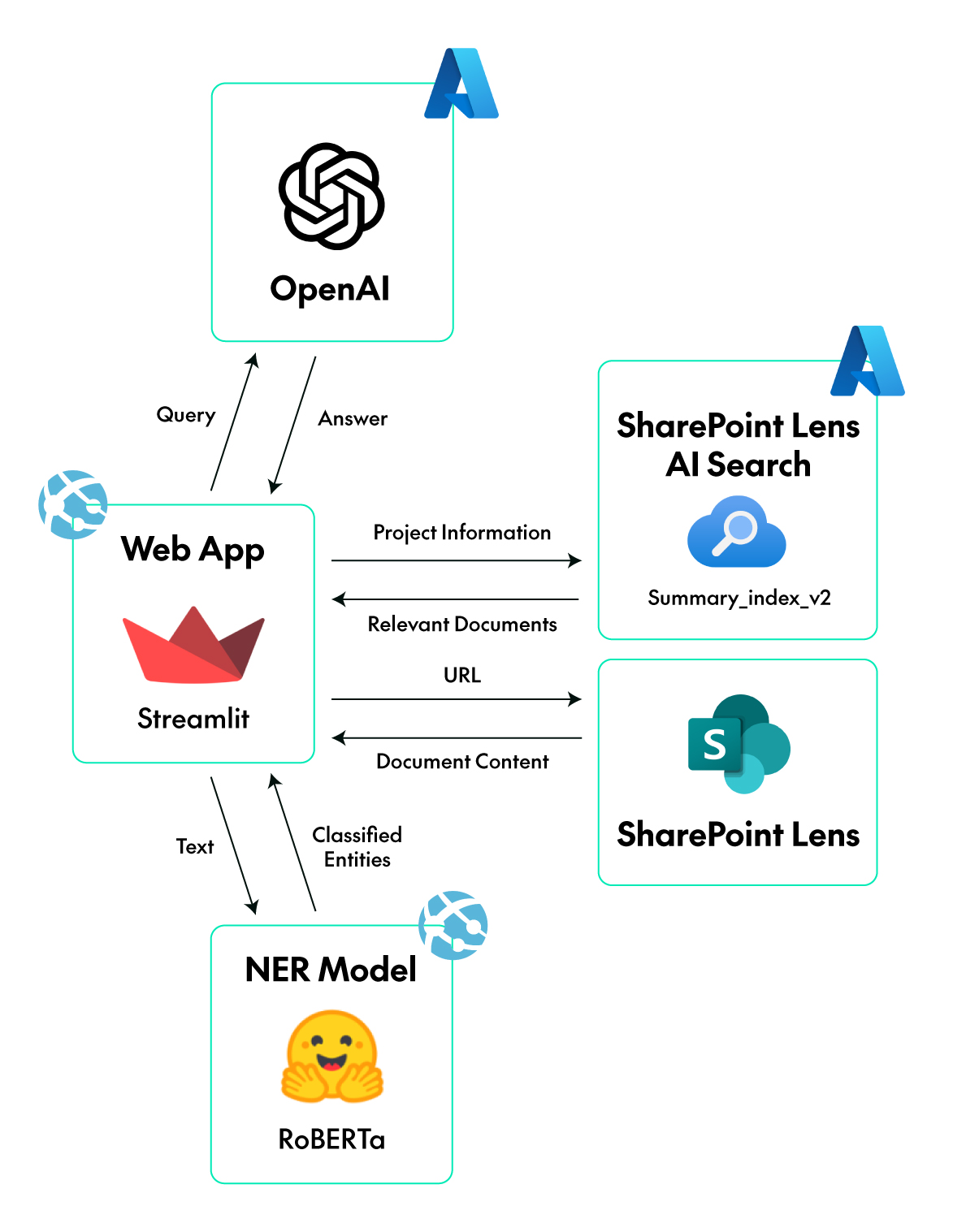
Figure 1: High-level Architecture of the AI PPT Builder
Azure Components
The solution is built on top of Microsoft’s Azure cloud platform, which provides a reliable environment for deploying this application. The main Azure services used include:
- Azure OpenAI Service: Hosts the GPT-4o model used to analyse documents, interpret user input, and generate presentation content.
- Azure Web App: Provides a managed environment to host the Streamlit web interface, making the chatbot accessible through a browser.
- Azure AI Search: Enables semantic search across company documents to retrieve the most relevant content based on project requirements or user feedback.
- Azure Blob Storage: Used to store large files such as the custom NER (Named-Entity Recognition) model that is downloaded at runtime.
Application Components and Libraries
The chatbot interface is built using Streamlit, a Python framework that simplifies the creation of web applications. Streamlit allows for rapid development of the user interface without the need for extensive handling of front-end languages such as HTML or JavaScript.
The back-end logic is implemented in Python 3.10, making use of its rich library repository; the most relevant libraries used in the development of the application include:
- OpenAI SDK: To connect with Azure OpenAI and to perform tasks such as text generation, content summarisation, and sentiment analysis.
- LangChain: To manage prompt templates, function calling, and to maintain conversation flow within the chatbot.
- python-pptx: To create and format the PowerPoint presentations using a predefined template, based on the generated content.
- Azure SDK: To access and interact with the Blob Storage and AI Search services.
- Transformers (Hugging Face): To load, run and train the fine-tuned RoBERTa model for NER purposes, to extract and classify structured entities from document text.
As we mentioned previously, relevant documents related to the current context are retrieved, using a vector database with semantic search capabilities, deployed through Azure AI Search. Once identified, the actual content of these documents is retrieved using SharePoint’s Graph API. This vector database is the same as that used in SharePoint Lens, allowing both systems to share a unified document index.
Phase Overview
To make the solution modular and easy to adapt or extend, we divided it into six distinct phases, each with a specific purpose and clearly defined responsibilities within the overall workflow. Note that each phase can be tailored independently to the specific use case.
Figure 2: Example Interaction with the Interface (partial view shown)
- Phase 0 – External Material Confirmation: The system ensures that all necessary input materials which are not present in SharePoint Lens have been provided by the user, then validates the inputs before proceeding with content generation. In the use case of Sales PPT generation, this includes the project information document, which outlines the key aspects of the project, and any optional support files.
- Phase 1 – External Material Information Analysis: To ensure that the knowledge base used for content generation is accurate and aligned with the context, the chatbot begins by analysing the uploaded materials. In our Sales use case, for example, this includes extracting key details such as customer background, industry, goals, and expected outcomes. If any crucial data is missing or unclear, the system will prompt the user to provide it, ensuring a complete and reliable foundation for the next phases of the workflow.
- Phase 2 – Document Analysis and Extraction: To ensure that the generated content is both relevant and based on past experiences, the system analyses both documents retrieved via AI Search from SharePoint and any support materials provided manually by the user. For example, in our case, if the expected outcome involves delivering an MLOps platform, the system will prioritise retrieving documents related to MLOps implementations. Once the user has agreed on the selected documents, all sources are processed, segmented into meaningful sections, and analysed to extract key insights that will serve as the foundation for content generation.
- Phase 3 – Presentation Structure Selection: To define the structure of the final presentation, the user selects one of the available templates based on the context. This choice determines the slide sequence, as well as the type of content expected in each section of the final presentation. In our use case, the template includes a Client Context & Understanding slide, which focuses on demonstrating knowledge of the client’s business environment and challenges.
- Phase 4 – Slide Content Generation: To build the presentation content, the system generates each slide with GPT-4o, using the details from the external materials and documents analysed to generate relevant content. After each slide has been created, the user can review the content and provide feedback to tweak the output as necessary.
- Phase 5 – Presentation Assembly: To produce the final deliverables, the system compiles the approved content into a supporting Word script, as well as summarising the content into bullet points that align with the narrative style. Then, it builds the final presentation using a predefined corporate template. Both files (Word and PPT) are available for immediate download through the chatbot interface.
Key Development Highlights
The GPT-4o model underpins the solution, performing tasks such as sentiment analysis, document review, slide-content generation, and bullet-point summarisation. A suite of carefully crafted prompts, refined through role definition, structured formatting, function calling, context injection and task decomposition, guides the model towards precise outputs. For example, when analysing PowerPoint files, the prompt concentrates on section titles and headers (which often carry the bulk of the meaning) so the model can produce a coherent summary despite the slides’ typically sparse text.
To improve the system’s grasp of unstructured documents, we introduced an NER model built on Hugging Face’s RoBERTa transformer and then fine-tuned it to detect the entity types used in our SharePoint repository: technologies, industries, domains and customer names.
We enhanced model performance by applying several data augmentation strategies to expand the dataset and boost accuracy and reliability. Because the resulting model exceeded our CI/CD size limit, we stored it in Azure Blob Storage and configured it to download and unpack automatically at application start-up, keeping deployment friction-free.
Due to extensive API calls, token-rate limits imposed by the Azure OpenAI Service were frequently triggered during document analysis. This led to bottlenecks, particularly when handling large batches of documents. We mitigated this by implementing a dynamic waiting mechanism that uses the retry-after time provided in the API response to delay requests and thus comply with rate limitations.
AI PPT Builder: Future Roadmap
- Deeper integration of the NER model into the document-selection workflow for content generation:
At present, documents are chosen on broad relevance alone, and the retrieval count is capped to avoid breaching token limits and flooding the LLM with irrelevant information. A deeper NER integration could instead score each document by the presence of entities that match the purpose of each slide, so the system could pull a larger initial set, then filter and prioritise only the most pertinent documents for slide creation. With this approach, the presentation would benefit from richer context whilst sparing the LLM from needless noise.
- Enhanced document analysis capabilities:
Currently, the system extracts only the raw text for analysis, ignoring all the information provided by images, schemas, charts, and figures. Enabling the system to parse and describe these graphical elements would mean a better understanding of the source material. And what’s more, the generated presentation could incorporate tailored visuals that illustrate the proposed solution for the specific use case, improving clarity, impact, and sellability.
- Expanded use cases:
The solution has been built following a modular approach, allowing its components to be reused independently or adapted for different functions. This flexibility allows the workflow to extend beyond sales scenarios to any context where content creation benefits from mining a document repository: for example, the same architecture could be repurposed to generate market research summaries, or executive briefings, where the ability to extract information from past reports, presentations, or customer data is crucial. In addition to the final presentation, the system also generates a supporting text document that contains the full script used to build each slide, providing users with a complete guide they can refer to during delivery, as well as showing how each slide was generated. By reusing the chatbot interface, document retrieval pipeline, and slide generation logic, the system can adapt to different use cases with minimal adjustments.
Conclusions
In this blog post we’ve presented the AI PPT Builder, a new SharePoint Lens feature.
The AI PPT Builder and the wider SharePoint Lens application are under continuous development, with a roadmap of new features and refinements already in motion. Although our current internal release targets sales scenarios, the underlying architecture is deliberately flexible and can support a broad range of presentation needs.
Within ClearPeaks, for example, we plan to use it for project updates, client-onboarding packs, executive briefings, and more. For you, it means faster, more consistent PowerPoints generated from your own SharePoint content. Thanks to its ability to automatically surface and organise relevant past material, it adds value across almost every department and presentation type. Looking ahead, the same approach could generate not only PowerPoint presentations but also any type of document involving structured text generation.
If you’re looking to streamline your SharePoint workflow, explore practical AI use cases, or build conversational agents on Azure, Snowflake, Cloudera, AWS or another modern stack, don’t hesitate to contact our team of AI experts!