10 Sep 2025 Building A Self-Service Enterprise Data Platform: A Real-World Implementation with Azure and Databricks
In one of our previous blog posts, How to Operate Your Enterprise Data Platform – Meet Our EDPOps Accelerator, we explored the key elements for successfully building an Enterprise Data Platform (EDP): selecting the right operating model, the best technology stack, the necessary frameworks, as well as defining roles and responsibilities.
In this follow-up post, we’ll walk you through how we built an EDP for one of our customers, focusing specifically on the different frameworks we implemented and how they helped to structure the platform. We’ll also detail the DevOps processes we put in place to reduce manual effort and enable self-service.
Although the implementation was carried out in Azure with Data Factory and Databricks at its core, most of the approaches we are presenting here are reusable in any stack or cloud provider.
Initial Requirements & Existing Decisions
The customer had already defined several key aspects of their EDP, giving us a clear starting point to focus on the implementation of frameworks and DevOps processes. The main decisions already in place were:
- Hub & Spoke Operating Model: The customer implemented a centralised platform team responsible for providing the infrastructure, shared frameworks, DevOps pipelines, and best practices to platform users. The team’s objective was to set up self-service capabilities for data engineers, allowing them to ingest data, orchestrate ETLs, refresh dashboards, and deploy across environments autonomously.
- Metadata-Driven Architecture: A key goal for the customer was to centralise all metadata in a single location and then use it as a foundation to build scalable, reliable, and reusable frameworks.
- Architecture and Technology Stack: The chosen architecture followed a medallion-based lakehouse model in Azure, with the selected technologies including Azure Data Factory for ingestion and orchestration, Databricks for core ETL processing and data governance, an SQL database to store control and log metadata, and Power BI for reporting and dashboards:

Figure 1: Customer’s EDP High-Level Design (HLD)
Frameworks
In this section we’ll explain the different metadata-driven frameworks we designed for ingesting, processing and refreshing our datasets across the platform.
Ingestion Framework
To bring data from various sources into the platform, first to the landing zone and later to the bronze layer, we built an ingestion framework based on Data Factory and Databricks. Our framework uses the Metadata-driven Copy Task provided by Microsoft, which we already covered in a previous blog post. This tool provides a flexible control table and a scalable set of pipelines, which we extended with enhancements like improved performance for full loads and a reliable logging mechanism.
The Microsoft utility only supports copying data into the landing zone, so we added the logic to populate the bronze layer too. In the bronze layer, we handle both full and incremental loads. In each bronze table, we set a Boolean flag to track which records are currently present in the source system, along with a modified timestamp to record when each new row was ingested or updated. These fields allow data engineers to configure their ETLs to read only new or changed records from the bronze layer.
The framework also manages complex source scenarios, such as late-arriving data or deleted records that are not explicitly flagged in the source system. These cases are managed using the Boolean flag mentioned above, together with an additional flag to track deletions.
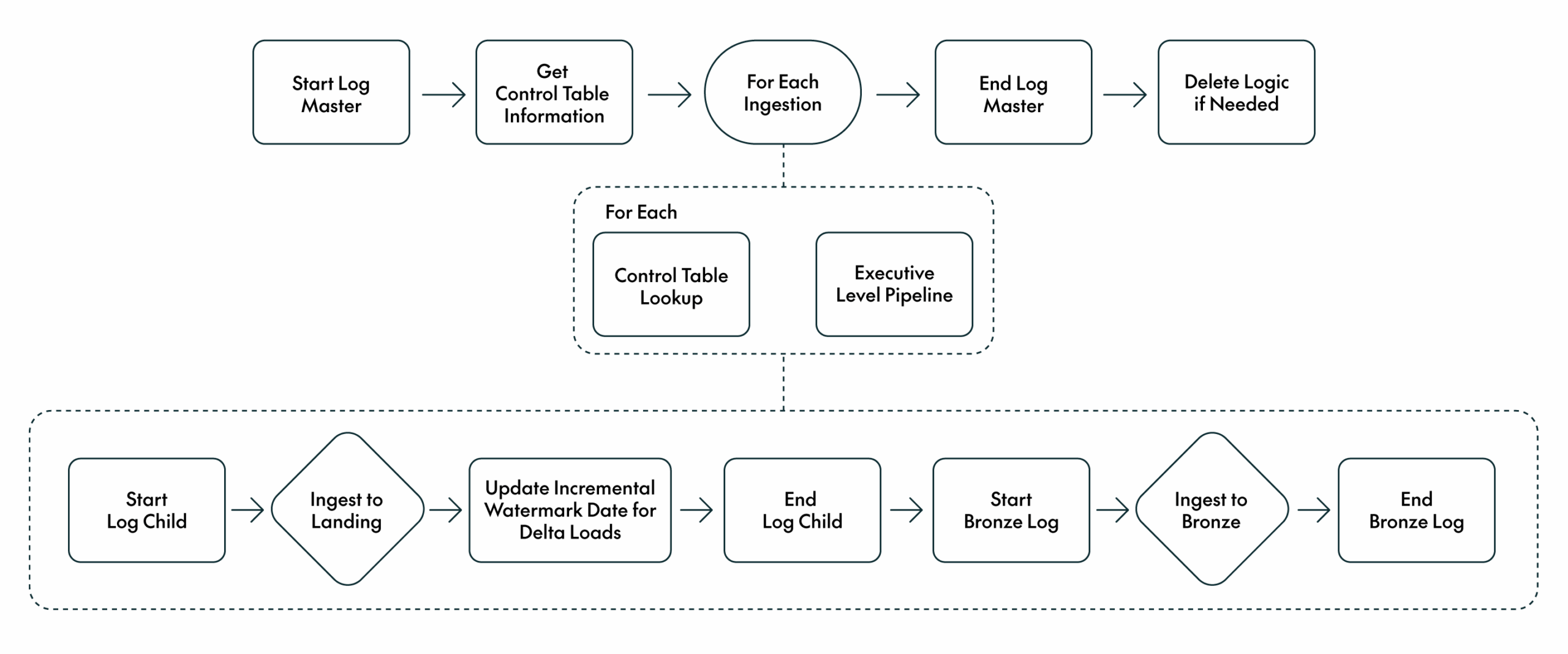
Figure 2: Ingestion Framework
Data engineers simply register the source details in the control table, and the framework ensures that the data is reliably ingested and made available in the bronze layer for downstream consumption.
Processing Framework
To provide a scalable, structured mechanism to orchestrate the data engineering ETL processes for the silver and gold layers, we built a processing framework on top of Data Factory to call the required Databricks notebooks in the necessary order.
We designed a control table to track the notebooks associated with each workstream, along with their dependencies. For example, if a gold-layer notebook depends on two silver tables, these are registered as dependencies. The framework reads this metadata and dynamically builds a DAG to orchestrate the execution order accordingly. If a dependency fails, as indicated in the logs, the dependent notebook is automatically skipped.
The framework also records the timestamp of each notebook’s last successful execution. This timestamp is passed as a parameter to the notebook at runtime, allowing data engineers to implement incremental logic without needing to manually manage the value.
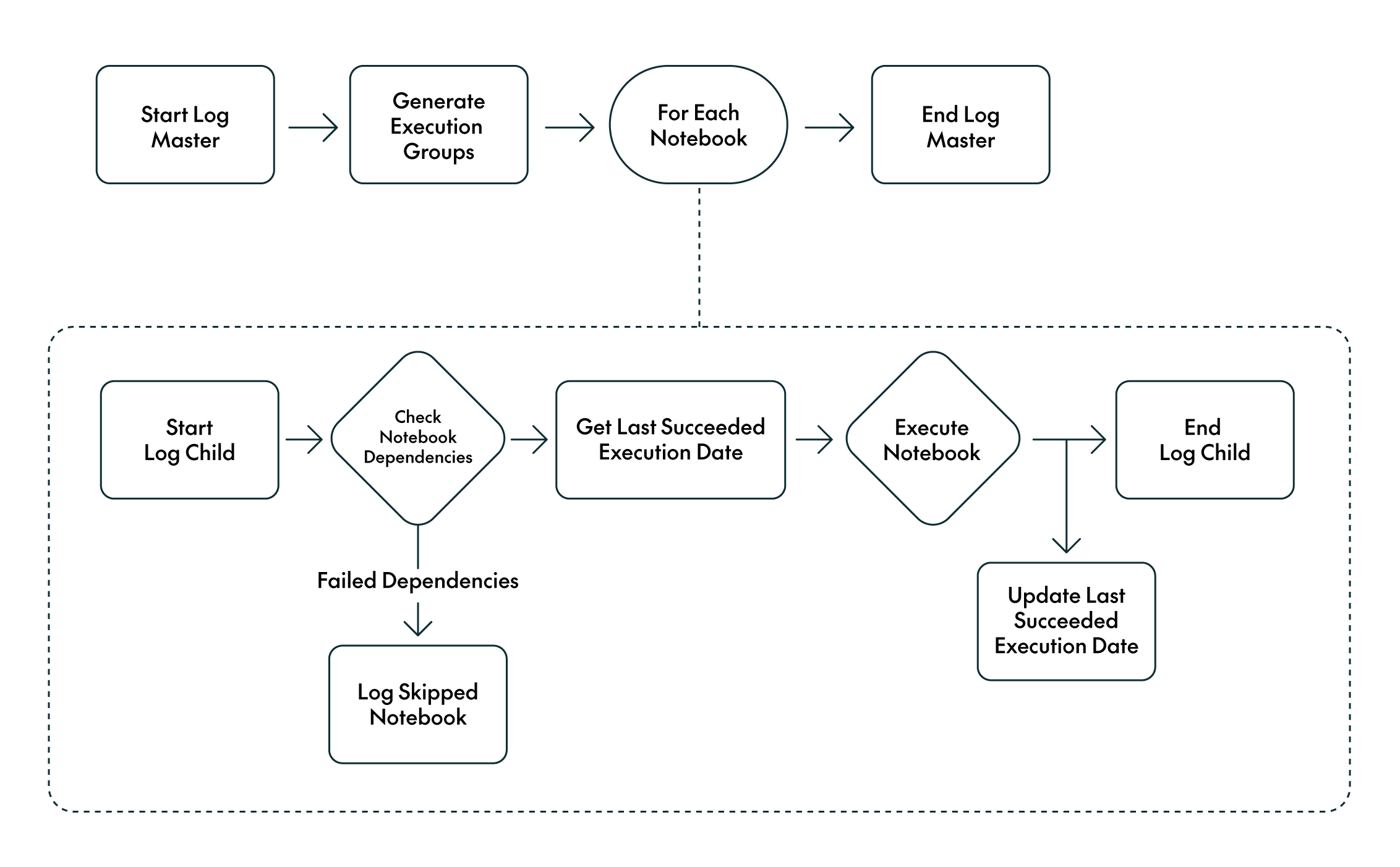
Figure 3: Processing Framework
Data engineers only need to specify their workstream, the notebooks to run, and their dependencies: the framework then orchestrates the pipelines after bronze ingestion, ensuring that all dependencies are properly managed.
Dashboards Refresh Framework
A critical aspect of any EDP is ensuring that dashboards are refreshed only when the underlying data is accurate and up to date. To achieve this, we implemented a framework to refresh Power BI datasets based on processing dependencies.
The control table stores dataset information, such as workspace and dataset IDs, and their dependencies on the underlying gold tables. The framework refreshes only the datasets whose dependencies have successfully executed, as verified in the processing logs:
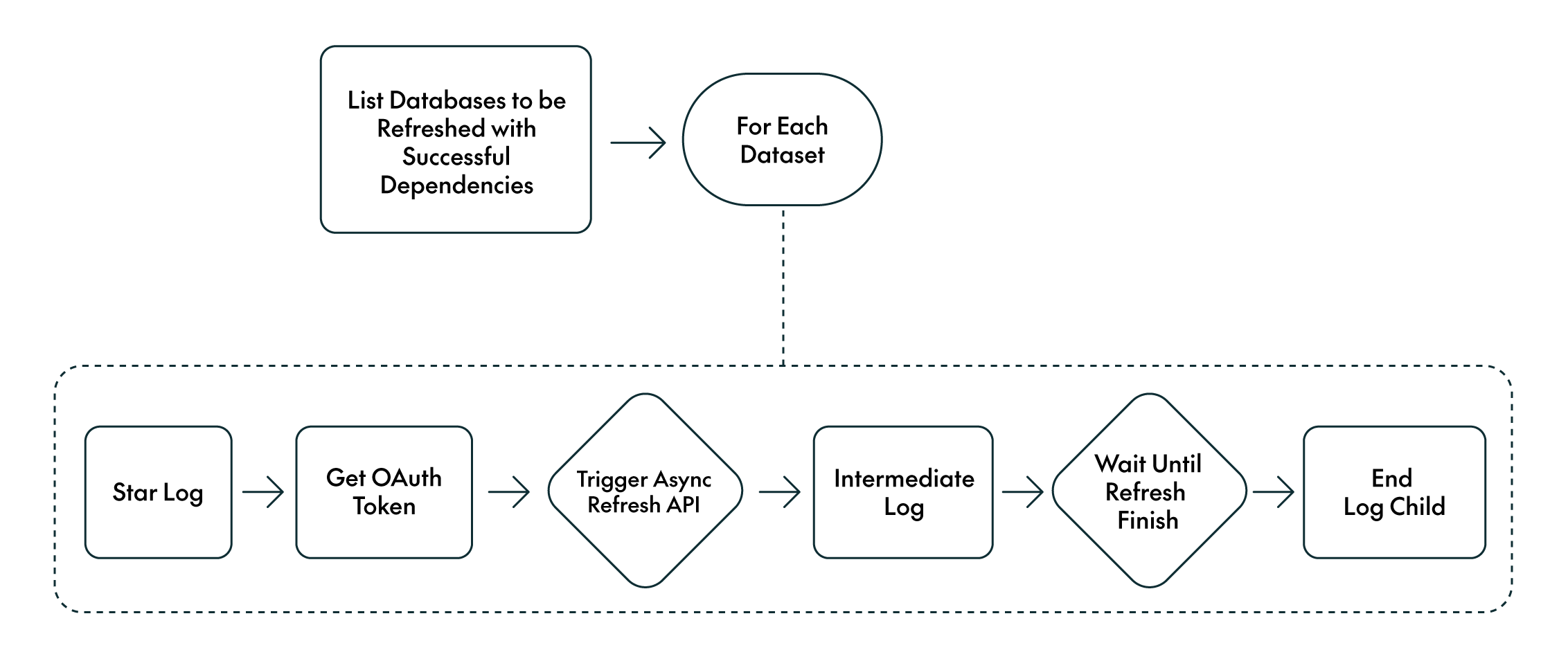
Figure 4: Dashboard Refresh Framework
In practice, the framework refreshes dashboards automatically, using the workspace and dataset IDs together with the defined dependencies. Dashboards are only refreshed once all dependent ETLs have completed successfully.
Automation & Self-Service Capabilities with DevOps Pipelines
To eliminate manual interventions and provide engineers with self-service capabilities, we implemented a set of DevOps pipelines to automate key processes across the platform.
Manage Control Tables
As described in the Frameworks section, all orchestrations and executions rely on control tables. To manage these in a reliable and version-controlled way, we created a Git repository where data engineers can define their control table entries using YAML files. A DevOps pipeline then validates the content and performs the necessary insert, update, or delete operations in the control tables across environments.
For more complex or ad hoc changes where the YAML-based repository is not sufficient, we introduced a second Git repository where engineers can upload SQL files to perform direct updates on the control tables. These scripts can then be executed in the target environment through another dedicated DevOps pipeline.
Together, these two repositories enable the full lifecycle management of control tables, giving data engineers complete control over their configurations without needing manual database access.
Manage DDLs
Managing DDLs across environments is also a key requirement of any EDP. We created a repository where engineers can upload their SQL files with their CREATE TABLE/VIEW statements and ALTER commands. A DevOps pipeline then performs basic validations on the SQL and prompts the user to specify the target environment where the changes should be applied.
Deployment Pipelines
All components of the platform, including pipelines, notebooks, SQL objects, and infrastructure, are deployed across environments through automated deployment pipelines. We set up DevOps pipelines for:
- Azure Data Factory pipelines
- Databricks notebooks
- SQL DDLs and stored procedures
- Terraform code for infrastructure provisioning
This approach ensures consistent deployments and proper versioning across development, test, and production environments.
Secrets Management
We also enabled secure, self-service secrets management for higher environments, where users typically don’t have direct access. Through a DevOps pipeline, users can submit the secret name, value, workstream, and target environment. The pipeline then handles the secure creation of secrets without requiring elevated permissions.
Masking Framework
PII (Personally Identifiable Information) and sensitive data must be handled in line with business policies and regulatory requirements. In our customer’s case, no production data was allowed in the development environment. To enforce this, we implemented a masking framework integrated into the ingestion process. Based on a control table, users can specify whether each column should be:
- Fully masked
- Partially masked (useful for data quality checks)
- Hashed (typically used for joins or aggregations)
Masking is applied during ingestion, ensuring that no unmasked data enters the platform.
For non-development environments, we applied row-level security and dynamic column masking so that sensitive data remains available but is restricted according to user access.
Common Shared Code as an Enterprise Package
It is common to generate code that can be reused in multiple sections, components or teams across an enterprise. In this customer’s case, we created a shared Python package with common functionalities that could be used by multiple teams. Teams were able to contribute new functionality autonomously, whilst our DevOps pipeline managed automated testing, versioning, and deployment. This allowed all teams to focus on development and reduce code complexity and duplication.
Observability
Before wrapping up, it’s important to highlight that a robust EDP requires strong observability across all frameworks and platform features. For this customer, we implemented the following:
- Comprehensive Logging: All frameworks and DevOps pipelines generate logs that provide visibility into their executions. A self-service platform must clearly surface what is working and what is failing.
- Execution Alerts: Microsoft Teams alerts notify users about pipeline execution status, ensuring timely awareness and response to issues.
- Automated Testing: All DevOps pipelines and frameworks are covered by automated tests. Given their central role in the platform, reliability through continuous testing is essential.
- Monitoring Dashboards: Whilst logs are critical, dashboards offer a more accessible view. We created monitoring dashboards that allow users to track the status of their pipelines, even in environments where they don’t have direct access to the services.
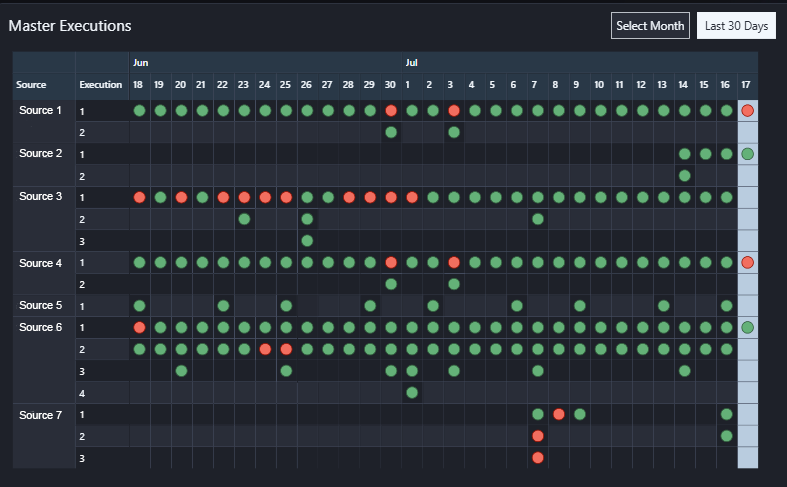
Figure 5: Monitoring Dashboard Subsection Example
Conclusion
The combination of metadata-driven frameworks and DevOps automation has brought significant benefits to the customer’s EDP:
- Dependency Awareness: Frameworks incorporate dependency tracking, enabling end-to-end lineage from source systems through to dashboards.
- Unified Development Approach: A common working methodology was adopted across teams, promoting best practices and development consistency.
- Fully Automated Workflows: Manual operations were eliminated; everything from ingestion to deployment and refreshes is handled through DevOps pipelines.
- Observability: Comprehensive logging, proactive alerting, and centralised monitoring dashboards provide full transparency across all platform activities. Users can quickly identify failures, monitor execution status, and gain visibility even in environments without direct service access.
Overall, these improvements allowed the customer to run their data platform with greater confidence and efficiency. Engineers no longer spend time on repetitive operational tasks, business teams can rely on timely and accurate dashboards, and governance requirements are built directly into the platform design. Many of the frameworks and platform features described in this post will be covered in more detail in upcoming blog posts, so stay tuned! And in the meantime, do reach out if you want to learn more about what you’ve read or need help designing your own Enterprise Data Platform.