19 Jun 2025 DLPROC 2.0 – An Enhanced & Audited Data Processing Framework for Spark & NiFi
A while ago we introduced you to DLPROC, a lightweight Python-based framework we developed for one of our customers to help with the development and execution of Spark jobs in Cloudera Data Platform (CDP), although it can also be used in any other Spark-based Enterprise Data Platform (EDP). Recently, we enhanced the framework for another of our CDP customers, and in this blog post we’ll share the result: DLPROC 2.0.
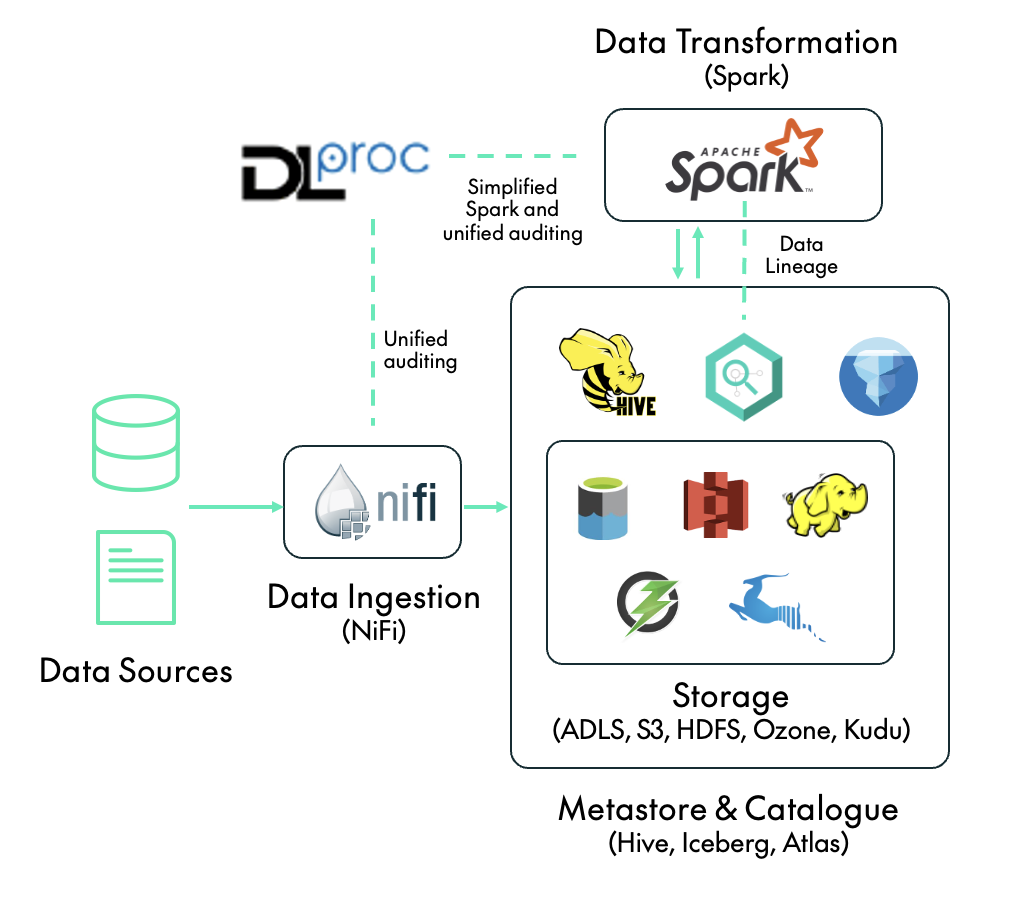
DLPROC 2.0 is no longer just a framework for Spark. Now it’s for running data processing operations in any data platform where:
- NiFi is used for data ingestion from external sources.
- Spark is used for data transformations within the data platform.
With DLPROC 2.0 you get:
- Simplified Spark pipelines: We have enhanced dlproc.py, a PySpark application that facilitates user interaction with Spark – all a user needs to know to use it is SQL. dlproc.py was already available in the previous release of DLPROC, we just made it better!
- Unified auditing: DLPROC 2.0 unifies the way the various data pipelines are audited, whether they’re ingested with NiFi from source to platform, or are Spark and dlproc.py transformations within the platform.
As a bonus, we can also highlight Spark Data Lineage. While not strictly a DLPROC feature, it’s still worth mentioning given the integration of Spark with Apache Atlas within CDP.
The following diagram shows where DLPROC 2.0 and the key features outlined above fit in a data platform with NiFi and Spark. Note that, just like its predecessor, DLPROC 2.0 can be deployed both on-premises using CDP Private Cloud, and in the cloud via CDP Public Cloud.
Now let’s dive into the key features!
Simplified Spark Pipelines
dlproc.py is a key component of the DLPROC 2.0 framework. It’s a PySpark application that enables users to execute Spark SQL statements by simply defining them in a properties file, so there’s no need to write Python code or interact directly with Spark APIs. At the same time, all executed steps are automatically audited (we’ll look at this in more detail later). Running dlproc.py (which should be done with spark-submit) requires three arguments:
- dlproc_config_file_name: The name of the JSON file containing the dlproc.py configuration, specifying settings such as the logging and auditing mode (more on this later).
- properties_file_name: The name of the properties file containing the sequence of SQL steps that we want to run. This file can contain parameters in the ${name} format; see below for an example.
- parameters: A comma-separated list of key: value At runtime, any parameter placeholders in the properties file will be replaced with the corresponding values provided here.
dlproc.py Steps
As mentioned above, the PySpark application dlproc.py will run the sequence of steps specified in the properties file. These steps fall into two categories: primary steps and their associated secondary steps. Each primary step type may require one or more specific secondary steps, and there are currently four types of primary step supported by dlproc.py:
- SRCQUERY: Runs the specified query on a source RDBMS (Relational Database Management System) such as Oracle, PostgreSQL, MySQL, etc. and loads the result into a temporary Spark table. A SRCQUERY must be accompanied by two secondary steps: TEMPTABLE and then another one called CONFIG. The TEMPTABLE step specifies the name of the temporary Spark table to be created from the query result; this table can then be referenced in downstream steps alongside Hive tables. The CONFIG step contains configuration parameters for the connection to the source system, specified in the param=value format in multiple lines. The first parameter must be src_type, and the other parameters vary depending on its value. For example, when src_type=oracle, the other parameters must include db_url, db_driver, db_user, db_password, fetchsize, and numPartitions (see an example below). Whilst NiFi can also be used for data ingestion, offering a broader feature set, dlproc.py includes built-in support for ingesting data from RDBMS sources, allowing DLPROC 2.0 users to choose the most suitable option.
- CHECKQUERY: Runs a specified SQL statement over one or more Hive tables or temporary Spark tables which returns a single value, and then checks that the returned value matches an expected value. If the check fails, dlproc.py will stop processing and flag the run as failed in the auditing system. CHECKQUERY requires a secondary step, CHECKVALUE, which specifies the expected result of the query.
- SQLQUERY: Runs a specified SQL statement over one or more Hive tables or temporary Spark tables and loads the result into a new temporary Spark table. There is also a secondary step, TEMPTABLE, which specifies the name of the temporary table created with the query result, enabling reuse in downstream steps.
- TGTQUERY: Runs a specified INSERT INTO or INSERT OVERWRITE statement on a target table. This step includes a secondary step called TGTCOUNT, which specifies a query to count the number of inserted rows. this information is sent to the auditing system.
The structure of the properties file should always be as follows:
START_DLPROC
STEP_[primary step type]_[step id]
[content]
STEP_[secondary step type]_[step id - same as related primary step]
[content]
...
other steps
...
END_DLPROC
Note that the properties file must start with START_DLPROC and finish with END_DLPROC. We recommend starting each step ID with a number to maintain clear sequencing. For example, a typical properties file might look like this:
START_DLPROC
STEP_CHECKQUERY_1_initial_check
select 1
STEP_CHECKVALUE_1_initial_check
1

STEP_SRCQUERY_2_fetch_oracle
select id, tstamp from oracle_schema.oracle_table where tstamp = TO_DATE('${load_date}')
STEP_TEMPTABLE_2_fetch_oracle
my_spark_temp_table
STEP_CONFIG_2_fetch_oracle
src_type=oracle
db_url=jdbc:oracle:thin:@${oracle_hostname}:${oracle_port}:${oracle_schema}
db_driver=oracle.jdbc.driver.OracleDriver
db_user=${db_user}
db_password=${db_password}
fetchsize=100000
numPartitions=4

STEP_SQLQUERY_3_create_other_temp
select id, tstamp, 'hello' as message from my_spark_temp_table
STEP_TEMPTABLE_3_create_other_temp
my_spark_other_temp_table

STEP_TGTQUERY_4_insert_final_table
insert overwrite table ${env}my_database.my_final_table PARTITION (tdate = '${load_date}')
select id, tstamp, message from my_spark_other_temp_table
STEP_TGTCOUNT_4_insert_final_table
select count(1) from ${env}my_database.my_final_table where tdate = '${load_date}'

END_DLPROC
The above example shows a typical DLPROC 2.0 job composed of four primary steps, each representing a different type of operation in the pipeline:
- Step 1 – 1_initial_check (Type: CHECKQUERY). This step performs a dummy check by executing a simple query (SELECT 1) and validating that the result matches the expected value (1). CHECKQUERY steps ensure the reliability of data transformation pipelines, verifying that required data is available before proceeding with the job. If a check fails, the job is terminated and the data engineer is alerted, thanks to the built-in auditing system.
- Step 2 – 2_fetch_oracle (Type: SRCQUERY). Data for a particular date is fetched from an Oracle table and loaded into a temporary Spark table, which exists only during the execution of the job. A SRCQUERY primary step must be accompanied by two secondary steps: TEMPTABLE, to define the name of the temporary Spark table to be created, and CONFIG, which includes connection details for accessing the Oracle source.
- Step 3 – 3_create_other_temp (Type: SQLQUERY). We create an additional Spark temporary table by executing a SELECT query on the Spark table generated in the previous step. It’s important to note that every SQLQUERY primary step must be accompanied by a secondary TEMPTABLE step, which defines the name of the temporary table being created.
- Step 4 – 4_insert_final_table (Type: TGTQUERY). This final step performs an INSERT into a Hive table which must already exist within Hive, meaning it should have been created beforehand. Each TGTQUERY primary step also requires a secondary TGTCOUNT step, which must be a SELECT COUNT(1) query. This is used to verify the number of rows affected by the insert operation.
Our example also illustrates the use of parameters such as ${load_date}, which are dynamically substituted with values passed via spark-submit, as previously explained. DLPROC 2.0 enforces parameter consistency, so if the properties file includes parameters that aren’t provided during execution, the process will return an error.
Whilst this example runs one of each type of primary step, it’s worth noting that a properties file can contain any combination of primary steps depending on the specific use case.
Example Execution
Next, we’ll run through an example of how to submit a dlproc.py job using a properties file containing the configuration shown above. As this job includes a SRCQUERY step that interacts with Oracle, we must include the appropriate JAR file for the Oracle driver:
$ spark-submit --jars [path to ojdbc8.jar] --deploy-mode cluster --files /path/to/dlproc_config.json,/path/to/test.properties /path/to/dlproc.py dlproc_config.json test.properties load_date:2024-09-29,env:dev_,oracle_hostname:oracledb.domain.com,oracle_port:
1518,oracle_schema:oschema,db_user:user,db_password:pass
This job can be scheduled with any orchestration tool such as Airflow (using the SparkSubmitOperator), Oozie, or even a cron job or bash script.
Development Recommendations
Before compiling the properties file for a given pipeline, we recommend testing the SQL queries using a Hive or Impala editor in Hue. Bear the following in mind:
- The Hue UI also supports parameters with ${param_name} so we can handle parameters in the same way both in Hue and in the final properties file.
- Since this testing is done on Hive or Impala rather than Spark, any secondary steps involving the creation of Spark temporary tables should be replaced with CTAS operations, i.e. creating temporary Hive or Impala tables manually. These tables should be deleted once development is complete. Effectively, we aim to mirror the same sequence of steps that Spark will execute, but we’ll run them using Impala or Hive during development. Please note that differences in SQL dialects between Spark, Hive and Impala may require minor adjustments when migrating the SQL into the properties file and running it via PySpark.
Repartitioning in SQLQUERY
In order to avoid small-file issues, we recommend repartitioning a Spark DataFrame before it is written to disk: do this by appending ([num_partitions]) at the end of a SQLQUERY step. For example, the following configuration repartitions the resulting DataFrame into 2 partitions, ensuring that only two output files are written:
STEP_SQLQUERY_3_create_temp_cdr_cons(2)
SELECT....
STEP_TEMPTABLE_3_create_temp_cdr_cons(2)
temp_cdr_cons
Unified Auditing
Whilst streamlining PySpark operations via the dlproc.py application is a key objective of the DLPROC framework, it’s not the only one! With DLPROC 2.0, we’ve also introduced a unified approach to auditing data operations, applicable not just within dlproc.py, but also across NiFi pipelines.
Auditing with DLPROC 2.0 (both in PySpark and NiFi) relies on a relational database to store the audit records. Currently, MariaDB, MySQL or PostgreSQL are supported, and records are stored in a table in the RDBMS.
dlproc.py Auditing
For each primary step run by dlproc.py, an audit entry is sent to the auditing database table. This entry contains:
- engine: spark in this case.
- flow_name: Taken from the properties file name.
- parameters: A comma-separated list of key:value parameters provided at runtime when submitting the job with spark-submit. Sensitive values (currently db_user and db_password) are automatically excluded from audit logs.
- step: The name of the step as specified in the properties file.
- status: SUCCESS or ERROR.
- message: A message outlining the result of the step, whether successful or detailing any errors.
- audit_timestamp: The exact time the step was executed.
- frequency: null in Spark.
- run_id: The Spark application ID (the same as the YARN ID in a YARN-based cluster).
For testing or debugging purposes, switch to stdout mode and audit messages are printed directly to the console, bypassing the RDBMS.
NiFi Auditing
We’ve defined a consistent approach to auditing NiFi ingestion flows, mirroring the audit methodology used for PySpark jobs with dlproc.py, and structured as follows:
- Each ingestion flow is contained in a NiFi processor group (PG) and is logically split into steps. When each step completes, or when an issue arises, an audit message is sent to an output port within the PG. A set of audit parameters is configured at the start of each flow to enable this.
- A dedicated PG at the same hierarchy level as the ingestion flows and named Send to Audit RDBMS, is responsible for receiving all audit messages from the ingestion PGs and forwarding them to the audit RDBMS.
The audit entries contain the same attributes as in the PySpark case, but with a few adjustments:
- engine: nifi in this case.
- flow_name: The name of the NiFi flow.
- parameters: Set of relevant attributes from the NiFi flow.
- run_id: An identifier incorporating both the ingestion time and the type of data ingested.
- frequency: The frequency with which the flow is executed.
Data Lineage
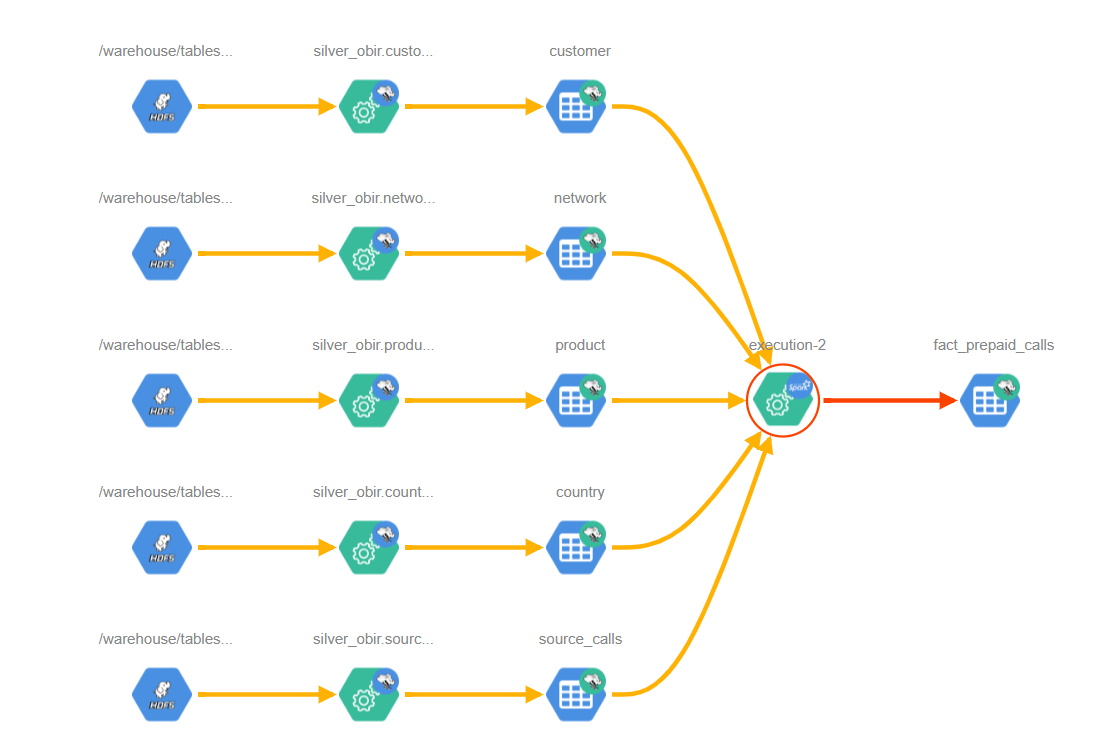
As of this version, we’ve begun to use a feature within CDP to enable visibility into the data lineage of Spark operations directly in Apache Atlas. While this capability requires some configuration adjustments in Cloudera Manager, it integrates perfectly with DLPROC 2.0 jobs.
Below we can see an example where a fact table is created or updated by a Spark job leveraging DLPROC 2.0, relying on five different source tables:
Conclusion
In this blog post, we’ve introduced DLPROC 2.0, an enhanced, streamlined, and fully audited data processing framework for Spark and NiFi. When running Enterprise Data Platforms (EDPs) at scale to support multiple users and various use cases, it’s essential to standardise how critical data and metadata operations are handled. DLPROC 2.0 can do just that.
With DLPROC 2.0, organisations can simplify data transformations in Spark while benefiting from a unified auditing mechanism that spans both Spark workloads and NiFi-based ingestion pipelines.
If you’re interested in streamlining your data engineering processes with DLPROC 2.0, or if you’d like support in building scalable and governed EDPs, do reach out to our team of experts. We’d be happy to assess your requirements and support your data journey.
And stay tuned for our next article on how to operate Enterprise Data Services (EDS) at scale!