23 Sep 2025 Enhancing Databricks Genie Insights with LLMs & Agents
We’ve all been there: you have a business question, the data to answer it sits somewhere in your database, but writing the right SQL query takes time, especially if you’re not an expert or if you’re not familiar with every table schema. In many cases, this also means relying on reporting teams for custom requests, adding delays to what should be a quick answer.
But what if you could just ask your question in plain English and get an answer back instantly?
That’s precisely what we set out to do for our customer with the help of Databricks Genie. Acting as a bridge between human language and structured queries, Genie allows users to explore their data more naturally. It translates questions into SQL, executes the query, and returns a concise summary along with a data table and sometimes even a helpful visualisation. This makes it much easier to query data without needing deep technical skills or knowledge of the underlying schema.
To take things further, we’ve built a custom framework around Genie that enhances the entire question-and-answer flow. It can refine or expand the user’s original question when needed, and then interpret Genie’s results by adding reasoning, business context, and clearer language. Using LangGraph, LLMs, and specialised agents, we can orchestrate this flow, bridging the gap between raw data output and user-ready insights that feel conversational and directly relevant to real business needs.
Let’s dive in!
Getting Genie Ready: The Importance of the Catalog
To unlock Genie’s full potential, the most important step isn’t Genie itself, but the Catalog it depends on. A well-structured Catalog ensures Genie can provide accurate, meaningful, and context-aware responses. Here’s the plan for an effective setup:
- Defining the Space
A space is essentially a curated collection of up to 25 tables from Unity Catalog. This is the scope Genie will work within when answering questions. By narrowing the search area, we improve both performance and the relevance of responses.
- Enriching with Metadata
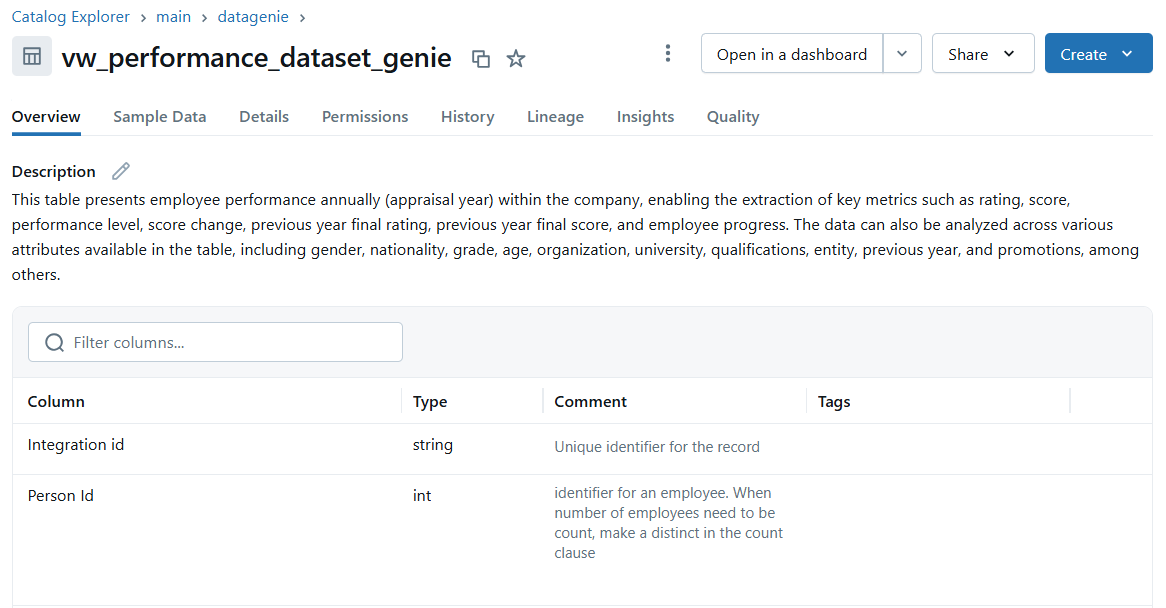
AI always appreciates a little guidance, so adding descriptions to each table and column in the space provides crucial context clues, helping Genie to interpret what the data represents and how it can be used. For example, instead of just naming a column «Value«, we can describe it as «Monthly revenue for each product category». The more informative the metadata is, the better Genie becomes at understanding the data.
- Adding Instructions
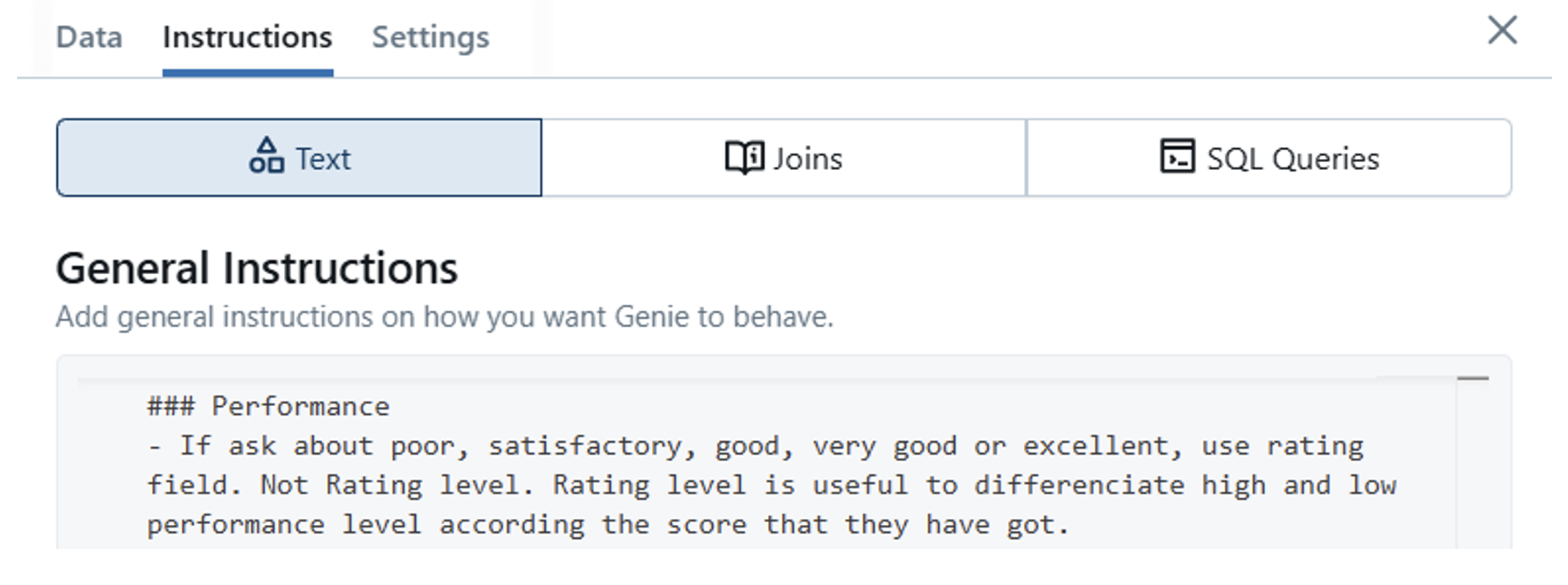
We can also provide custom instructions that guide Genie on how to interpret and relate data. These might define relationships between tables (e.g., “join sales with products on product_id”), preferred formats for answers (e.g., «show results in descending order of revenue»), or business logic rules (e.g., “exclude test users from analytics”). This can significantly enhance the quality and precision of Genie’s responses, especially when working with complex datasets:
- Example Questions with SQL Queries
Another way to guide Genie is by adding example questions along with the corresponding SQL queries used to answer them. These examples are especially useful for clarifying complex questions, teaching Genie business-specific terminology or showing how certain metrics should be calculated.
Testing Genie As-Is
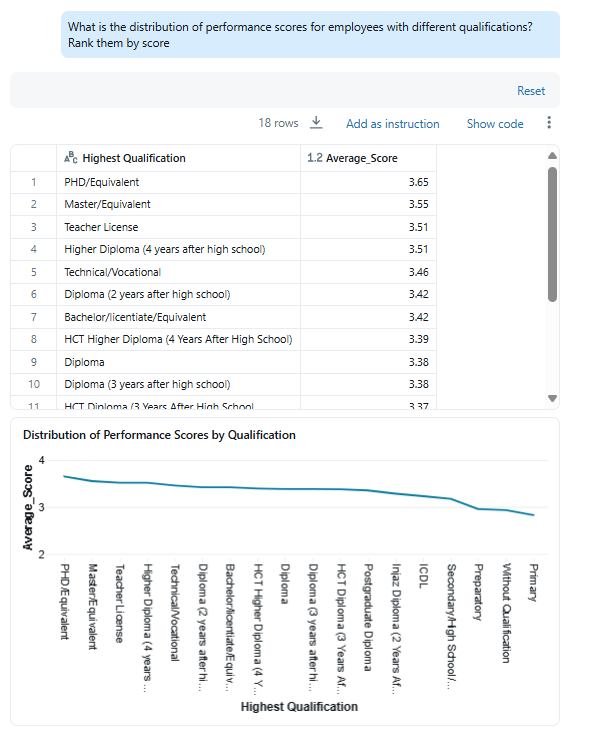
As shown in the image, Genie’s response typically includes a short natural language summary, a table of results, and, when appropriate, a visualisation to make the data easier to interpret. You can also view the underlying SQL query used to generate the response, which is particularly useful for validating the logic or understanding how the result was produced; this SQL can be reused as an example query (as mentioned earlier) to guide future responses. What’s more, the results can be downloaded as a CSV file for further analysis or reporting.
So, are we done?
Our Enhanced System
Our goal throughout this process is to empower non-technical users to ask questions, understand the answers effortlessly, and extract meaningful value, whether that’s identifying patterns, spotting outliers, determining next steps, or surfacing key insights.
To do this, we’ve built a multi-step system that wraps around Genie, enhancing both the input and output of each interaction. Whilst Genie plays a central role in translating natural language to SQL, our broader framework refines the question, optimises the workflow, and ensures the returned insights are as clear and as relevant as possible.
We won’t dive into the technical details here, but we will walk through the system’s main components.
- Understanding the User Input
Most users we support aren’t tech wizards familiar with the structure of the underlying database, so their questions may be vague, incomplete, or missing key details.
For instance, a user might ask: «Who studied humanities?» But in our database, we only store subject names like Philosophy, Ethics, or Literature, not «Humanities» as a category, so we enhance the query into something like: «Who studied Philosophy, Ethics, or Literature?» This clarification increases the chances of returning a meaningful result.
We also resolve ambiguous terms, such as geographical references: «Which students come from the Gulf?» becomes «Which students come from Gulf countries such as the United Arab Emirates, Saudi Arabia, Qatar, Bahrain, Kuwait, and Oman?»
Or we fine-tune the structure of the question for better precision. For example, «Can you give me the number of students who have enrolled since 2022 by age group? How many of these are local vs. international?» becomes «Can you give me the number of students who have enrolled since 2022 by age group, with a breakdown of local vs. international students for each group?»
Sometimes, a single user input contains multiple questions. These can’t be answered with a single SQL query, so we split the input into manageable parts, handle each independently, and then synthesise the results into one coherent answer.
- Using Existing Data When Possible
Not every question requires a new database query. Sometimes, the user’s next question is simply a continuation of the previous one, like applying a filter, changing the sort order, or requesting a different view of the same dataset. In these cases, we check whether we already have the necessary data in memory. If we do, we can avoid re-querying the database, saving both time and resources. A supervisor agent decides whether to call Genie again or to work with the data we’ve already collected.
- Querying with Genie
When we need a new query, we send the refined user question to Genie, which then translates it into SQL and retrieves the relevant data. The response usually includes a results table and a brief natural language summary. While this is a solid foundation, Genie stops at data retrieval: it doesn’t interpret, summarise, or add deeper insights beyond the raw output. That’s where our final component steps in!
- Formatting and Delivering the Final Response
The last step of the pipeline involves formatting the response into something significant, clear, and aligned with the user’s intent. We aggregate the original question (or questions), the SQL results, and then tailor the output depending on the type of data: time series, rankings, categorical comparisons, and large tables all require different treatment. Each type is processed with a prompt that includes specific instructions on how to present the results, how deep the analysis should go, which insights to highlight, and what actionable next steps to propose. Our goal is to ensure the user doesn’t just get data, but a value-rich, interpreted answer, made for them: clear, contextual, and ready to drive decisions.
Bringing It All Together
The result is a conversational interface that feels less like querying a database and more like having a dialogue with a knowledgeable analyst. Users can ask follow-up questions, request different views of the same data, or drill down into specific details without ever thinking about SQL syntax or table schemas. The system handles the complexity behind the scenes whilst delivering insights that are understandable and actionable.
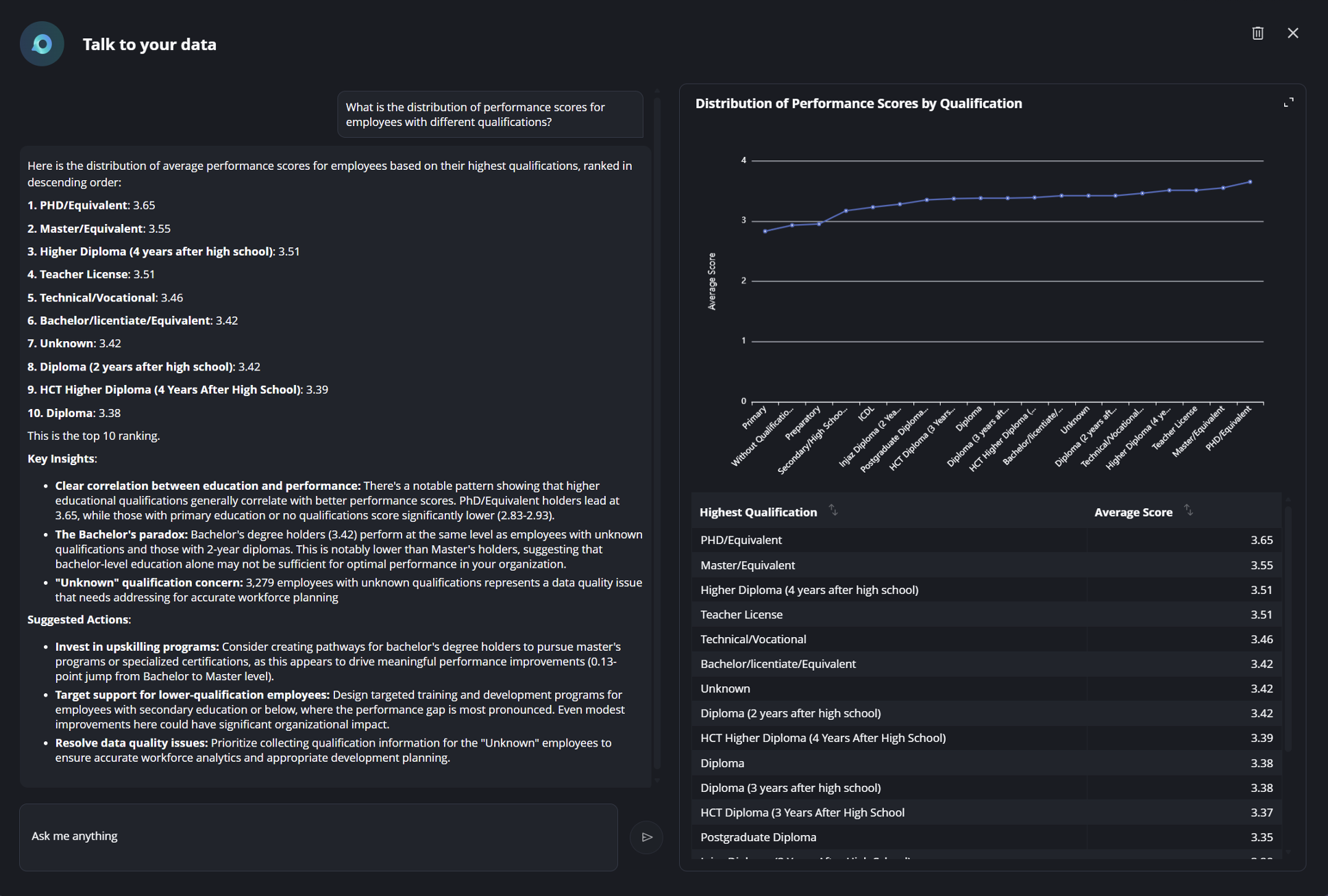
This approach addresses a common frustration: the gap between having data and actually understanding what it means for your business. By combining Databricks Genie’s natural language-to-SQL capabilities with question refinement, smart caching, and context-aware response formatting, we’ve created something that feels less like a tool and more like a practical way to work with data daily. Teams can explore independently, get answers quickly, and spend more time acting on insights rather than waiting for them.
If you’re interested in how solutions like Databricks Genie, combined with our custom framework, can transform the way your teams interact with data, we’d love to continue the conversation. Contact us now to explore how we can help you unlock fast, intuitive, and business-ready insights!