27 Nov 2025 Improving Observation Deck Performance Through Image Migration
Our flagship product Observation Deck had recently been struggling with some performance issues, most notably a high LCP (Last Contentful Paint). In practical terms, users were staring at the loading screen for far too long before the application became usable. After an expert internal review, we identified the root cause: image loading was holding everything up. Once we refined the architecture and reworked how those assets were handled, load times plummeted from a sluggish 5–10 seconds to an average of just 0.1 seconds. Let’s see how we did it!
Old Setup
Our original approach was straightforward: store the images directly in the database so users could customise their experience as they wished. We kept the design simple by storing each image as a byte array in PostgreSQL, allowing us to reuse our existing infrastructure whenever an image needed to be fetched or uploaded. This setup worked well in the early stages of Observation Deck, but it did not scale once the application reached its current, much larger user base. Image handling became a major bottleneck, tying up the entire Java Spring Boot backend as each file was processed, packaged, and delivered to the user, effectively blocking the system and slowing everything down. On top of that, our PostgreSQL instance ballooned in size, as images were stored without compression or optimisation.
New Architecture
Our new architecture is simpler, more efficient, and scalable: we’ve kept the overall flow familiar, but shifted image storage to Azure Blob Storage, which fits naturally within our existing Azure infrastructure. This gives us far better scalability and performance than relying on an SQL database, which is optimised for structured relational data rather than large binary objects. Clients now fetch images directly from Azure using short-lived SAS tokens, whilst the server only handles the metadata; the actual image content lives in Blob Storage. For uploads, the client sends the image to the new Node.js server that efficiently optimises it, reducing file size by around 90% without compromising quality, then sends it directly to Azure Blob Storage.
How It Works
This system is also rather simple. Here’s how a typical upload works – imagine that the client wants to change their landing page image to a new 4K wallpaper:
- First, the client uploads the raw image to the server.
- The server optimises the image to .webp.
- Then the server uploads the file to Azure Blob Storage using the path pattern type/theme/id.webp. This ensures that the image can be retrieved instantly, as it contains all the necessary context.
- The server notifies the client that the upload has completed successfully.
Imagine that the client now wants to retrieve the uploaded image. Previously, the backend had to query the image, process it, pack it, and return it to the client. The new process is much simpler:
- The client requests an image through the API.
- The backend checks if the client has the necessary permissions.
- The backend creates a single-use token to let the client access only the specific content it asked for.
- The backend redirects the request to the Azure Blob Storage image URL, adding the token.
- The client receives the response and loads the image directly from Azure.
Hybrid Solution for Retrocompatibility
Some of our clients need an on-premise architecture; we anticipated this need and opted for a hybrid approach to support them. This new implementation can be flagged using an environment variable. We also experimented with Azurite to emulate a local document-based database, but as it’s not ready for production environments we ruled it out. Below you can see how this new hybrid system works:
Upload A New Image
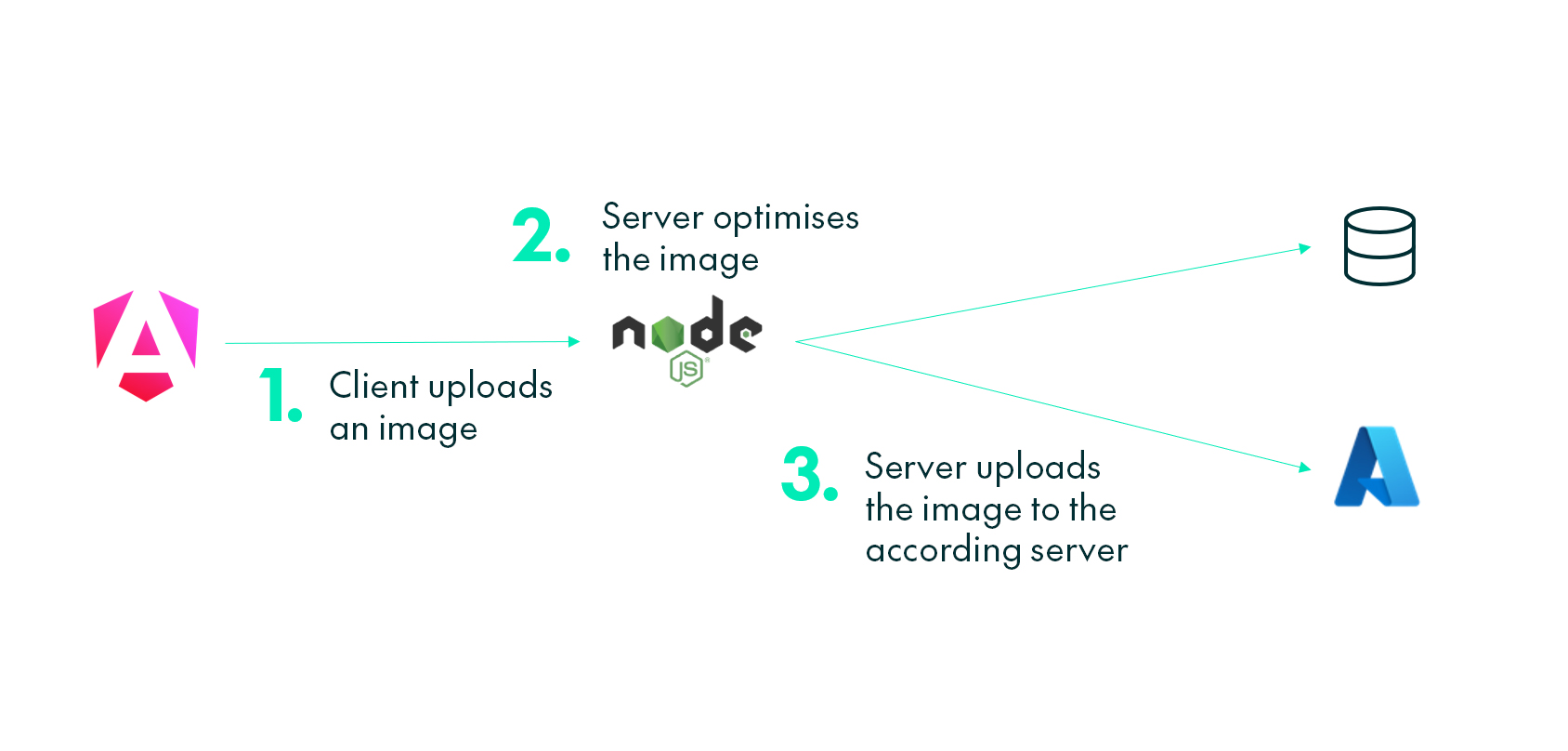
It’s the backend’s responsibility to optimise the image and upload it to the appropriate database. This process runs identically regardless of whether the feature flag is enabled.
Get An Image
To retrieve the image, the frontend remains entirely agnostic about the server’s data source. This means the page can operate seamlessly with either system, without requiring any changes to the frontend code.
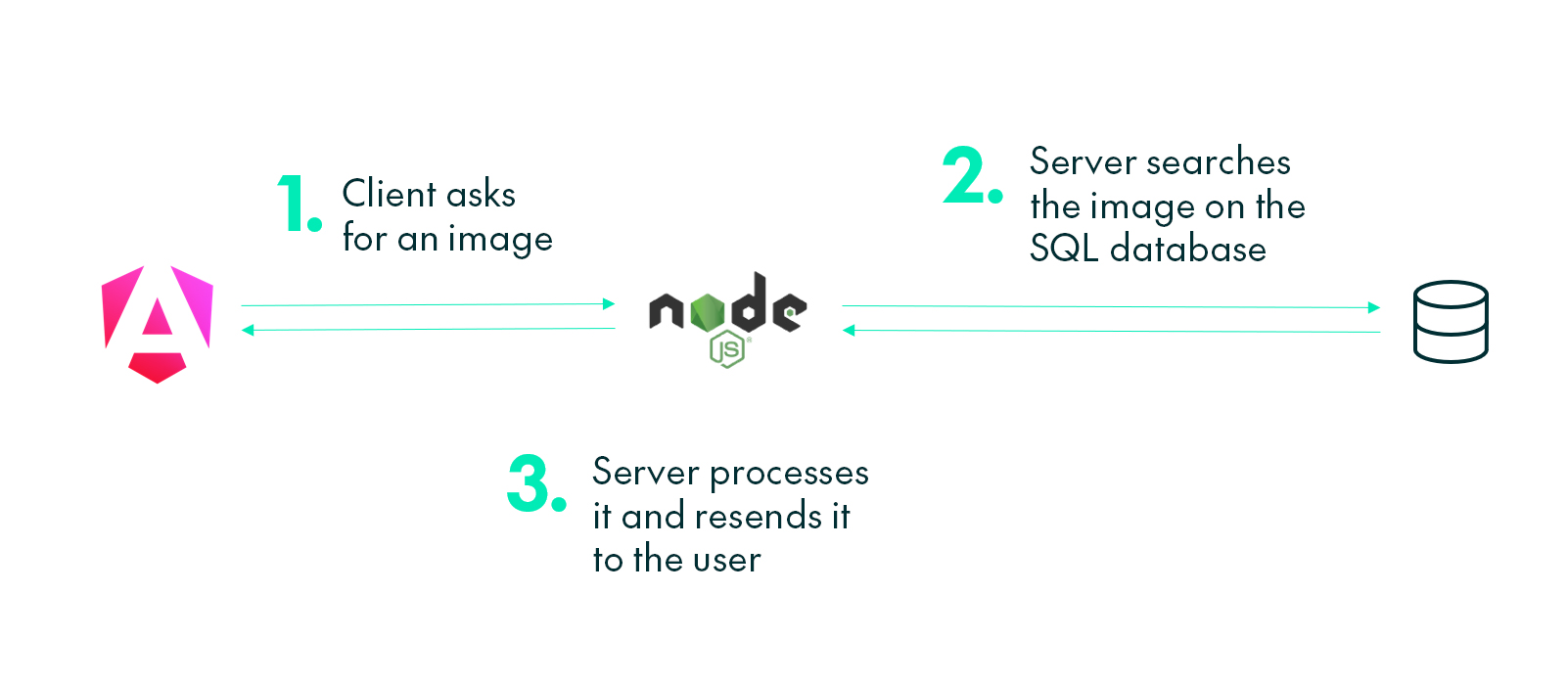
With this approach, we need to process the image in the backend, forcing other requests to wait until this finishes. Processing time quickly adds up when there are multiple image requests.
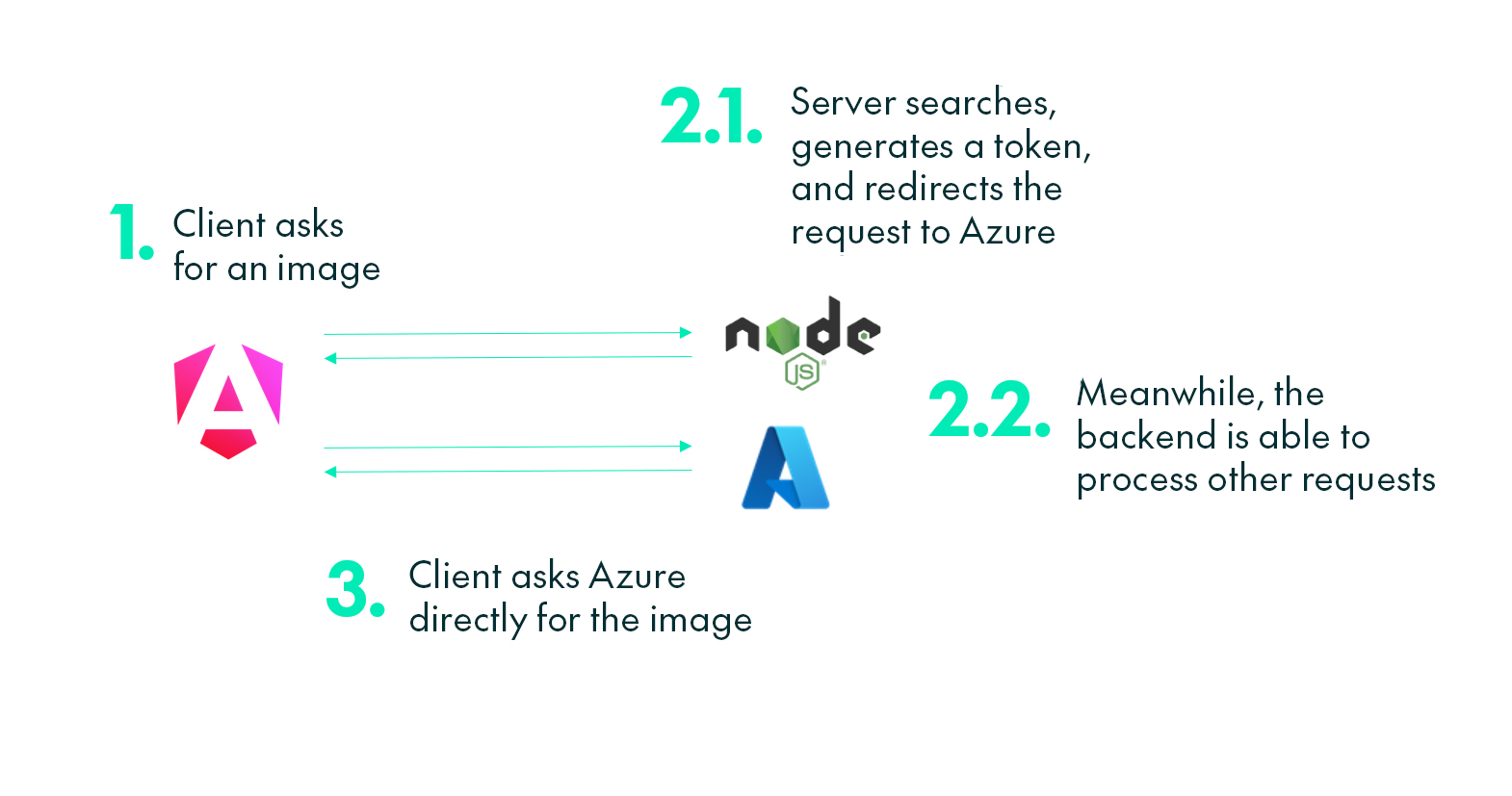
In this diagram, we can see how the server gains more time to handle other requests by securely redirecting image traffic through the SAS token.
Image Optimisation
Image optimisation is carried out at upload time: this keeps the content stored in the database as small as possible, with all processing completed in advance. Each image is automatically converted to .webp at 80% quality, which typically reduces file size by 90–95%. The result is less storage usage, faster uploads and downloads, and reduced API compute time. The process is extremely fast and delivers these improvements without any noticeable loss in quality. Overall, this significantly reduces CDN costs.
Migration Steps
This major change required an automated process to move all existing images to the new database. We added a new button to the Admin panel, enabled only when there are images pending migration. When triggered, it quickly selects all images from the database in parallel, optimises them, and uploads them to Azure. Only once this completes are all SQL image values set to NULL. The whole process may take a few seconds, but the improvement afterwards is substantial. Let’s take a look!
Performance Gains
After the migration, the metrics showed a clear performance gain: our LCP dropped from 5–10 seconds (occasionally even 30 seconds) to under a second, mainly because the backend is no longer bogged down by loading the huge images it previously had to manage, freeing up substantial CPU time to query other data from the application.
Database usage also fell sharply: removing all binary data from the SQL database reduced I/O overhead, and API response times improved by about 20%.
By converting all images to .webp at 80% quality, we now handle only around 10% of the data we had before.
Security
SAS tokens allow the application to ensure that users can perform only certain actions, within a controlled environment, for a limited time, and only on the files explicitly designated for access. Single-use tokens guarantee that data can be requested only once, and the time window is tight enough to prevent reuse even if a token were to be intercepted. All communication occurs over HTTPS, preventing man-in-the-middle attacks from capturing these tokens. We also enforce CORS, restricting requests exclusively to the admin panel site. Each request is then validated through a JWT token, confirming user identity and access permissions before any read or write operation is permitted.
Conclusions
Migrating our image storage from PostgreSQL to Azure Blob Storage, paired with direct client uploads and WebP optimisation, delivered a dramatic improvement. Image load times fell from 5–10 seconds to around 0.1–0.3 seconds, and the backend gained substantial compute capacity for other requests, boosting overall response times. Our hybrid approach also ensured we could continue providing images seamlessly to our on-demand clients.
This migration streamlined the application stack, reduced operational costs, and made the entire Observation Deck user experience far more responsive. It’s a straightforward change with a disproportionately positive impact, and if you’re considering a similar modernisation or just want to refine your own image delivery pipeline, get in touch with our experts today!