12 Nov 2025 Model Context Protocol In Action: Building an HR Talent Assistant
In our first blog post in this mini-series we introduced the Model Context Protocol (MCP) and explained why it matters: it gives AI assistants a standard way to connect with different services and to keep track of context.
In this, the second part, we’ll move from theory to practice, showing MCP at work through a concrete use case we implemented, an HR Talent Assistant.
The assistant is designed to support two everyday HR tasks: firstly, it can quickly retrieve employee information from a database, like how many people work in a department, and secondly, it can generate personalised employee objectives, saving them back into the system for future tracking.
By walking through these two workflows step by step, we’ll see how MCP makes the assistant more reliable, easier to extend, and more transparent about how it reaches its answers.
System Architecture
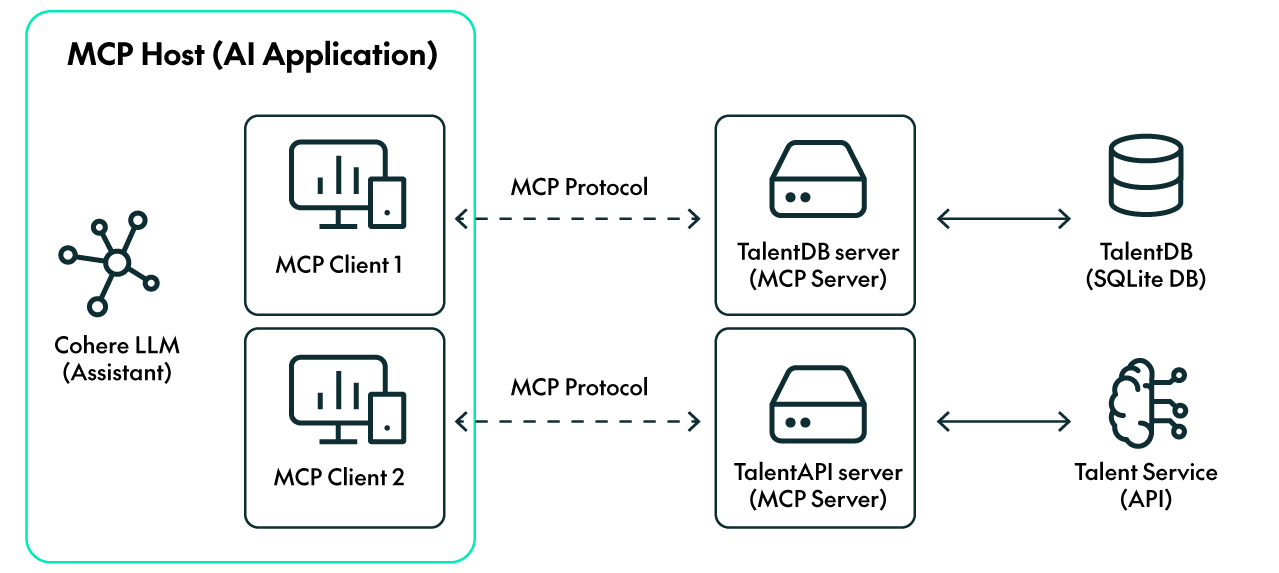
In our previous blog post, we outlined MCP’s key components; in this post, we’ll revisit that architecture and show how it was applied in building our HR Talent Assistant.
- Assistant: The Cohere command-a-03-2025 model interprets user requests and decides what actions to take.
- Servers: Servers expose capabilities as tools that the assistant can call.
1. TalentDB Server: Connects to an SQLite database containing employee data.
- list_tables: Retrieves metadata about tables in the database.
- execute_select_query: Runs SELECT queries (e.g. to fetch job roles or skills).
- execute_insert_query: Stores new data (e.g. generated objectives).
2. TalentAPI Server: Connects to an API that uses an LLM to generate personalised objectives.
- generate_objectives: Uses a language model to produce personalised objectives based on job role and skills.
The Workflow in Action
Now that we’ve introduced the core components, let’s see how the assistant uses MCP to complete its two main tasks. In each case, the assistant follows a consistent reasoning loop: it evaluates the current context, determines what information is missing, selects the right tool based on metadata, and iterates until it can generate a complete and accurate response.
We’ll illustrate how this works with two examples:
Task 1: Retrieving Employee Information
One of the most common HR requests is quick access to employee information: a department headcount, a person’s role, skills details, etc. In traditional setups, these requests can take time, involving manual queries or custom reports, but with MCP, the assistant can handle them directly in conversation:

Steps:
- Interpret the request
The assistant identifies this as a data retrieval task: it needs to count the employees in a specific department, which likely requires querying the HR database.
- Check its context
It first checks if the relevant employee data is already available in the current conversation context; if not, it decides to fetch it from the HR database server.
- Discover relevant tools
Through the MCP tool metadata, the assistant knows it can use the execute_select_query tool hosted on the TalentDB server. To construct a valid query, it first uses the list_tables tool to understand the schema, specifically which table includes employee and department relationships:

- Use the tools to retrieve the data
Once it understands the schema, the assistant generates an SQL query and submits it using execute_select_query. The result is added to the context:

This SQL query counts the number of registers in the employee table whose department is ‘Big Data and Cloud’.
- Check the context and return the result
The assistant checks whether it has enough information to answer the user’s request. If it does, it responds directly in natural language. If not, it repeats the previous steps until it has what it needs to generate a complete response:

Task 2: Generating and Storing New Objectives
As well as answering questions, the HR Talent Assistant can also help managers to shape employee development. Creating objectives is often a time-consuming task, requiring consistency across teams and alignment with role-specific skills, but with MCP the assistant can generate high-quality objectives and save them back into the system in a single workflow:

Steps:
- Interpret the request
The assistant infers that this is a generative task: it needs to produce new objectives based on job and skills data.
- Discover the relevant tools and check the context
Using MCP’s tool metadata, the assistant identifies generate_objectives as the tool to be used and sees that it is hosted on the TalentAPI server. The assistant also knows that this tool requires an input (employee skills and job role), so it checks whether it has this information in the context or not. If it does, it goes to step 4, and if it doesn’t, to step 3.
- Prepare the appropriate input payload
The assistant follows the same steps as in Task 1 to gather all the necessary data and then format it to match the input schema required by the generate_objectives tool:
- Call list_tables to understand the database schemas:

- Generate an SQL query to retrieve Alice’s job role; this information is stored in the employee table:

- Generate a second SQL query to get Alice’s skills from the database. In this case, it joins different tables by employee ID and skill ID to select all the skills associated with Alice:

- Call the generative tool
The tool is called using all the previously retrieved information, and the server adds the results to the context:

- Store the results in the database
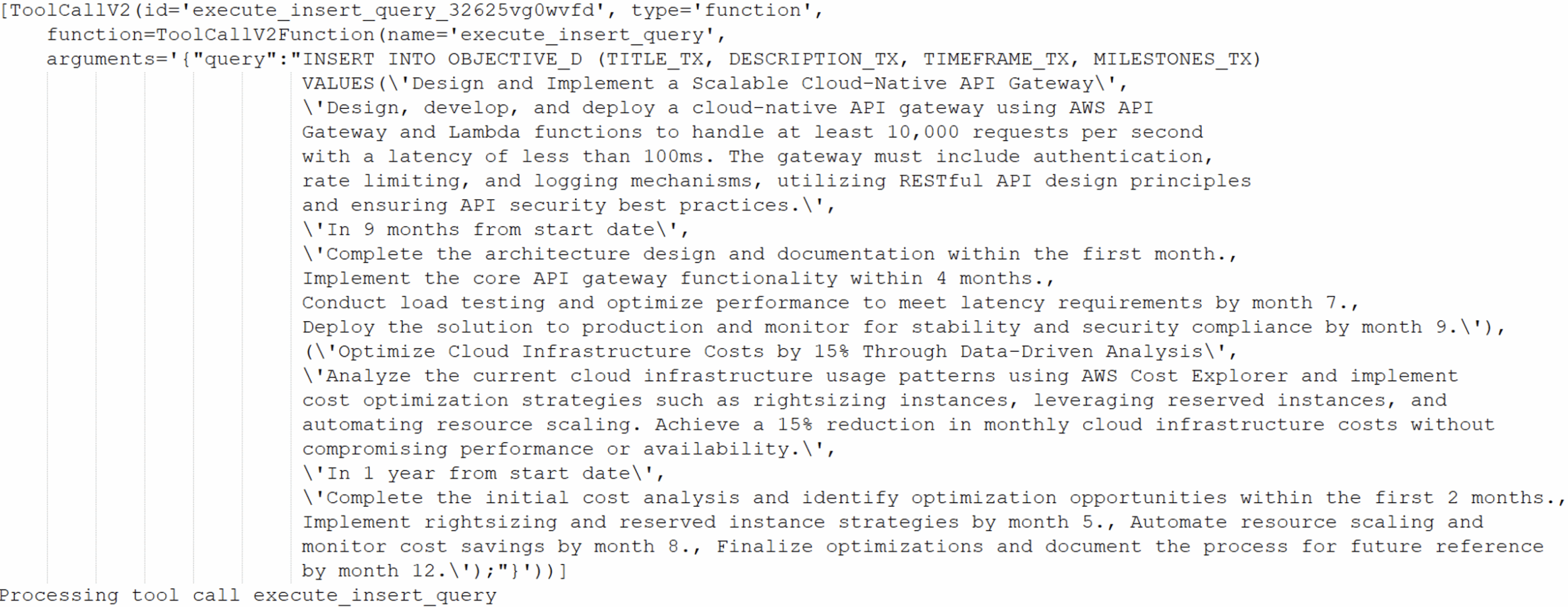
If the user specified that the results should be stored in the initial prompt, the assistant gathers the required table details and relationships, then uses the execute_insert_query tool to store the objectives in the HR database and link them to Alice:
- Insert the objectives into the OBJECTIVES table:
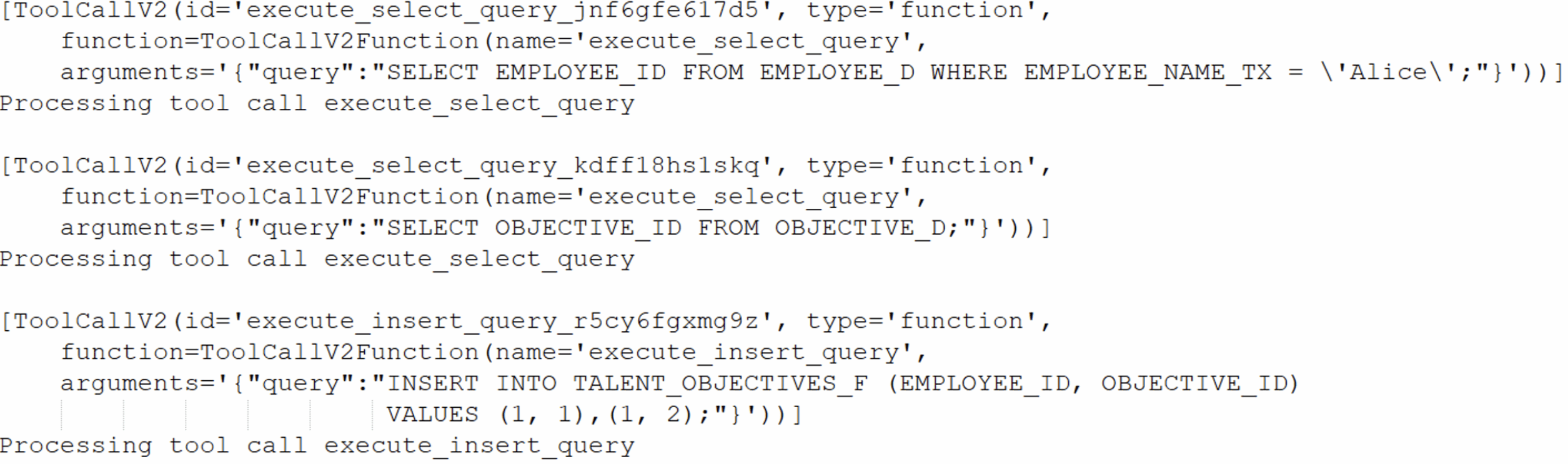
- Retrieve the Employee ID and Objective ID to link the objectives to Alice; then insert the new registers into the TALENT_OBJECTIVES_F table which stores each employee’s objectives:
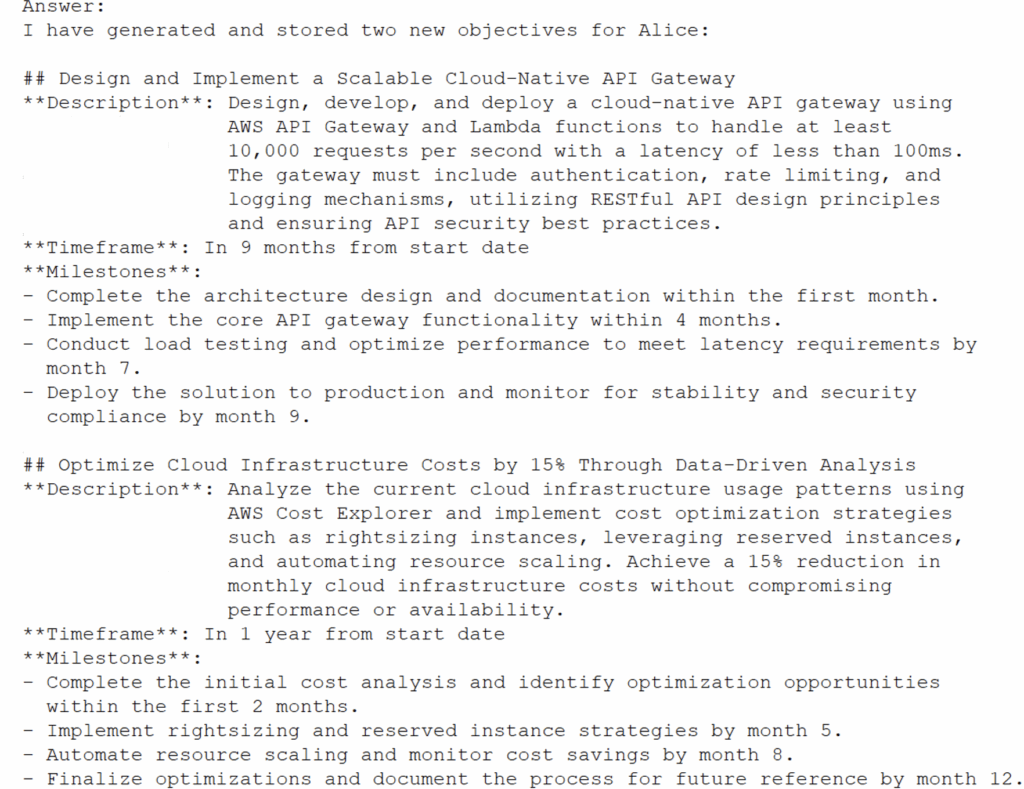
- Display the results
Finally, the assistant presents the generated objectives to the user:
MCP’s Business Value: Transforming HR Processes
This example demonstrates the tangible value of an HR assistant using MCP in real business processes:
- Faster decision-making: Managers no longer need to wait for manual reports or ad hoc queries. By connecting the assistant to the HR database via MCP, information such as department headcounts or team metrics is instantly accessible, enabling quicker data-driven decisions.
- Smarter goal setting: Integrating employee data with the TalentAPI produces objectives that are consistent, personalised, and ready for immediate review, minimising the time managers spend planning goals whilst ensuring alignment with role-specific skills and organisational priorities.
- Auditability: All queries and generated objectives are automatically recorded in the shared context, so HR teams can trace exactly how information was gathered or objectives were defined, a key feature for governance, compliance, and internal transparency.
- Adaptability: The system’s modular design allows organisations to extend their capabilities with ease. New services like learning platforms or performance-tracking tools can be integrated simply by connecting another MCP server, removing the need to rebuild the assistant from scratch.
This use case demonstrates how an MCP-based HR assistant can streamline departmental operations: it simplifies access to information, supports the setting of goals, and brings more clarity to everyday processes. Even in this simple example, the practical benefits are easy to see.
Conclusions
This article has illustrated how MCP can transform a language model into a practical assistant that supports real HR work, from accessing employee data to creating personalised objectives, whilst offering flexibility and scalability. By consistently connecting AI assistants to enterprise systems, organisations can move beyond isolated solutions and establish a framework that is smarter, easier to use, and able to evolve as needs change.
What we built for HR can just as easily be applied across other business areas: the same approach (understanding queries, discovering the right tools, managing shared context, and completing tasks) can benefit finance, operations, procurement, customer service, and any other function that depends on structured data or repeatable workflows.
In other words, MCP is not just a technical protocol, but a practical strategy for scaling GenAI across the company.
If you are wondering how intelligent assistants could enhance your organisational processes, reach out to us and our team of certified professionals will be glad to help you to explore how MCP can support your own business goals.