04 Nov 2026 Snowflake Cost Management Tool
Snowflake has evolved well beyond its origins as a cloud data warehouse: today it positions itself as a complete AI data platform, where data engineering, data sharing, application development, machine learning, and generative AI all operate alongside the data they use. Capabilities such as Snowpark, Snowflake Native Apps, Streamlit in Snowflake, and Snowflake Cortex AI services mean that teams can now run an enormous range of workloads without ever having to move their data out of the account.
This is good news all round: the more a platform can do, the fewer moving parts an organisation has to stitch together, and the faster teams can deliver value. A data scientist can call an LLM on governed data with a single SQL function; an analyst can have an interactive application up and running in minutes.
Nevertheless, all of these capabilities consume credits, and the number of ways to burn through them has grown dramatically. A warehouse left running overnight is easy to understand and easy to spot, but a Cortex AI function called thousands of times inside a loop, a serverless task that quietly scales up, or a data transfer across regions are much harder to identify and analyse. As the platform grows, the risk of unexpected spend grows with it.
We have seen this first-hand: when Snowflake introduced billing for CoCo, its AI coding agent, one of our customers saw their bill quadruple. Nothing was broken and nobody was careless; a new service had simply started consuming credits, , let alone cap it. Understanding who is spending what, on which service, and for which project is the foundation for using the platform responsibly. In this article, we’ll describe the tool we built to turn Snowflake cost data into visibility, alerts and, where it makes sense, automatic enforcement.
AI and Other Snowflake Service Costs
Before discussing how to control spend, it helps to understand where those costs originate. In Snowflake, almost everything is billed in credits, but those credits are consumed by a growing list of distinct services, each with its own behaviour and cost profile, so familiarity with these services is essential for effective cost governance.
The table below summarises the main billable services and what drives their consumption:
| Category | Service | What Drives the Cost? |
|---|---|---|
| Compute | Virtual Warehouse Services (Standard, Gen 2, Snowpark-optimized) | Warehouse size and operational runtime (billed per second with a 1-minute minimum). Multi-cluster setups multiply the cost by the number of active clusters. |
| Interactive Warehouse | Warehouse size and operational runtime, subject to a much larger 60-minute minimum charge on startup. | |
| Compute Nodes / Snowpark Container Services (SPCS Compute) | Instance family type and operational runtime, subject to a 5-minute minimum charge on startup. | |
| Adaptive Compute Services (Adaptive Warehouse) | Dynamic scaling is based on active queries, software optimisations, and compute usage while queries are running. | |
| Snowflake Openflow Compute | Runtime duration (per second with a 60-second minimum) or a flat rate per vCPU per hour depending on deployment. | |
| Postgres Compute | Instance size, cloud provider, high availability configuration, and runtime (subject to a 1-minute minimum). | |
| Cloud Services | Cloud Services Layer | Hourly resource usage (flat credit rate). Charges are waived daily if usage stays under 10% of your standard warehouse compute spend. |
| Serverless Features | Snowflake-Managed Features (e.g., Snowpipe, Backup, Materialized Views) | Total compute-hours used (normalised to warehouse size) multiplied by a feature rate, plus occasional unit charges like file counts or data volume. |
| AI Features* | Cortex AI Functions & Inference, Cortex Agent, Cortex Analyst, Cortex Search, CoCo | Volume of tokens processed (split by input and output text) or the total compute time spent running the job. The ratio between tokens/credits depends on the LLM used. |
| Storage | Standard Storage | Average monthly data volume (measured in terabytes) calculated via continuous, automated snapshots. |
| Specialised Storage (Hybrid Tables, SPCS Block, Archive) | Storage volume footprint (GB/TB per month), performance allocations like IOPS/throughput, and data retrieval processing fees for archive tiers. | |
| Data Transfer | Ingress, Egress, and SPCS Data Transfer | Data volume moved outside the local region or cloud provider network. |
* Note that AI functions consume AI Credits, which are billed separately from Platform Credits.
Snowflake offers extensive visibility into costs across these services through the account usage and organisation usage views. Resource monitors can cap or suspend virtual warehouses, but for other services, including the fast-growing category of Cortex AI consumption, native enforcement is limited. Although Snowflake’s recent updates have introduced more control over Cortex AI, granular visibility and agile enforcement still present challenges. Our tool bridges this gap by providing a single, unified control plane that eliminates the complexity of navigating multiple configurations so you can monitor and manage everything from one place.
Why Create This Tool?
That gap is precisely why we created this tool. Snowflake offers plenty of raw data about consumption, but turning that data into day-to-day governance can still require considerable effort from the customer; teams may need to write their own queries against the usage views, build their own dashboards, remember to check them, and then act manually when something looks wrong. In practice this rarely happens and overspend is often discovered only when the monthly invoice arrives; this is exactly the problem illustrated by the CoCo example above.
We wanted to close this gap with a single tool that does three things: monitor, analyse, and act. Our tool monitors Snowflake costs from several perspectives at once: by service, by warehouse, by role, by user, and by project tag, so that the same spend can be understood from the angle that matters to whoever is asking. A finance owner thinks in projects, a platform engineer thinks in warehouses, and an AI lead thinks in Cortex usage per user. Our solution serves them all from the same underlying data.
It also enhances the native monitoring options rather than replacing them. The account usage views are powerful but hard to navigate, so the tool packages them into clear consumption views, trends, and month-on-month comparisons that can be read at a glance, without requiring users to write SQL.
Above all, our tool lets you take action. Beyond passive observation, it can define consumption quotas, raise alerts before a budget is exceeded, and automatically revoke or restrict usage for an entity that crosses its limit. By combining these capabilities in one place, it simplifies cost control across Snowflake services, particularly when managing Cortex AI and other AI-related expenditure.
Scope and High-Level Architecture
At a high level, the tool is an application built entirely in Snowflake that turns cost visibility into cost enforcement. The scope can be summarised in three principles:
- To monitor credit consumption across warehouses, roles, users, projects, and Cortex AI in near real time.
- To set quotas, to alert before overspending, and to auto-block entities that exceed their budget, all without external infrastructure or SaaS fees.
- To provide a Streamlit in Snowflake app that deploys in minutes without data ever leaving your account.
Architecturally, the tool combines monitoring and actions across tags, users, roles, and services, and it does so entirely with native Snowflake capabilities. The monitoring layer reads from the account usage and organisation usage views, which provide detailed records of Snowflake credit consumption. The presentation layer is the Streamlit in Snowflake interface, where users can explore consumption, configure quotas, and manage alert rules through an interactive dashboard. The enforcement layer relies on standard Snowflake features, principally scheduled tasks that evaluate quotas on a regular cadence and stored procedures that apply the agreed action, such as suspending a warehouse, restricting a role, or disabling a user.
As every component runs inside the customer account, there is no external service to provision, no connector to secure, and no data egress to worry about. The tool inherits the same security, governance, and access controls as the rest of the platform.
Features and Capabilities
The tool brings together seven capabilities that cover the full journey from seeing a cost to stopping it. They are summarised below and explained in the following subsections:
- Overview Dashboard: An interactive consumption dashboard with monthly credit target tracking.
- Cost Quotas: Limits by warehouse, role, user, project tag, or service type.
- Warehouse Management: Efficiency alerts covering auto-suspend, scaling out, downsizing, and partition pruning.
- Cortex AI: Per-role and per-user Cortex credit budgets with short usage windows.
- Service Types: Snowflake billing line items mapped with month-on-month variance alerting.
- Alert Rules: Threshold triggers, severity levels, cooldown periods, email groups.
- Auto-Block: Scheduled task that auto-disables entities exceeding their quota.
Overview Dashboard
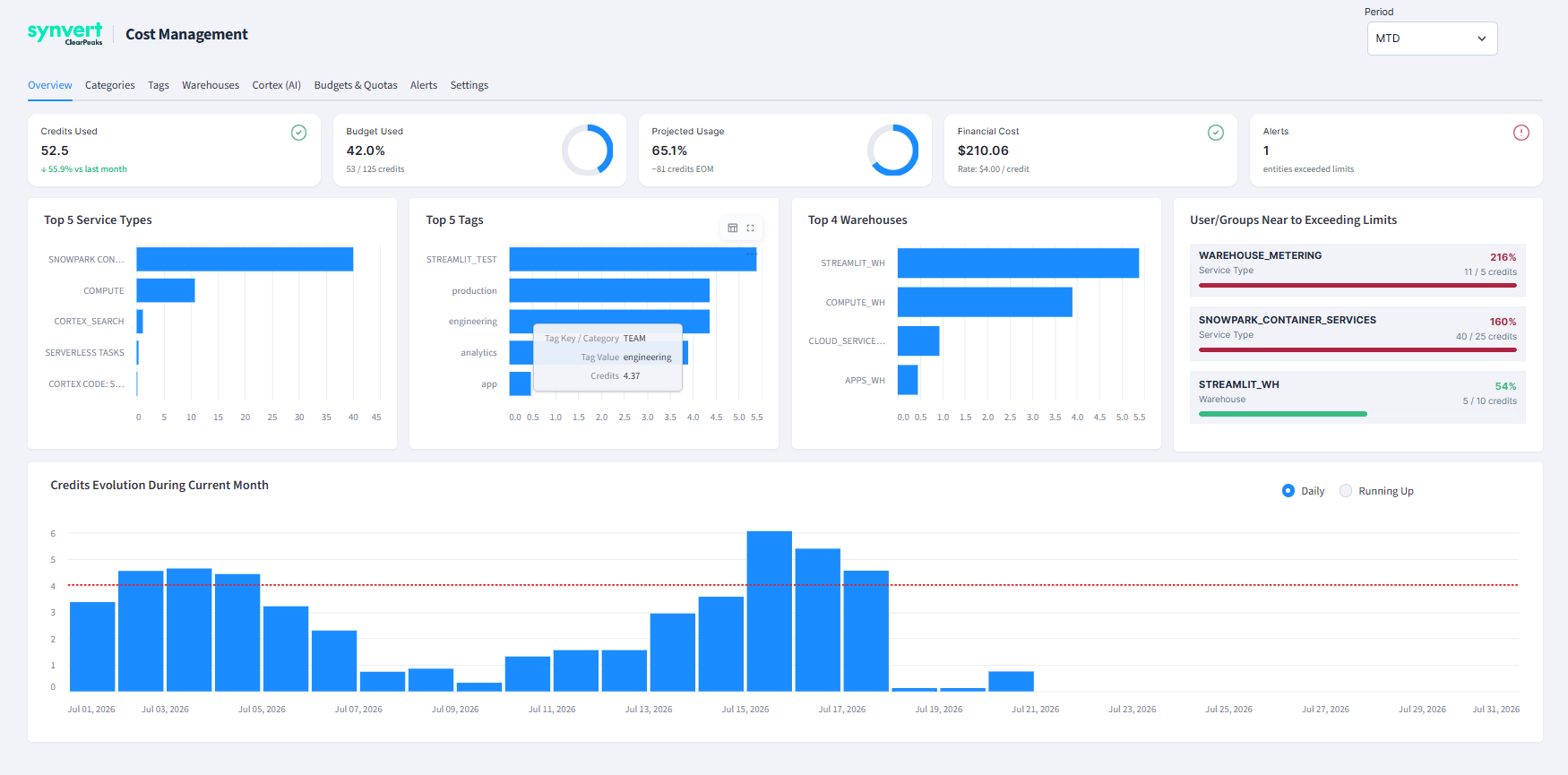
The landing view is an interactive consumption dashboard that tracks credits used against a monthly target. It shows the current run rate, the projected end-of-month total, and how today compares with the same day in previous months, so you can easily see whether the account is on track or trending over budget.
Cost Quotas
Quotas are the heart of the tool: a quota is a credit limit attached to a specific dimension, such as a warehouse, a role, a user, a project tag, or a whole service type. Each quota has its own budget and its own window, and the same entity can sit under several quotas at once, for example a per-user limit nested inside a per-project limit.
Warehouse Management
Beyond pure budgeting, the tool surfaces efficiency alerts that point to wasteful patterns. It flags warehouses with excessively long auto-suspend settings, candidates for scaling out or downsizing, and queries that would benefit from better partition pruning. These recommendations help reduce cost at source rather than simply capping it.
Cortex AI
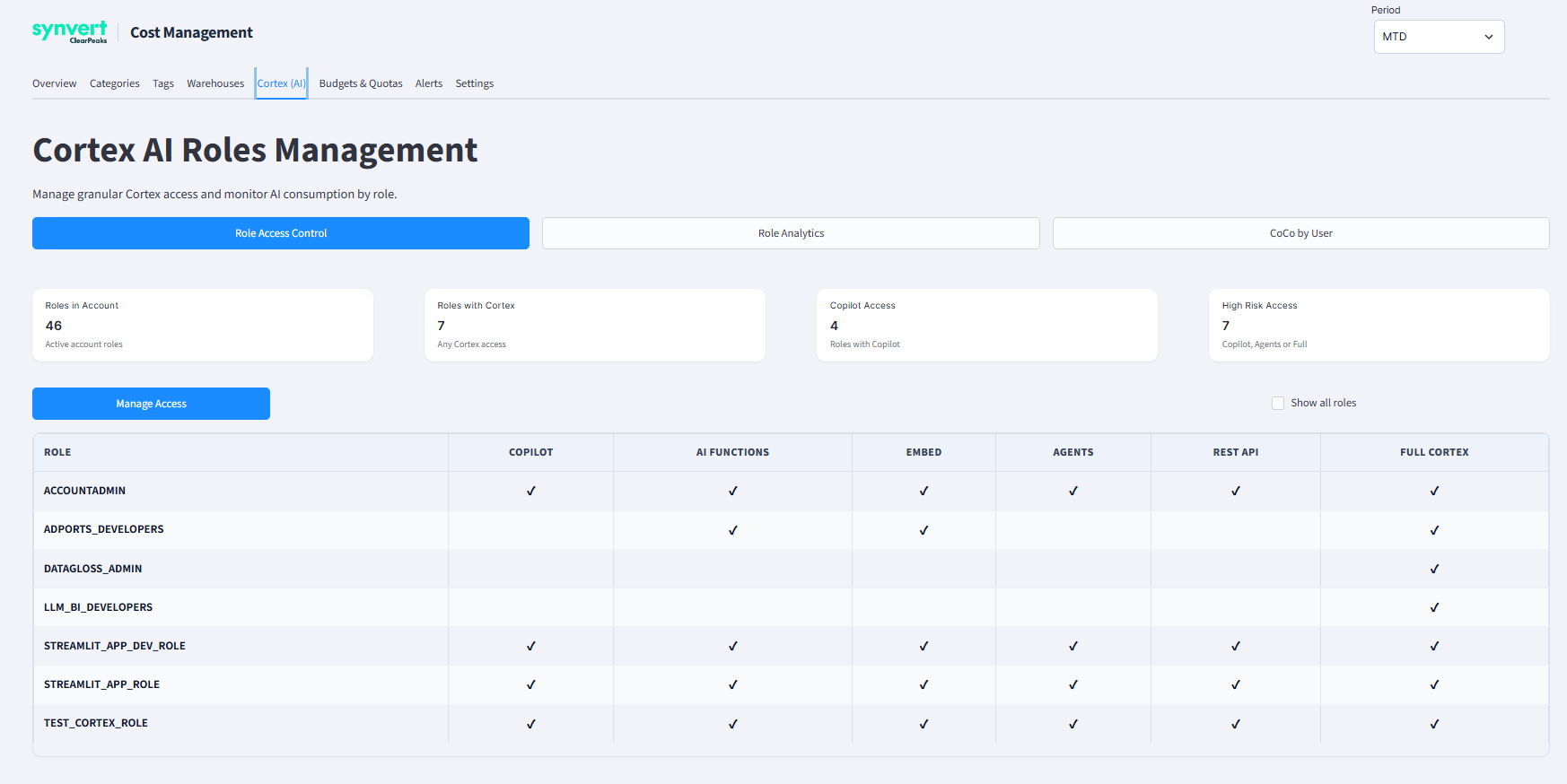
AI usage gets dedicated treatment because its consumption can increase rapidly and may be difficult to predict. The tool defines per-role and per-user Cortex credit budgets and supports short usage windows, meaning that, for example, a runaway prompt loop or an over-eager batch job can be detected within minutes rather than at the end of the month.
Service Types
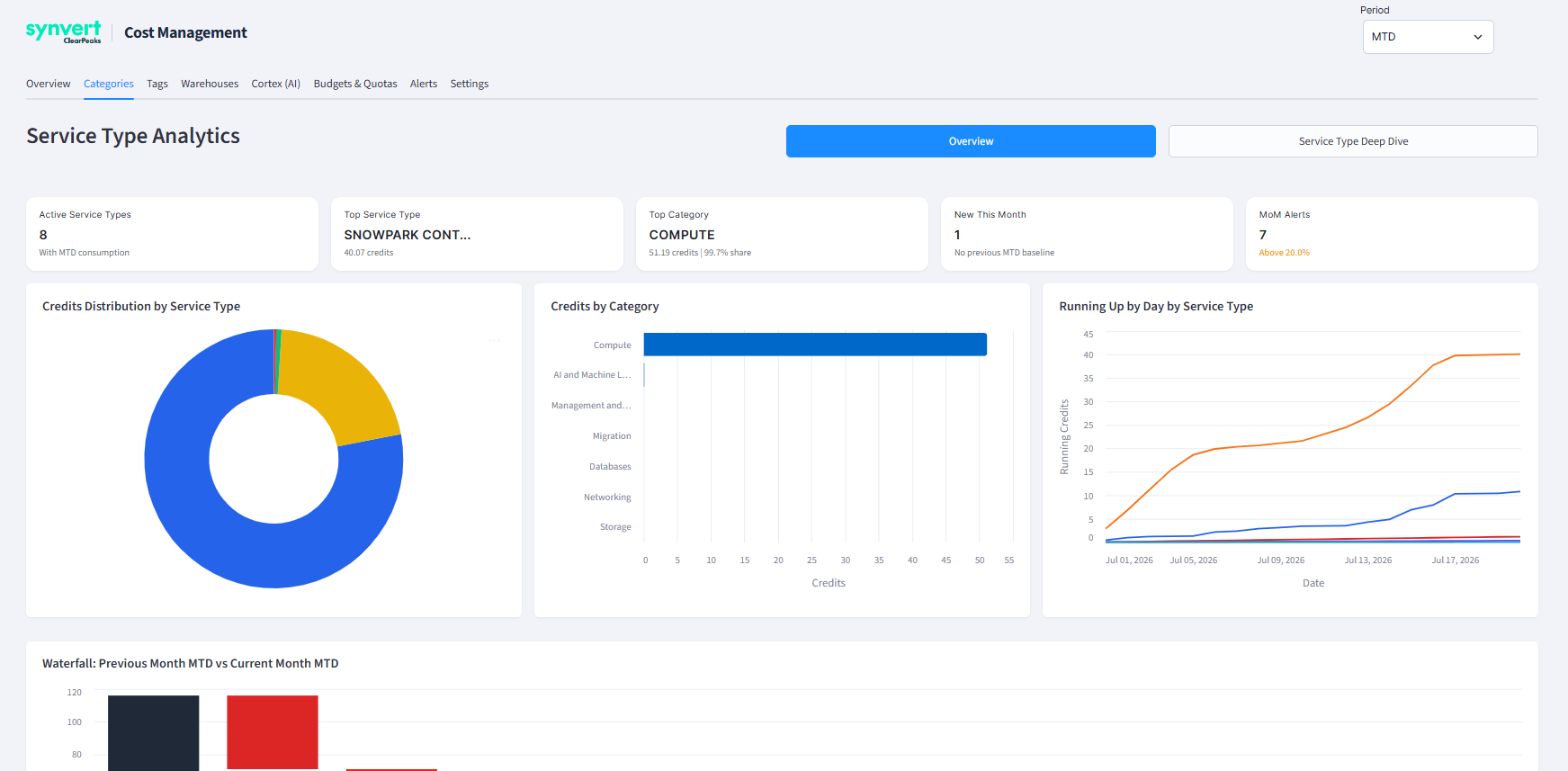
Snowflake billing is reported as a set of line items that are not always intuitive. The tool maps each line item to a clear service type and tracks month-on-month variance, raising an alert when spending on any service exceeds its normal range. This makes it easy to spot, for example, a sudden rise in serverless or data transfer spend.
Alert Rules
Alerting is fully configurable: each rule combines a threshold trigger, a severity level, a cooldown period to avoid noisy repeats, and the email groups that should be notified. Alerts can warn well before a quota is reached, giving owners time to react before any enforcement action is taken.
Auto-Block
When prevention is not enough, a scheduled task evaluates quotas on a regular cadence and automatically disables any entity that has exceeded its limit. Blocking can be enabled selectively, so that low-risk quotas only trigger alerts, whilst critical ones trigger enforcement actions.
Conclusions
As Snowflake continues to expand its range of services, effective cost governance is becoming increasingly important, particularly as organisations adopt more AI and serverless capabilities. Every additional service introduces new ways for costs to accumulate, often quietly and quickly, and although the platform has improved overall cost visibility, organisations may still need more granular and customisable monitoring and control capabilities.
Our tool addresses these challenges by bringing all cost monitoring needs together in a single, cohesive app, giving owners granular control over their budgets. As it is built entirely as a Streamlit in Snowflake application on top of the usage views and standard platform features, it adds this governance without external infrastructure or SaaS fees, and no data ever leaves the account.
Instead of finding overspend in the monthly invoice, teams can now set clear quotas, monitor consumption more closely, and keep spending on their most sensitive workloads, especially AI usage, within agreed limits. Snowflake will continue adding billable services; the next CoCo is probably already on a roadmap somewhere. We would much rather find out from an alert than from the invoice! Contact us now to see how our Snowflake Cost Management Tool can help your organisation to monitor and control Snowflake expenditure.