25 Jun 2025 Exploring Snowflake Cortex AI Solutions for Chatbots (Cortex Analyst & Cortex Search)
Most of us have now realised that AI has changed, and is changing, the way we interact with our data. AI models now allow us to ask questions directly of our data, offering intuitive tools that bring business users closer to their data too, without needing to write complex code. One of the leaders of this transformation is Snowflake Cortex, a collection of integrated AI and machine learning capabilities designed to make advanced analytics accessible directly within the Snowflake ecosystem.
With Cortex, users can harness the power of LLMs to perform different tasks, from generating SQL queries using natural language to executing advanced semantic searches across structured and unstructured data. These features are not only powerful but are also very easy to implement, use and share, making them ideal solutions for organisations looking for more impactful data insights.
In one of our previous blog posts, we explored some of these Cortex capabilities, and today, in this article, we’ll dive deeper into two of them:
- Cortex Search: Build semantic search engines that go beyond keyword matching and can really grasp the meaning behind queries, returning results that are contextually relevant across diverse data types.
- Cortex Analyst (powered by the text_to_sql agent): Turn natural language questions into accurate SQL queries, using semantic models that understand business logic and data structures.
We’ll look at these functionalities in a use case scenario with different practical examples, explaining how they can be trained, and looking at their costs.
Use Case Working Scenario
Let’s imagine our customer is a library with a vast collection of books. They keep a dataset containing key details such as Title, Author, Category, Description, Year of Publication, and Average Rating, amongst other schema fields, but they often struggle to locate the right books efficiently. The titles and descriptions aren’t always as clear as they should be, and when users make varied or complex requests, the staff often spend too much time creating queries to get relevant results.
To address these challenges, the library wants to implement a chatbot that allows customers to query their database using natural language, so we’ll create two different Streamlit apps that will allow direct interaction with the data:
- Books Search Assistant: Based on Cortex Search, this app will be used as a chatbot where we can use natural language to find the desired books.
- Books Search Analyst: Based on Cortex Analyst, this app will use the engine to generate SQL queries from natural language.
The apps will follow this workflow:

Streamlit App working pipeline
The code will be based on this quick-start tutorial from Snowflake, and the dataset used can be downloaded from Kaggle.
Cortex Search: Books Search Assistant
Let’s see how this app works. We’ll ask for “a kids’ book about Australia”:
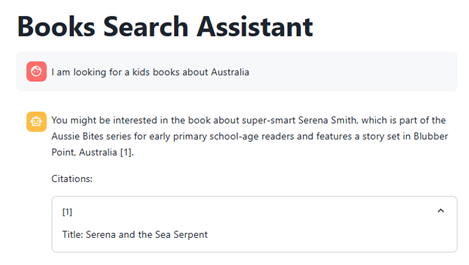
As we can see, the app suggests a book that could meet our requirements and even gives us its citation. With a normal SQL query, it would have been nearly impossible to find this book as the title does not mention Australia, so we’d have had to run an elaborate full-text search across the synopsis. However, this app uses an LLM to understand the description and returns a much more relevant match.
Now let’s try a more complex question, like “I would like to read the highest-rated book with dragons”:

This time the app understands that “bestseller” means a highly rated title and recommends a book about dragons. Although The Wheel of Time doesn’t mention dragons in its name, Cortex Search’s semantic layer still surfaces it in seconds, something that would have required a far more elaborate full-text SQL query in a traditional setup.
Let’s walk through how to set up Cortex Search with our own data:
1) Once we have loaded our dataset into a table (in our example, BOOKS.DATA.BOOKS_DATASET) we have to create our Cortex Search agent, which we’ll call books_conversation_search:
USE DATABASE BOOKS;
USE SCHEMA DATA;

-- Create the search service
CREATE OR REPLACE CORTEX SEARCH SERVICE books_conversation_search
  ON description
  ATTRIBUTES     title, subtitle, authors, categories
  WAREHOUSE = compute_wh
  TARGET_LAG = '1 minute'
  AS (
    SELECT
    title ,
    subtitle ,
    authors ,
    categories ,
    thumbnail ,
    description ,
    published_year,
    average_rating,
    num_pages,
    ratings_count
    FROM books_dataset

);
About this code:
- ON specifies the column used for semantic matching in natural language queries (in our case, “description column”)
- ATTRIBUTES are additional fields returned in results and usable for filtering or grouping, but not semantically searched.
- TARGET_LAG sets the maximum staleness between the table and the index (here, one minute).
- AS SELECT defines the query to build the index, listing all accessible fields for the search service.
We can see that creating a Cortex Search agent is straightforward. There’s no separate train-test cycle. All that’s left is to ask the agent a question, and we can do that in two ways:
1) Use SQL code:
WITH json_input AS (
  SELECT PARSE_JSON(
    SNOWFLAKE.CORTEX.SEARCH_PREVIEW(
      'BOOKS.DATA.BOOKS_CONVERSATION_SEARCH',
      '{
        "query": "In which books i can find dragons?",
        "columns": ["description","title","num_pages","authors"],
        "limit": 10
      }'
    )
  )['results'] AS results
),
flattened AS (
  SELECT value
  FROM json_input, LATERAL FLATTEN(input => results)
)
SELECT
  value:"title"::STRING       AS title,
  value:"description"::STRING AS description,
  value:"num_pages"::NUMBER   AS num_pages,
  value:"authors"::STRING     AS authors
FROM flattened;
As we can see, the agent returns ten hits for ‘In which books can I find dragons?’, showing it has grasped the question perfectly:

2) Using _snowflake.send_snow_api_request() in Streamlit:
snowflake.send_snow_api_request() is a function available in Snowflake Native Apps to call internal Snowflake APIs, especially used for Cortex agents. It sends structured requests (like natural language queries) to Snowflake’s endpoint and returns AI-powered responses like SQL or search results.
The code for our Cortex Search app looks like this:
API_ENDPOINT = "/api/v2/cortex/agent:run"
API_TIMEOUT = 50000  # in milliseconds

_snowflake.send_snow_api_request(
            "POST",  # method
            API_ENDPOINT,  # path
            {},  # headers
            {},  # params
            payload,  # body
            None,  # request_guid
            API_TIMEOUT,  # timeout in milliseconds,
        )
This function issues a POST request to the relevant Cortex API endpoint. Alongside the request body (payload) you can add custom headers or query parameters, although we’re leaving them blank here. Within the payload we define the model, select the tool (Cortex Search), and, under tool resources, reference the Cortex Search agent created earlier. These parameters give Snowflake all it needs – which LLM to call, which tool to run, and which index to query:
CORTEX_SEARCH_SERVICES = "BOOKS.DATA.BOOKS_CONVERSATION_SEARCH" # The CORTEX SEARCH we previously created in SQL

payload = {
     "model": "llama3.1-70b",
     "messages": [
         {
             "role": "user",
             "content": [
                 {
                     "type": "text",
                     "text": query
                 }
             ]
         }
     ],
     "tools": [

         {
             "tool_spec": {
                 "type": "cortex_search",
                 "name": "search1"
             }
         }
     ],
     "tool_resources": {
         "search1": {
             "name": CORTEX_SEARCH_SERVICES,
             "max_results": 10,
             "id_column": "description"
         }
     }
 }
Once again, the workflow is simple: no complex or convoluted codebase is required, yet the agent still returns impressively precise answers. The full code to create this chatbot can be found here:
-- CORTEX SEARCH AGENT STREAMLIT CODE

import streamlit as st
import json
import _snowflake
from snowflake.snowpark.context import get_active_session
from snowflake.snowpark.functions import col

session = get_active_session()

API_ENDPOINT = "/api/v2/cortex/agent:run"
API_TIMEOUT = 50000

CORTEX_SEARCH_SERVICES = "BOOKS.DATA.BOOKS_CONVERSATION_SEARCH"

def run_snowflake_query(query):
    try:
        df = session.sql(query.replace(';',''))
        return df
    except Exception as e:
        st.error(f"Error executing SQL: {str(e)}")
        return None

def snowflake_api_call(messages: list, limit: int = 10):
    payload = {
        "model": "llama3.1-70b",
        "messages": [
            {
                "role": msg["role"],
                "content": [{"type": "text", "text": msg["content"]}]
            }
            for msg in messages
        ],
        "tools": [
            {
                "tool_spec": {
                    "type": "cortex_search",
                    "name": "search1"
                }
            }
        ],
        "tool_resources": {
            "search1": {
                "name": CORTEX_SEARCH_SERVICES,
                "max_results": limit,
                "id_column": "description"
            }
        }
    }

    try:
        resp = _snowflake.send_snow_api_request(
            "POST", API_ENDPOINT, {}, {}, payload, None, API_TIMEOUT
        )

        if resp["status"] != 200:
            st.error(f"❌ HTTP Error: {resp['status']} - {resp.get('reason', 'Unknown reason')}")
            st.error(f"Response details: {resp}")
            return None

        try:
            return json.loads(resp["content"])
        except json.JSONDecodeError:
            st.error("❌ Failed to parse API response.")
            return None

    except Exception as e:
        st.error(f"Error making request: {str(e)}")
        return None

def process_sse_response(response):
    text = ""
    sql = ""
    citations = []

    if not response or isinstance(response, str):
        return text, sql, citations

    try:
        for event in response:
            if event.get('event') == "message.delta":
                delta = event.get('data', {}).get('delta', {})
                for item in delta.get('content', []):
                    if item.get('type') == "tool_results":
                        for result in item.get('tool_results', {}).get('content', []):
                            if result.get('type') == 'json':
                                json_data = result.get('json', {})
                                text += json_data.get('text', '')
                                sql = json_data.get('sql', '')
                                citations += [
                                    {
                                        'source_id': r.get('source_id', ''),
                                        'doc_id': r.get('doc_id', '')
                                    }
                                    for r in json_data.get('searchResults', [])
                                ]
                    elif item.get('type') == 'text':
                        text += item.get('text', '')

    except Exception as e:
        st.error(f"Error processing response: {str(e)}")

    return text, sql, citations

def main():
    st.title("Books Search Assistant")

    with st.sidebar:
        if st.button("New Conversation"):
            st.session_state.messages = []
            st.rerun()

    if 'messages' not in st.session_state:
        st.session_state.messages = []

    for msg in st.session_state.messages:
        with st.chat_message(msg['role']):
            st.markdown(msg['content'].replace("•", "\n\n"))

    if query := st.chat_input("Would you like to learn?"):
        with st.chat_message("user"):
            st.markdown(query)
        st.session_state.messages.append({"role": "user", "content": query})

        with st.spinner("Processing..."):
            response = snowflake_api_call(st.session_state.messages)
            text, sql, citations = process_sse_response(response)

            if text:
                text = text.replace("【†", "[").replace("†】", "]")
                st.session_state.messages.append({"role": "assistant", "content": text})
                with st.chat_message("assistant"):
                    st.markdown(text.replace("•", "\n\n"))
                    if citations:
                        st.write("Citations:")
                        for c in citations:
                            try:
                                doc_id = c.get("doc_id", "")
                                df = session.table("books.data.books_dataset").filter(col("description") == doc_id).to_pandas()
                                transcript = "Title: " + df.iloc[0,2] if not df.empty else "No transcript available"
                            except Exception as e:
                                transcript = "Error retrieving description"
                            with st.expander(f"[{c.get('source_id', '')}]"):
                                st.write(transcript)

            if sql:
                st.markdown("### Generated SQL")
                st.code(sql, language="sql")
                results = run_snowflake_query(sql)
                if results is not None:
                    st.write("### Books Search Report")
                    st.dataframe(results)

if __name__ == "__main__":
    main()


-- CORTEX ANALYST AGENT

import streamlit as st
import json
import _snowflake
from snowflake.snowpark.context import get_active_session
from snowflake.snowpark.functions import col

session = get_active_session()

API_ENDPOINT = "/api/v2/cortex/agent:run"
API_TIMEOUT = 50000
SEMANTIC_MODELS = "@books.data.models/books_semantic_model_2.yaml"

def run_snowflake_query(query):
    try:
        df = session.sql(query.replace(';',''))
        return df
    except Exception as e:
        st.error(f"Error executing SQL: {str(e)}")
        return None

def snowflake_api_call(messages: list, limit: int = 10):
    payload = {
        "model": "llama3.1-70b",
        "messages": [
            {
                "role": msg["role"],
                "content": [{"type": "text", "text": msg["content"]}]
            }
            for msg in messages
        ],
        "tools": [
            {
                "tool_spec": {
                    "type": "cortex_analyst_text_to_sql",
                    "name": "analyst1"
                }
            }
        ],
        "tool_resources": {
            "analyst1": {"semantic_model_file": SEMANTIC_MODELS}
        }
    }

    try:
        resp = _snowflake.send_snow_api_request(
            "POST", API_ENDPOINT, {}, {}, payload, None, API_TIMEOUT
        )

        if resp["status"] != 200:
            st.error(f"❌ HTTP Error: {resp['status']} - {resp.get('reason', 'Unknown reason')}")
            st.error(f"Response details: {resp}")
            return None

        try:
            return json.loads(resp["content"])
        except json.JSONDecodeError:
            st.error("❌ Failed to parse API response.")
            return None

    except Exception as e:
        st.error(f"Error making request: {str(e)}")
        return None

def process_sse_response(response):
    text = ""
    sql = ""
    citations = []

    if not response or isinstance(response, str):
        return text, sql, citations

    try:
        for event in response:
            if event.get('event') == "message.delta":
                delta = event.get('data', {}).get('delta', {})
                for item in delta.get('content', []):
                    if item.get('type') == "tool_results":
                        for result in item.get('tool_results', {}).get('content', []):
                            if result.get('type') == 'json':
                                json_data = result.get('json', {})
                                text += json_data.get('text', '')
                                sql = json_data.get('sql', '')
                                citations += [
                                    {
                                        'source_id': r.get('source_id', ''),
                                        'doc_id': r.get('doc_id', '')
                                    }
                                    for r in json_data.get('searchResults', [])
                                ]
                    elif item.get('type') == 'text':
                        text += item.get('text', '')

    except Exception as e:
        st.error(f"Error processing response: {str(e)}")

    return text, sql, citations

def main():
    st.title("Books Analytic Assistant")

    with st.sidebar:
        if st.button("New Conversation", key="new_chat"):
            st.session_state.messages = []
            st.rerun()

    if 'messages' not in st.session_state:
        st.session_state.messages = []

    for message in st.session_state.messages:
        with st.chat_message(message['role']):
            st.markdown(message['content'].replace("•", "\n\n"))

    if query := st.chat_input("Would you like to learn?"):
        with st.chat_message("user"):
            st.markdown(query)
        st.session_state.messages.append({"role": "user", "content": query})

        with st.spinner("Processing your request..."):
            response = snowflake_api_call(st.session_state.messages, 10)
            text, sql, citations = process_sse_response(response)

            if text:
                text = text.replace("【†", "[").replace("†】", "]")
                st.session_state.messages.append({"role": "assistant", "content": text})
                with st.chat_message("assistant"):
                    st.markdown(text.replace("•", "\n\n"))
                    if citations:
                        st.write("Citations:")
                        for c in citations:
                            try:
                                doc_id = c.get("doc_id", "")
                                df = session.table("books.data.books_dataset").filter(col("description") == doc_id).to_pandas()
                                transcript = "Title: " + df.iloc[0,2] if not df.empty else "No transcript available"
                            except Exception as e:
                                transcript = "Error retrieving description"
                            with st.expander(f"[{c.get('source_id', '')}]"):
                                st.write(transcript)

            if sql:
                st.markdown("### Generated SQL")
                st.code(sql, language="sql")
                results = run_snowflake_query(sql)
                if results is not None:
                    st.write("### Books Analytic Report")
                    st.dataframe(results)

if __name__ == "__main__":
    main()
Want to see both the chatbots in action? Watch our video here.
Cortex Analyst: Books Analytic Assistant
Now we will explore the Books Analytic Assistant Streamlit app, which works like a chatbot and returns answers from our data as SQL queries. Let’s look at some examples.
We will ask our app for “The top 5 books about Cooking with highest average rating”:

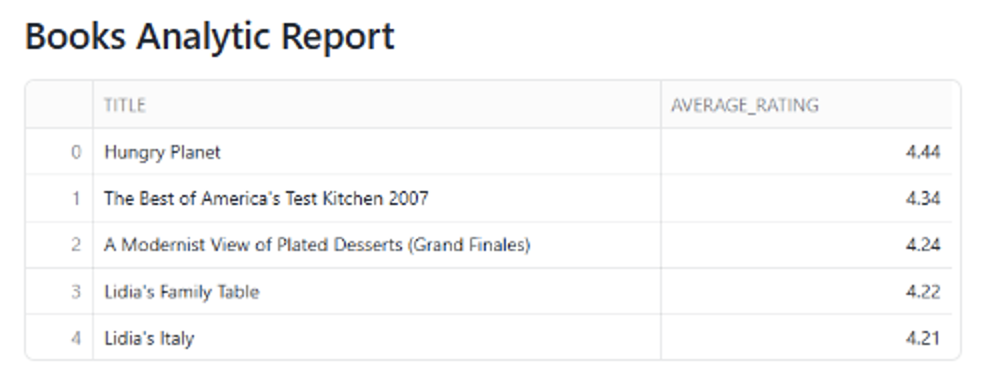
The app automatically interprets the request and generates the exact query needed to retrieve the answer. Note how it recognises ‘Cooking’ as a value in the categories column and selects only the relevant fields.
Now let’s try something a bit more challenging. We’ll ask for “The most recent published book, written by the author who has written the greatest number of pages in total across all their books”:


Even with such a complex query, the chatbot returns both the correct SQL and the resulting data. Having the SQL is invaluable, as it lets us verify exactly where the answer comes from, giving us full confidence in the result.
Now we’ll dive deeper into the code used to create this Cortex Analyst Streamlit app. Unlike the Search agent, we don’t need to create anything in SQL beforehand. Instead, we build a semantic model that supplies the context the agent needs to understand our data. This semantic model must be a YAML object and should contain:
- NAME AND DESCRIPTION: Defines the model’s identity and purpose.
- TABLES: Defines the tables to be used.
- DIMENSIONS: This is the crucial part where we give context to our agent, describing the name, expression, data_type, description, and synonyms for each categorical column. This information helps the agent to give better responses.
- MEASURES: Similar to DIMENSIONS but for numeric metrics.
Our semantic model looks like this:
name: books_description
description: Semantic model for querying books metadata using natural language
tables:
  - name: BOOKS_DATASET
    base_table:
      database: BOOKS
      schema: DATA
      table: BOOKS_DATASET

    dimensions:
      - name: ISBN13
        expr: ISBN13
        data_type: INTEGER
        description: 13-digit ISBN identifier for the book.
        synonyms: [isbn, book_id, isbn_code]

      - name: ISBN10
        expr: ISBN10
        data_type: STRING
        description: 10-digit ISBN identifier for the book.
        synonyms: [isbn, old_isbn, short_isbn]

… (similar with rest of columns)

    measures:
      - name: AVERAGE_RATING
        expr: AVERAGE_RATING
        data_type: NUMBER(3,2)
        description: Average rating of the book.
        synonyms: [rating, score, review average, stars]

      - name: RATINGS_COUNT
        expr: RATINGS_COUNT
        data_type: INTEGER
        description: Total number of ratings the book has received.
        synonyms: [number of ratings, votes, reviews count, feedback count]

… (similar with rest of measures)
You can check the semantic model used in this example here:
name: books_description
description: Semantic model for querying books metadata using natural language
tables:
  - name: BOOKS_DATASET
    base_table:
      database: BOOKS
      schema: DATA
      table: BOOKS_DATASET

    dimensions:
      - name: ISBN13
        expr: ISBN13
        data_type: INTEGER
        description: 13-digit ISBN identifier for the book.
        synonyms: [isbn, book_id, isbn_code]

      - name: ISBN10
        expr: ISBN10
        data_type: STRING
        description: 10-digit ISBN identifier for the book.
        synonyms: [isbn, old_isbn, short_isbn]

      - name: TITLE
        expr: TITLE
        data_type: STRING
        description: The title of the book.
        synonyms: [book title, name, headline, heading]

      - name: SUBTITLE
        expr: SUBTITLE
        data_type: STRING
        description: The subtitle or secondary title of the book.
        synonyms: [subheading, secondary title]

      - name: AUTHORS
        expr: AUTHORS
        data_type: STRING
        description: Comma-separated list of authors for the book.
        synonyms: [writer, author, creators, contributors]

      - name: CATEGORIES
        expr: CATEGORIES
        data_type: STRING
        description: Genres or categories assigned to the book with possible values as Fiction,Other, Art, Children, Business, Biography,Technology, History, Religion, Science, Horror, Cooking, Health
        synonyms: [genre, topic, subject, classification, tags]


      - name: DESCRIPTION
        expr: DESCRIPTION
        data_type: STRING
        description: Description or summary of the book content.
        synonyms: [summary, overview, synopsis, abstract]

      - name: THUMBNAIL
        expr: THUMBNAIL
        data_type: STRING
        description: URL link to the book's cover image.
        synonyms: [image, cover, preview]

      - name: PUBLISHED_YEAR
        expr: PUBLISHED_YEAR
        data_type: NUMBER(4,0)
        description: Year the book was published.
        synonyms: [year, release year, publication year, date published]

    measures:
      - name: AVERAGE_RATING
        expr: AVERAGE_RATING
        data_type: NUMBER(3,2)
        description: Average rating of the book.
        synonyms: [rating, score, review average, stars]

      - name: RATINGS_COUNT
        expr: RATINGS_COUNT
        data_type: INTEGER
        description: Total number of ratings the book has received.
        synonyms: [number of ratings, votes, reviews count, feedback count]

      - name: NUM_PAGES
        expr: NUM_PAGES
        data_type: INTEGER
        description: Total number of pages in the book.
        synonyms: [pages, page count, length]
Once the semantic model has been created, call the _snowflake.send_snow_api_request() function again, this time adding the semantic model details to the payload:
SEMANTIC_MODELS = "@books.data.models/books_semantic_model.yaml" # Our semantic model saved in a stage

payload = {
        "model": "llama3.1-70b",
        "messages": [
            {
                "role": "user",
                "content": [
                    {
                        "type": "text",
                        "text": query
                    }
                ]
            }
        ],
        "tools": [
            {
                "tool_spec": {
                    "type": "cortex_analyst_text_to_sql",
                    "name": "analyst1"
                }
            }
        ],
        "tool_resources": {
            "analyst1": {"semantic_model_file": SEMANTIC_MODELS}
        }
    }
No additional code is required to obtain the answer, and no extra train-test cycle is needed either, so once again the process is straightforward.
Cost and Resources Used for Cortex
Integrating Snowflake Cortex capabilities into a Streamlit app opens the door to intelligent, low-code user experiences. Nevertheless, to deploy these apps efficiently, it’s important to understand how the different Cortex features are billed.
Cortex Search Pricing
The Streamlit app uses _snowflake.send_snow_api_request() to query the Cortex Search service, and costs are primarily driven by embedding operations and semantic query executions:
- Embedding Model Usage
During indexing, Cortex Search uses a hosted embedding model to generate vector representations of your data. You are charged per million tokens embedded, and the rate depends on the model you select:
| Model | Language | Cost/1M Tokens | Notes |
| snowflake-arctic-embed-m-v1.5 | English-only | 0.03 credits | Fastest and default |
| snowflake-arctic-embed-l-v2.0 | Multilingual | 0.05 credits | Better quality, more languages |
| voyage-multilingual-2 | Multilingual | 0.07 credits | Top quality third-party model |
- Tokenisation Rules
Only the first 512 tokens (1 token ≈ ¾ of an English word) of each text field are used for semantic search; CORTEX.COUNT_TOKENS() can be used to estimate embedding costs. Typical message sizes are shown below:
| Data Type | Approx. Words | Tokens | Notes |
| Product description | 40-60 words | 60-80 | Low cost |
| Book summary | 150-300 words | 200-400 | Well below 512-token limit |
| Legal document | 1000+ words | 1300+ | Exceeds limit; only the first 512 used for semantic search |
- Refresh and Index Maintenance
Automatic refreshes occur when source data changes, triggering new embeddings (and their corresponding costs) unless incremental refresh is enabled. After five consecutive failures, indexing is suspended.
- Warehouse Usage
Creating the service and running queries still uses a virtual warehouse, billed under Snowflake’s compute model.
Cortex Analyst Pricing
When the Streamlit app sends requests to Cortex Analyst via _snowflake.send_snow_api_request() using the text_to_sql agent, pricing is simple and usage-based:
- Per-Message Pricing: Billing occurs per successful message (HTTP 200), regardless of the token count. The cost is specified in the Snowflake Service Consumption Table and includes the LLM processing required to convert natural language queries into SQL. Token volume and model configuration in the payload have no effect on Cortex Analyst pricing.
- Warehouse Costs for Query Execution: The SQL generated by Cortex Analyst runs on a virtual warehouse, incurring standard compute charges based on the volume of data scanned and the size of the warehouse. Notably, only successful API calls are billed; there are no charges for invalid prompts or failed responses.
Conclusions and Observations
After developing and testing the Streamlit apps extensively, we found them to be a powerful and user-friendly way to interact with data. That said, we also encountered a few limitations worth mentioning. Let’s outline some of these challenges along with our suggestions for addressing them:
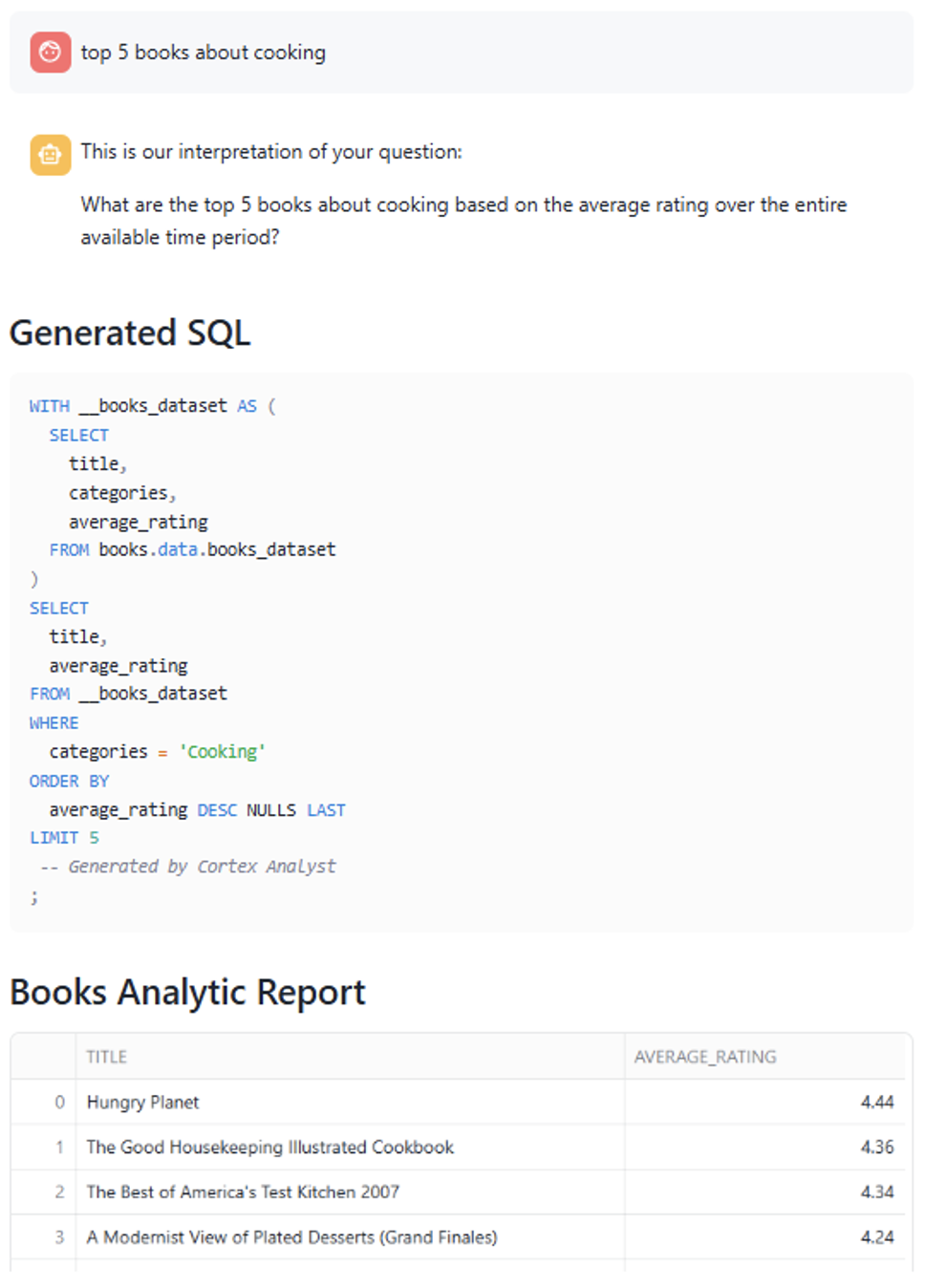
- Cortex Analyst has proved that it can create very challenging queries correctly. However, precise phrasing is key to obtaining the correct results. For example, we noticed issues when queries included misspelled terms. In one case, we requested data for “cooking” (lowercase), whereas the correct category was “Cooking” (capitalised), and this discrepancy led to incorrect results, highlighting the importance of accurate input when using natural language queries:
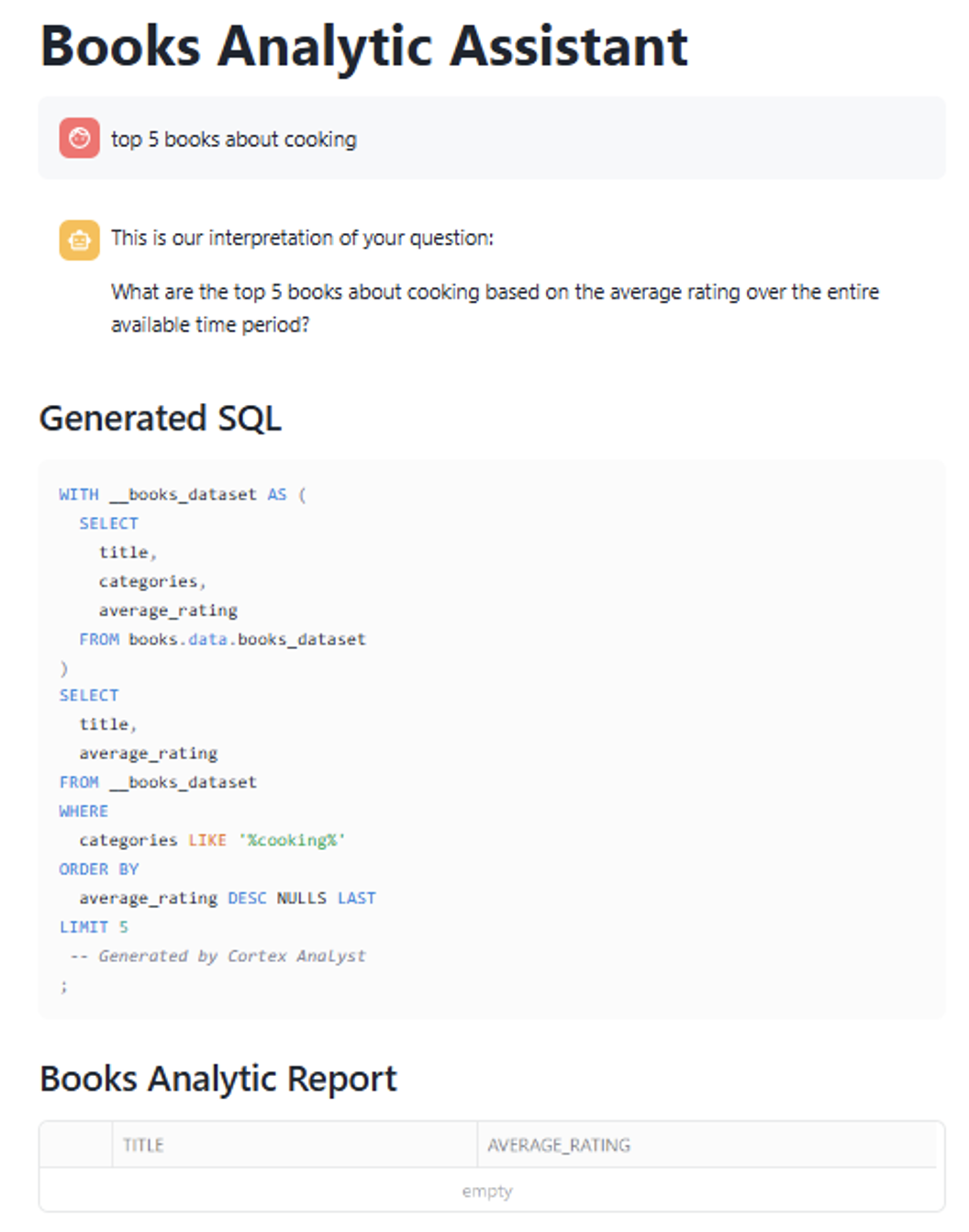
The agent does not validate category names before generating the SQL query, but simply uses the provided term as it is. This means that if the requested category doesn’t exactly match an existing value, the query may return no results. To address this, we can improve the semantic model by enriching the category descriptions with expected values, providing the agent with more context and so improving its understanding and response accuracy:
- New semantic model:
name: books_description
description: Semantic model for querying books metadata using natural language
tables:
  - name: BOOKS_DATASET
    base_table:
      database: BOOKS
      schema: DATA
      table: BOOKS_DATASET

    dimensions:
      - name: CATEGORIES
        expr: CATEGORIES
        data_type: STRING
        description: Genres or categories assigned to the book with possible
  values as Fiction,Other, Art, Children, Business, Biography,Technology,
  History, Religion, Science, Horror, Cooking, Health
        synonyms: [genre, topic, subject, classification, tags]
...
Updating the semantic model with possible values in the category descriptions leads to noticeably better results:
- Another downside is that, unlike ChatGPT, the app does not retain the context of previous interactions. Both agents treat each query independently, meaning the chatbot doesn’t reference earlier messages, even when responding to follow-up questions or clarifications. Here’s an example:
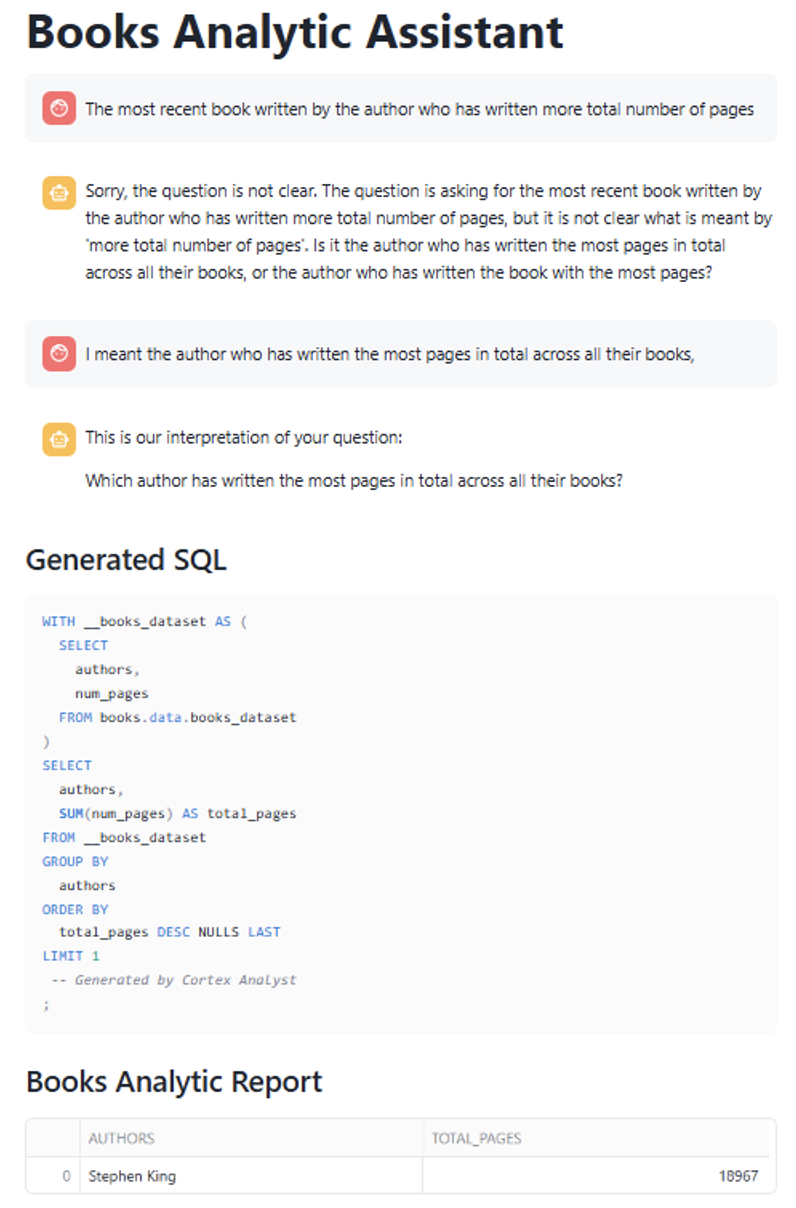
In this case we submitted a query that required clarification; specifically, the app needed more detail on what we meant by “total number of pages.” When we provided clarification in the next message, the app failed to link it to the previous query and instead treated it as a new, unrelated request.
To solve this, we’ll create a “chat history” and enter it in the messages section of the payload. Here’s the code:
if 'messages' not in st.session_state:
        st.session_state.messages = []

    for message in st.session_state.messages:
        with st.chat_message(message['role']):
            st.markdown(message['content'].replace("•", "\n\n"))
Once the chat history has been set up, the app can track the conversation and deliver more relevant answers. For example, when asking for the “Top 5 books” followed by a request for “1 more,” the app correctly interprets the second query as a continuation of the first, returning an additional, sixth book:


- Another limitation of Cortex Search is that it only evaluates the column specified in the ON clause (e.g., ON description) for semantic search. This means that vector embeddings and similarity retrieval are computed based on that column only, so any relevant information in other fields is ignored, potentially leading to incomplete or less relevant results:
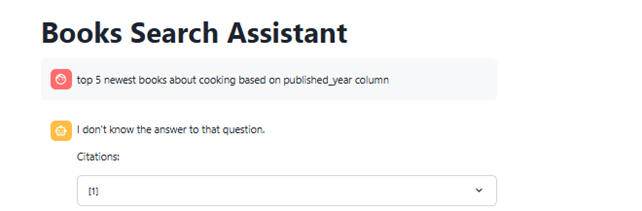
- Finally, it’s worth noting that you can build a single Streamlit app that incorporates both Cortex features simultaneously, as shown in the hands-on exercise. The app selects either a Cortex Search or Cortex Analyst response based on the nature of the query; this provides good results in general, and you only need to create one app. However, after several tries, Cortex Analyst tends to be prioritised, making it difficult to find the correct query to use when you want the Search agent.
In summary, both Cortex Analyst and Cortex Search offer powerful capabilities for building natural language interfaces to your data. They are simple to implement and deliver excellent results with minimal effort. What’s more, they integrate perfectly with Snowflake’s core strengths, such as virtual warehouse flexibility, effective role-based access control, and effortless data sharing, making both tools a valuable addition to any data-driven solution.
Interested in building your own natural language interface with Cortex? Whether you’re looking to enhance data accessibility, speed up insights, or explore what Streamlit and Snowflake can do for your business, we’re here to help. Simply get in touch today!