05 Nov 2025 Model Context Protocol: The Next Step in AI Workflow Coordination
AI is rapidly evolving from single-task tools to intelligent systems that reason through complex, multi-step workflows. These systems often integrate language models, APIs, structured databases, and third-party services to deliver value to businesses.
But as capabilities grow, so does complexity. Teams now face critical questions like:
- How can components share context reliably across steps?
- How can you coordinate models and tools consistently?
- How can you scale workflows without rewriting the code every time?
This is where the Model Context Protocol (MCP) comes into play. MCP is an open protocol introduced by Anthropic in late 2024 to standardise how AI systems (especially LLMs) connect with external tools and data. It provides a modular foundation for building AI workflows that are easier to understand, maintain, and scale, without compromising flexibility.
This article is the first part of a series in which we’ll explore how MCP works and why it matters. Today we’ll focus on the big picture: the evolution of AI workflows, the core ideas behind MCP, and the business value it brings.
How We Got Here – The Evolution of LLM Use Cases
To understand the importance of protocols like MCP, we need to see how Generative AI systems have evolved over time. Each phase has brought new features but also new challenges, especially in coordination, memory, and state management.
Phase 1: Prompt + Model
Early LLM interactions were simple: send a prompt to the model and get a reply. This was fine for basic tasks (summarising a paragraph, answering questions, etc.), but each interaction was stateless. The model did not remember anything from one query to the next, and it had no access to outside data beyond its training.
Phase 2: Retrieval-Augmented Generation (RAG)
To give models up-to-date knowledge, systems introduced document retrieval or databases. In RAG setups, the AI first searches an external source for relevant text, then uses that as context to answer the question. This improves accuracy and reduces hallucinations, as the model can cite real information. However, context still has to be rebuilt for each query: there is no persistent memory of past steps, and each request means fetching all the necessary data again.
Phase 3: Tool-Using Agents
The next advance was to let LLMs use tools directly, with agent frameworks. The model can plan a sequence of actions, call APIs, and run queries at each step. This makes workflows much more dynamic, but it has also proved to be rather fragile. Each tool integration has to be handcrafted: the assistant (the LLM) must know exactly which API to call and in what format. In practice, custom logic has to be built every time a new data source or model is worked with, leaving little room for reuse.
Phase 4: Protocol-Based Coordination
Smarter tools and memory are not enough on their own. What is missing is a shared layer to manage context and to coordinate actions across multiple steps, and this is what MCP does. For example, consider a sales assistant that pulls customer data from a CRM, runs an analytics query to identify buying patterns, and then uses an email automation tool to draft a personalised offer. Each of these steps relies on different tools, and without a shared context layer they would remain unconnected. MCP ties them together, ensuring the workflow is coherent from start to finish.
What is The Model Context Protocol?
It’s an open standard that enables AI assistants to interact with tools and data sources in a structured, context-aware way. It defines:
- How tools expose their capabilities (via metadata)
- How shared context is stored and updated
- How reasoning is coordinated across steps and systems
With MCP, assistants and tools “speak the same language”, thus removing the need for rigid rules or fragile API chains, letting you build modular systems where models can manage workflows dynamically using shared state and tool metadata.
MCP does not replace agents or retrieval, but it enhances them, allowing developers to design smarter, more maintainable systems where models can decide what to do next based on the evolving context.
How MCP works: Architecture and Communication
Let’s dive into the MCP core components and see how they work together to let AI agents reason, act, and adapt across tools and data sources.
Core Components:
- The Assistant: The AI reasoning engine (an LLM) that interprets user queries and decides what to do next. It is not hardcoded; it relies on the MCP’s context and tool info to plan.
- The MCP Host: The central app managing the session (a chatbot interface, an IDE, etc.). It runs the assistant and holds the MCP clients.
- The MCP Client: A software component that lives in the host. Each client talks to an MCP server, requesting context or calling tools as necessary.
- Context: This is the shared workspace for the conversation. It persists throughout the session, recording what the user asked, which tools were used, what data came back, and what the assistant decided at each step. By using this context, the assistant can “remember” previous steps without redoing them.
- The MCP Server: A server that exposes data and functions via the MCP protocol.
- Tools: These are the actual functions exposed by MCP servers. Each tool has a name and a defined input/output schema; the assistant uses the tool metadata to know what each tool does and how to call it.
The Communication Protocol:
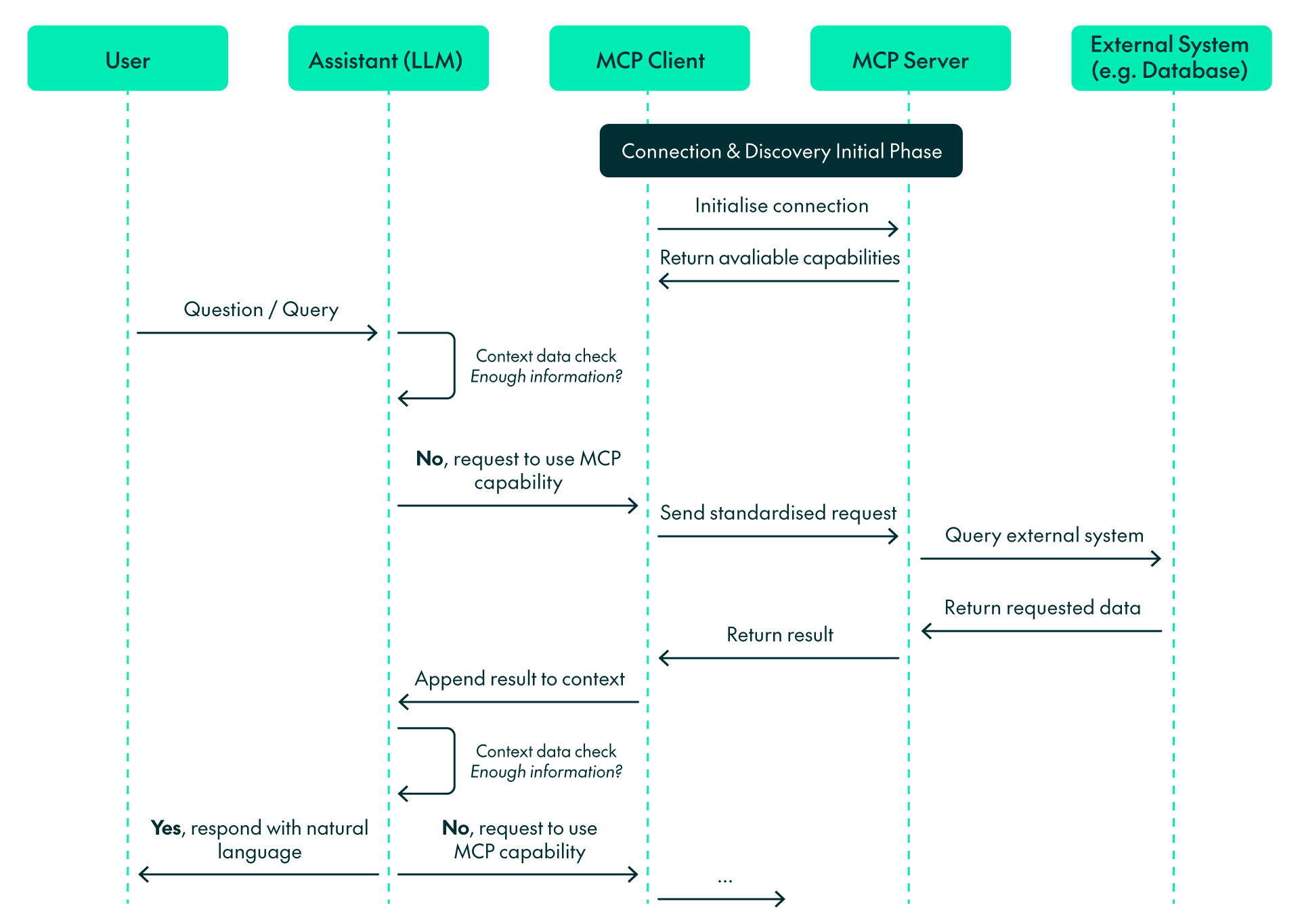
Initial handshake:
- Initial connection to servers: When an MCP client starts, it connects to the configured MCP servers.
- Capabilities discovery: The client requests the capabilities of each server, and each server replies with its available tools and resources.
- Capabilities registration: The client registers these capabilities for the assistant to use during the conversation.
From user request to the provided answer:
- Identify missing information: The assistant analyses the question and determines whether it needs external data not contained in its training.
- Context check: The assistant checks whether the context has enough information to provide an accurate answer.
- Select capability: The assistant chooses the appropriate MCP tool(s) or resource(s) to retrieve the necessary information. For instance, the sales assistant might use the CRM tool to fetch a customer’s purchase history and then switch to the analytics tool to identify buying patterns.
- Send request: The client sends a request to the appropriate MCP servers using the standardised protocol.
- Process request: The MCP server executes the required actions, such as running a database query or calling an API.
- Return results: The server sends the results back to the client in a standardised format.
- Updated context check: The assistant reviews the updated context to determine if it now contains enough information to answer. If so, proceed to Step 8; if not, return to Step 3.
- Response generation: Using the updated context, the assistant produces a natural language answer.
Business Impact: Why MCP Matters
MCP not only speeds up AI development but also lays the foundation for long-term value by making systems easier to extend, maintain, and scale as needs evolve. Here are the key benefits it brings to teams and organisations:
- Faster Development with Less Overhead
Before MCP, every AI model or system needed its own custom connectors. Adding a new tool or data source meant rewriting connection code from scratch. MCP changes all that by separating the assistant’s reasoning from the integrations. Tools simply register with the protocol, and the assistant can discover them automatically. This makes it easy to add new features just by plugging in new tools without disrupting what is already running.
- Maintainability and Modularity
Each system component has a defined role and communicates via a shared context. This means the system is modular: you can update or swap out a tool without rewriting the assistant, and debugging is easier because components are isolated by design. In other words, MCP encourages a plug-and-play architecture where each piece can evolve independently, reducing the risk that one change breaks everything.
- Coordination Across Systems
Many enterprise use cases span multiple systems and data sources. MCP allows assistants to reason across these systems coherently, sharing context across steps, regardless of which server or tool is involved.
- Explainability Through Context Tracking
Because MCP logs every step in the shared context, you have a full record of the assistant’s reasoning. The context shows which tools were used, what inputs were sent, and what outputs were returned. This transparency enables teams to inspect how answers were generated, diagnose errors easily, and build trust in the system. In short, you can trace exactly how the assistant arrived at an answer, making the AI a transparent collaborator instead of a mysterious black box.
- Smarter, More Resilient Assistants
Traditional agents often relied on hand-coded rules to decide which tool to use, leading to errors if anything changed. With MCP, the assistant has built-in knowledge of all available tools (via their metadata) and can reason dynamically, letting it adapt when tools are updated or added, building a more reliable system that adjusts to evolving requirements with minimal manual effort.
- Enterprise-Ready Foundation
Finally, MCP aligns well with enterprise needs. It is an open, versioned standard that multiple vendors (OpenAI, Google, Microsoft, etc., as well as Anthropic) are adopting. Governance features (like explicit capability discovery and context logs) help to meet compliance and auditing requirements. In practice, this ensures that organisations can scale their AI workflows safely, maintain them over time, and align them with corporate IT policies.
Conclusions
AI models alone are just not enough: modern systems also need to adapt, work seamlessly with tools, and coordinate all components. MCP makes this possible, enabling assistants to reason through tasks, build on previous steps, and avoid custom logic, resulting in clearer workflows and systems that are easier to maintain, extend, and scale.
In the next article of this series, we will move from theory to practice. You will see MCP powering a real HR Talent Assistant that retrieves employee data, generates personalised objectives, and stores them, simply by coordinating multiple tools through a single, shared context. We’ll take a step-by-step look at how the concepts we’ve explored here translate into a fully functional AI solution.
If your company or organisation is building intelligent assistants or AI systems that need to coordinate tools, context, and data, MCP is well worth exploring. Don’t hesitate to contact us – our team of certified and experienced experts will be happy to help!