07 Jan 2026 How Microinteractions Make Your App More Usable and Engaging
Microinteractions are those little details in your app that respond to user actions, like animated buttons or pop-up confirmations. They guide the user, making their experience more enjoyable, engaging, and productive. Even tiny animations or brief feedback messages can prevent frustration, increase engagement, and make your website or application look polished and professional. In this blog post, we’ll explore how microinteractions work, why they are essential in software development, and how to design them effectively for modern web and mobile apps.
How Microinteractions Work
Every microinteraction follows a simple but powerful flow of communication between the user and the system. Understanding this process helps developers to design better, more responsive interfaces.
- Trigger
The trigger is what starts the interaction.
It can come from:
- The user: Clicking on a button, hovering over an element, typing in a form, etc.
- The system: Receiving a new message, completing a process, or loading new content.
- Rules
Once triggered, the app’s rules define what happens next.
For example, when a user clicks on Submit, the system might:
- Validate the form.
- Send the data to the server.
- Display a Success message if everything is good, or an Error message if not.
- Feedback
Feedback is how the system communicates the result of that action to the user.
This could be:
- A subtle colour change or animation.
- A confirmation toast or pop-up.
- A progress bar showing the system is working.
- Loops and modes
Finally, loops define how long the interaction lasts or whether it repeats, while modes set variations (e.g., success vs. error states).
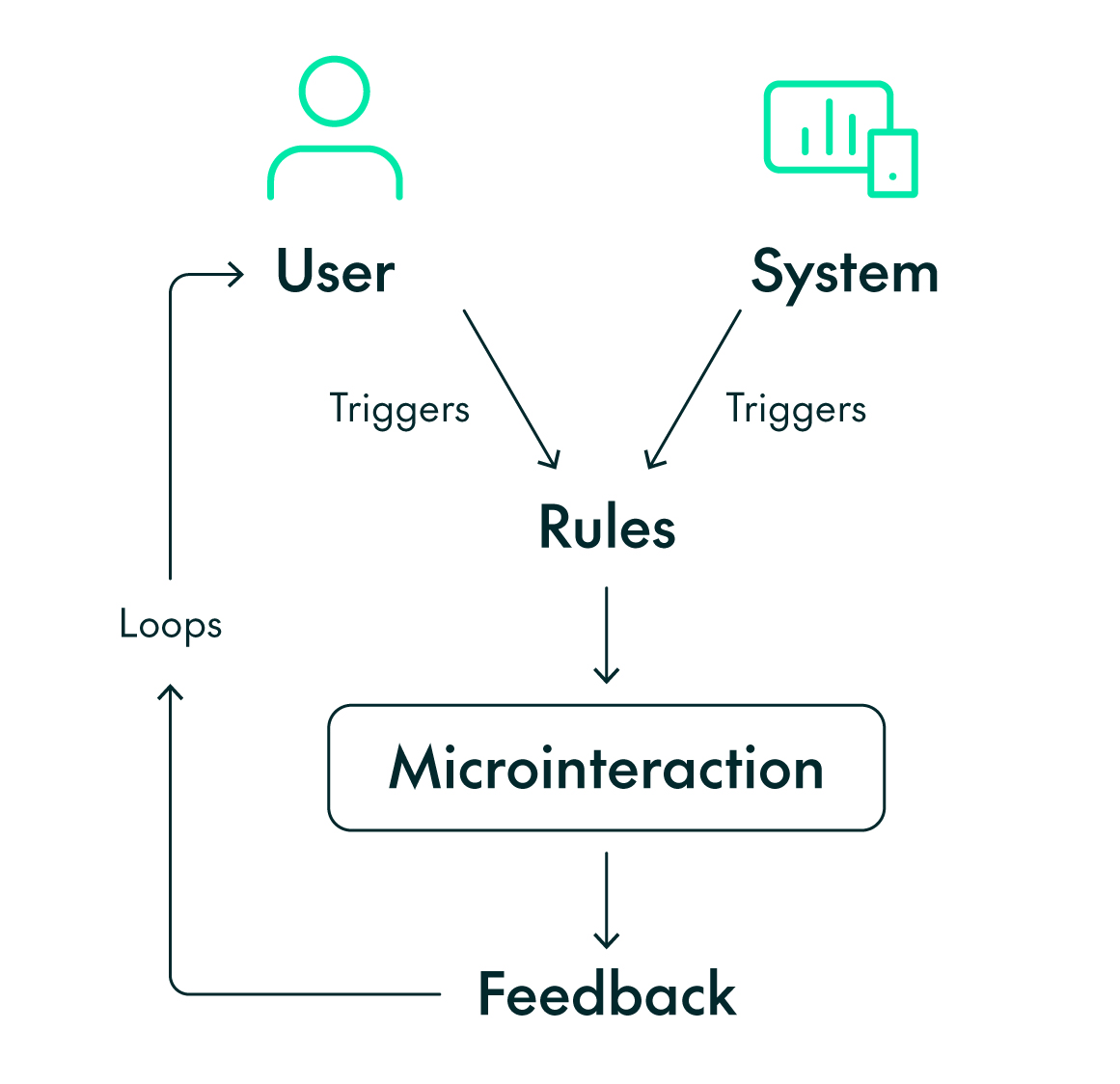
This cycle creates a dialogue between the user and the system, a constant exchange of actions and responses that keeps users oriented and confident.
How Microinteractions Can Improve Your Web/Mobile Applications
Microinteractions do far more than make your interface look nice. They define how users understand, trust, and connect with your product, bridging that gap between functionality and emotion, turning actions into experiences that feel natural and fluid.
Microinteractions can enhance your app in the following ways:
- They provide clarity and feedback
Users need to know that the system has understood them. Microinteractions provide this feedback immediately: a button that subtly animates when clicked, a colour change that confirms a selection, or a short success message after data is submitted. This instant, visible response reinforces the relationship between action and result, helping users to feel in control.

Example 1: Selected colours after being chosen
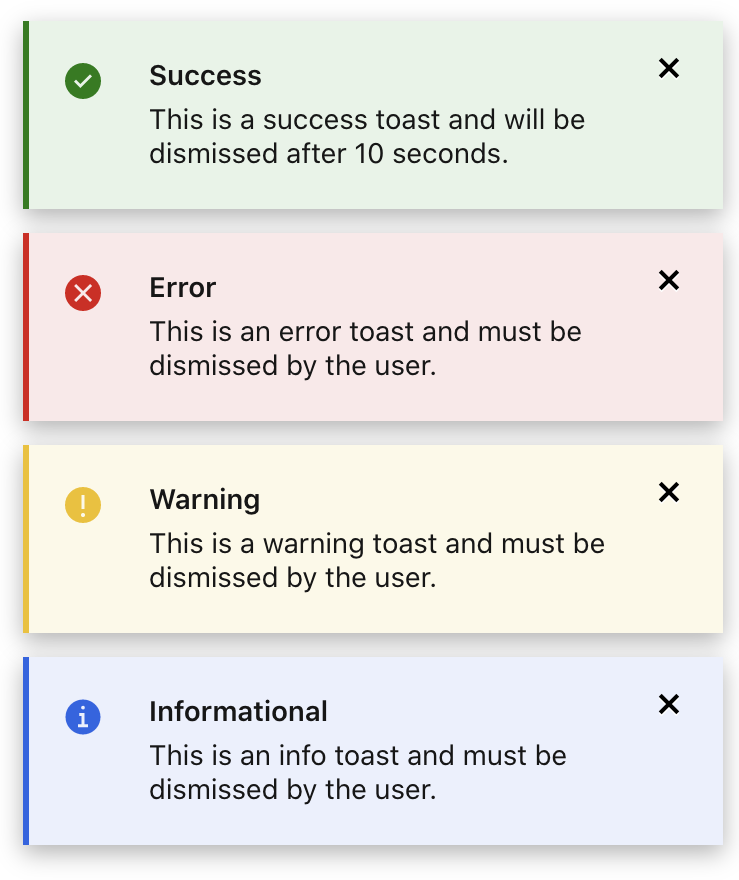
Example 2: Different types of toast message
- They communicate the system status
In modern web and mobile apps, there’s a lot happening behind the scenes: background requests, content loading, or autosaving. Microinteractions make these invisible processes visible. A spinner, a progress bar, or a subtle pulse animation tells users that the system is actively working, preventing confusion or mistrust.
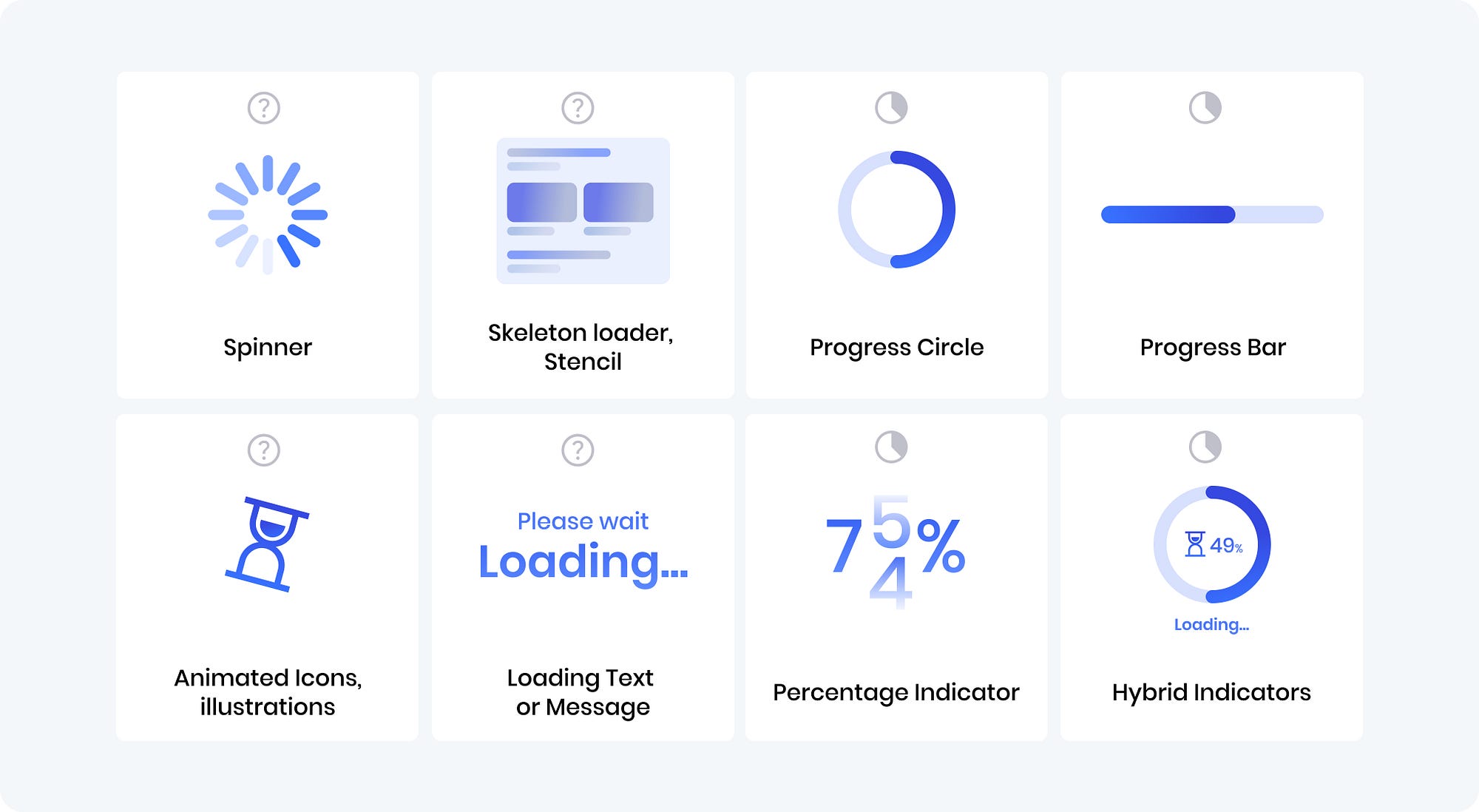
Example: Loading indicators that visually communicate system status
- They support flow and usability
Microinteractions guide users smoothly through complex actions, like filling out forms or completing multi-step tasks. Instead of waiting for a full reload or relying on static feedback, users see real-time validation, progress states, and contextual hints. This means an uninterrupted experience and staying focused on the goal, not the interface.

Example: Real-time form validation highlighting errors in red
- They strengthen emotional connection
Beyond clarity and efficiency, microinteractions give your product personality. Small, thoughtful touches, like smooth transitions, a satisfying click, or a light animation when a task is completed, can turn an ordinary moment into something memorable. These tiny details show care and attention to quality, helping users to see that your app is deliberately and thoughtfully designed.
Best Practices for Developers
- Keep them purposeful: Avoid animations that are purely decorative. Each microinteraction should serve a clear purpose, such as guiding users to the next step, signalling system state, or confirming an action.
- Maintain consistency: Apply the same timing, motion, and style patterns across your interface.
- Prioritise performance: Animations should be lightweight and smooth. Use CSS transitions or GPU-accelerated transforms instead of heavy JavaScript animations when applicable. There are libraries that offer efficient, declarative ways to add motion without impacting performance.
- Consider accessibility: Ensure that users with motion sensitivity or assistive technologies still receive clear, meaningful feedback.
- Test across devices: Microinteractions can behave differently on desktop and mobile. Test transitions, timing, and responsiveness across multiple environments to guarantee consistency.
- Mind your motion timing: Stick to short, consistent durations, typically 150-300ms for quick UI feedback. Longer transitions (up to 500ms) can be reserved for full-screen changes or context shifts.
- Use the right tools: There are several tools to help you to design, test, and assess microinteractions, including:
- Framer Motion, Lottie, or GSAP for web animation.
- After Effects with LottieFiles to create lightweight animations.
- Figma Smart Animate for quick prototyping and interaction previews.
- Chrome DevTools Performance Panel to analyse animation smoothness and frame rates.
Assessing & Refining Microinteractions
Before launching a feature, observe how users react:
- Do they notice the feedback?
- Do they understand what the animation means?
- Does it enhance clarity or just add noise?
Usability testing and internal reviews can spot friction points early on. Analytics tools or session replays can also highlight when users hesitate or repeat actions, suggesting in turn that the feedback might be unclear.
Microinteractions evolve with your product, so keep improving them as you refine your app’s flow, animations, and interactions over time.
Conclusion
Microinteractions might seem insignificant, but they have a huge impact on how users perceive and trust your app. They transform static screens into conversations, helping users to feel that the interface understands and reacts to them.
For developers, microinteractions are where technical precision meets user empathy. They’re not just about movement or design, but about communication. A well-implemented microinteraction can turn a simple action into a satisfying experience that strengthens trust and retention.
By paying attention to these brief moments, you’re not only improving your UI, but also shaping how people feel when they use your app. In the end, that’s what great digital experiences are made of!
If you’re thinking about how microinteractions fit into your wider analytics or application strategy, ClearPeaks can help. From designing intuitive user experiences to implementing performant, scalable BI and data platforms, we work closely with our customers to turn thoughtful design into measurable impact.